Why automation completions and message sends do not match
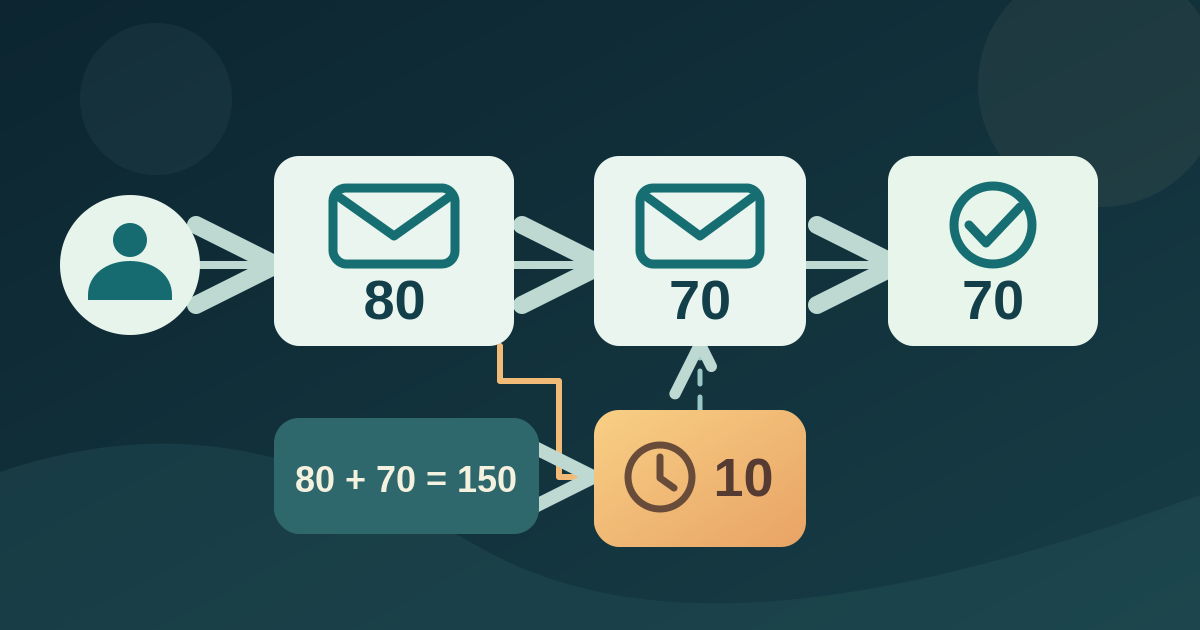
A Mailchimp Classic report can show 70 subscribers completed and 80 sends at its first email. The figures count different things: ‘Subscribers who've completed’ means people to whom every workflow email was sent, while ‘Emails sent’ counts individual messages. If a later email is still pending, first-step sends can exceed completions. Marketing Automation Flows use different report units, so keep the models separate. Freeze the screen, cutoff and source labels, then use the worksheet to account for only the counts you can actually verify.
Boletolibre editorial team
Published
Freeze the report and choose the product model
Download the automation count-bridge worksheet (Markdown, English)
Record the provider, flow name, report screen, status, snapshot time and time zone before doing arithmetic. Mailchimp separates Classic automation reports from Marketing Automation Flow reports. Its current flow report describes data from the beginning of the flow to the present and offers a Performance summary and Step analysis of message campaigns. A daily digest, a lifetime view and a later screenshot are not the same observation. Preserve each source label instead of renaming it to fit a spreadsheet.[1][3][2]
Choose one job for this review: explain why the reported completion count differs from email sends at particular steps after the flow ran. Do not use this ledger as a prelaunch path test or a single-campaign engagement scorecard. Mark any change to triggers, messages or branches since the period being discussed. If the report cannot isolate that period, say so; a snapshot at one cutoff is still useful, but it is not a cohort report by itself.
Put each count in its own unit
In Mailchimp Classic automation, ‘Subscribers who've completed’ means subscribers sent every email in that workflow; ‘Emails sent’ counts individual email messages sent to subscribers in its queue. Its per-email Queue number is the subscribers currently queued, not everyone who has ever reached that email. These definitions belong to Classic automation. A person-level completion cannot be expected to equal an event-level total of messages, especially when a workflow has more than one email.[2]
For Marketing Automation Flows, Mailchimp's mobile report explicitly distinguishes total starts and completions, which count flow instances including repeats, from unique starts and completions, which count distinct contacts. Its web Performance ‘Total sends’ includes emails and/or SMS, while Step analysis lists message campaigns and their sends. Record whether your source says contact, flow instance or message event. Do not divide a mixed-channel send total by unique completed contacts and call it a step conversion rate.[4][3]
Account for branches, waits and exits
Sketch only the paths needed to explain the counts. A conditional split sends contacts down different branches, a wait-for-trigger holds them until a condition is met, and flow settings may allow re-entry or remove a contact before completion. A paused step can accumulate a queue. Those documented mechanisms mean someone who reached the start need not have reached every email by the snapshot. Write each message-step ID beside its branch, and note where paths join or exit.[5][6][7]
The public flow-report page describes a message list in Step analysis; it does not define an exported eligible-contact count for every split, wait or non-message node. If your account does show a reached or queued count, record its exact label and source. Otherwise leave that cell ‘not available’. Do not infer 20 skipped contacts merely by subtracting sends from starts: some may still be waiting, take another path, exit early, or be counted again after re-entry.[3][7]
Work a small count bridge
In a separate fictional Classic sequence with two emails, suppose the first email has 80 sends and the second has 70 at the same cutoff. If account evidence confirms that the same 70 were sent both emails and ten are currently queued for the second, the report's 70 ‘Subscribers who've completed’ is compatible with 150 overall ‘Emails sent’ (80 + 70). Those ten were sent only the first email. This bridge requires the verified cohort and both per-email reports; it cannot be inferred from the three totals alone.[2]
Separately, here is a fictional Marketing Automation Flow observed at one cutoff, with no re-entry. A manually checked cohort has 100 unique starts. Fifty contacts take branch A, 30 take branch B, and 20 are still waiting before either email. The A email has 50 sends; the B email has 30. Each path has a final non-message step after its email and before completion. Of those 80 contacts sent one email, 45 from A and 25 from B have completed, while five on each branch remain in progress at that final step. Thus 70 completions and 80 email sends are compatible. The extra ten sends belong to people who have not completed yet, not to a missing-contact error.
This example's branch and wait counts are illustrative manual evidence, not fields promised by a Mailchimp export. At this cutoff, 70 completed plus 10 active after a send plus 20 still waiting accounts for the 100 starts, and 50 plus 30 accounts for the 80 email sends. If there were two emails on either path, a repeat entry, an SMS action, or an early exit, this simple bridge would change. Show the arithmetic only for buckets that are actually mutually exclusive and measured over the same flow population.
Investigate a gap without inventing a cause
First compare the report labels and cutoffs: Classic versus flow, overall versus individual message, lifetime versus daily, email-only versus email-plus-SMS. Classic reports update continuously, and their digest's ‘Sent’ and ‘Completed’ refer to the previous day. The current flow report's Step analysis lists campaigns with sends and can export a CSV. Neither source says that summing visible step sends must equal a contact completion count. Keep delivery, opens and clicks out of the send-versus-completion bridge. In Classic, also check Deleted Workflow Emails before summing only the currently visible steps: basic statistics, including sends, remain after a workflow email is deleted, though its full email report does not.[3][2]
Next inspect branch rules, waiting and paused steps, re-entry, manual removals and exit conditions. Mailchimp documents each of those flow controls, but a count gap alone does not identify which control affected a particular contact. Use a small authorized sample of anonymous internal references in the provider account if the operational decision needs contact-level proof. Avoid putting email addresses in the worksheet. Label a residual as unexplained when the report lacks an eligible-at-step denominator or a comparable period.[7][3]
Hand off a reproducible explanation
The handoff should state the one comparison made, its two units, the exact flow and step IDs, the snapshot time, what the observed counts establish, and what remains unknown. For example: ‘At the 16:00 snapshot, 70 flow completions and 80 email sends are recorded; branch and queue evidence accounts for ten sends before completion in this checked cohort.’ If branch evidence is absent, replace the last clause with ‘reason unverified’ and name the next account check. A useful report preserves uncertainty rather than creating a neat but unsupported percentage.
Use the localized count-bridge worksheet to attach the report screen or Step analysis export, map message steps to paths and record whether a number is unique contacts, repeated flow runs or sent messages. The provider's own CSV can support message-level review, but it is not proof that every non-message node has a count. Revisit the worksheet at a new cutoff if the flow is active; do not overwrite the earlier observation.[3]
Sources and further reading
- Getting Started with ReportsMailchimp · Accessed
- About Classic Automation ReportsMailchimp · Accessed
- About Marketing Automation Flow ReportsMailchimp · Accessed
- View Marketing Automation Flow Reports on MobileMailchimp · Accessed
- Use Conditional Split RulesMailchimp · Accessed
- Use Wait for Trigger RulesMailchimp · Accessed
- Edit a Marketing Automation FlowMailchimp · Accessed