How to buy a taken domain for an event: due diligence and transfer checklist
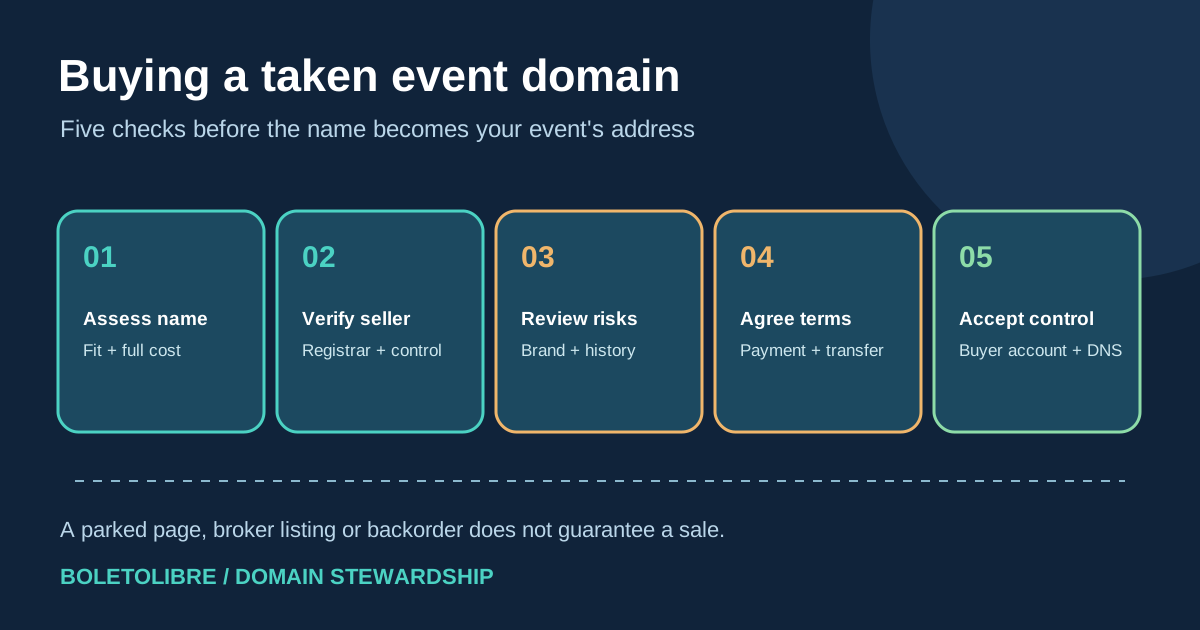
A domain that is already registered can be purchased only if the current holder agrees and the transfer can be completed. Start by deciding whether this exact name merits the cost. The leading Google discussion captures a buyer's uncertainty about brokers and backorders, but its prices and claim about bots buying searched names are not reliable general rules. Use a documented process that separates negotiation, payment and verified control.
Boletolibre editorial team
Published
Download a taken-domain purchase worksheet
Download the buyer due-diligence and handoff sheet (Markdown, English)
Use the sheet to record a domain's current status, seller channel, brand review, total transaction terms, transfer method and acceptance evidence. Keep payment credentials and private identity documents out of a shared worksheet. A name being parked or offered through a broker does not mean the owner must sell.
Check whether buying this exact name is worth the effort
For an event series, compare the desired domain with a workable new name before spending time on acquisition. Evaluate spoken and typed clarity, season-to-season fit, confusion with existing events, current use, asking price and the future renewal cost. Set an internal maximum budget that includes broker, escrow, transfer, taxes where applicable and continuing registration charges. The first-ranked community discussion describes a buyer facing a broker fee and uncertainty; treat those figures and the allegation that a bot captured the name after a search as anecdote, not proof or a current price benchmark.[1]
Do not assume an older domain carries a ranking benefit. If you plan to move an existing site, Google recommends checking the recently purchased domain for outstanding issues such as manual actions and treating a domain move as a site migration, with URL mapping and monitoring.[6]
Identify the registration and a legitimate contact route
Use ICANN Lookup to see the registrar and available RDAP registration data. Privacy services may hide the registrant's direct contact details, and public data cannot by itself prove that a marketplace listing controls the name. Look for an owner-posted sale link, an established marketplace listing or an official registrar/broker route. Verify the seller's control through the chosen transaction service and registrar process before committing money. Avoid emailing private registrant data scraped from unrelated sources.[2]
A parked page only shows how the name currently resolves. It does not establish that the name is abandoned, for sale, or free to register. A backorder is a different bet: it depends on the current holder not renewing and does not guarantee acquisition.
Review brand and operational risks before an offer
Check whether the proposed event brand conflicts with another organization's name or trademark in the markets where it will be used. Domain registration and trademark rights are different; ask qualified local counsel to review material brand risk before a substantial purchase or public launch. Examine the domain's current and archived use, existing links, search results and email reputation as due-diligence signals, not as a promise about future SEO or deliverability.[5][6]
| Question | Evidence to keep | Decision |
|---|---|---|
| Does the exact spelling and TLD serve this event brand? | Audience/name review | Buy, rename or stop |
| Can the seller complete an authorized transfer? | Verified marketplace/registrar path | Proceed or pause |
| Are the price and conditions acceptable? | Written sale, fee and refund terms | Approve or decline |
| Is the prior web or mail history acceptable? | Archived pages, Search Console access when available | Investigate or choose another name |
Agree on transfer and payment conditions before paying
Specify the exact domain and TLD, buyer legal entity, seller, price, currency, each fee, inspection/acceptance period, delivery method, and what happens if the transfer fails. Use a reputable transaction service with independently verified instructions where appropriate. Escrow.com describes one workflow in which the buyer funds the service, the seller transfers the domain, the buyer inspects receipt, and funds are released under the agreed terms; confirm the actual service's current terms rather than treating this as a universal guarantee.[4]
Ask the registrar whether this transaction will be a change of registrant in the same account system, a move between registrars, or both. ICANN's gTLD Transfer Policy treats those as distinct operations and includes authorization and possible transfer-lock conditions. The seller should not simply give you a username and password as a substitute for a properly recorded registrant change. Do not alter nameservers until the purchase handoff and service plan are clear.[3]
Verify control before launching the event site
At handoff, verify that the domain appears in the organization's own registrar account, that the registered holder and contacts are correct, and that the buyer controls renewal, security settings and DNS. Record the exact time and proof of acceptance under the transaction terms. Preserve existing DNS and email settings until you understand what traffic they serve; then follow a separately planned website and mail cutover. If the seller cannot deliver the agreed rights, use the transaction service's dispute process before accepting the transfer.[3][4]
Finally, assign the organization's domain owner, finance contact, independent recovery email and renewal review date. Buying the domain is one milestone; the site launch and any SEO migration need their own verification. Never describe the intended event URL as live until it is actually checked.[6]
Sources and further reading
- Does anyone know how to buy a taken domain name?Reddit r/smallbusiness · Accessed
- ICANN LookupICANN · Accessed
- Transfer PolicyICANN · Accessed
- How to buy and sell domains onlineEscrow.com · Accessed
- How trademarks and domain names differUSPTO · Accessed
- Site moves with URL changesGoogle Search Central · Accessed