Change an event website domain without breaking tickets and links
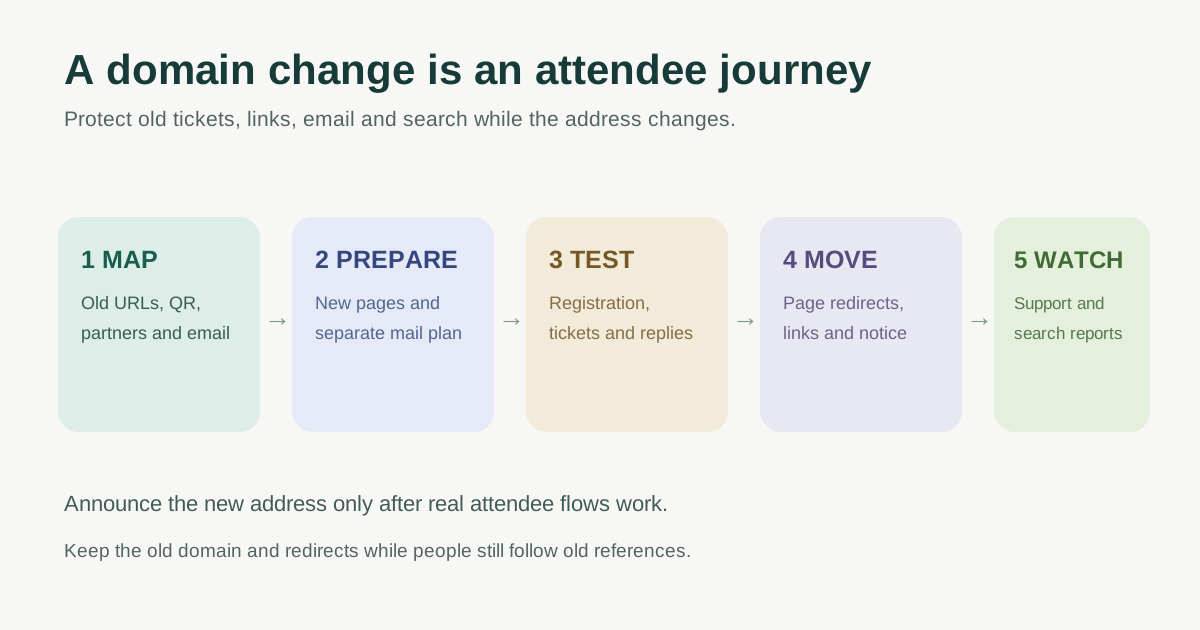
A domain change is more than pointing a new name at the same website. Attendees may have bookmarked an event page, received a confirmation from the old address, saved a QR code, or seen a poster that cannot be recalled. The first organic Google result for a domain-change checklist walks through redirects, search, email and external links. This event-specific plan turns those into a cutover record, with named owners and checks before public launch. It does not promise unchanged rankings or a fixed recovery date.
Boletolibre editorial team
Published
First, identify the kind of change
If only the hosting server or DNS provider changes and the public URLs stay the same, follow a hosting or DNS migration plan. If an extra campaign domain simply forwards to an existing page, that is not a full website move. This guide covers changing the public hostname of a live event site, for example from an old organizer address to a new brand address. Name whether the event pages, ticketing subdomain and email addresses move together or on separate dates.
| Asset | Old location or owner | New location or decision |
|---|---|---|
| Main site and event pages | Inventory every public URL | Keep or map each page to its closest new equivalent |
| Registration, checkout and ticket links | Record provider hostname and callbacks | Confirm provider-approved destination and test flow |
| Email sender and replies | Record addresses and provider | Plan receiving, sending and authentication separately |
| Offline references | Posters, QR codes, partner listings | Keep old destination working or replace at source |
Prepare the new address and one-to-one URL map
Secure control of both domain registrations. Record who can edit the new DNS, site, email service, ticketing platform and Search Console properties. Test the new site privately where feasible, then remove any temporary blocks before public cutover. Keep event dates, prices, access details and registration destinations consistent across the move. Avoid combining a domain change with an unnecessary redesign or URL rewrite; Google says more simultaneous changes can make it harder to reassess pages.[2][3]
Export or manually inventory old public URLs: event detail, schedule, speakers, venue, accessibility, policy, help, ticketing handoff and evergreen blog pages. For each, record the true new equivalent or a deliberate retired status. Do not send every old URL to the homepage: an attendee opening an old ticket-help link needs the corresponding help page. Test old QR and short links against this map, including query parameters used by campaigns.[2]
The worksheet below separates the web map from communication and vendor changes. Fill in the actual old and new hostnames, responsible person, evidence and launch window. A “ready” label without a tested destination is not evidence.
Freeze the launch-day URL map once stakeholders approve it. Give changes to event names, ticket types and venue pages a named owner rather than letting a late content edit silently change the destination. Keep a copy of current DNS records and deployment settings, but do not assume restoring old DNS reverses search, email or ticketing changes. The decision record should identify which operations can be rolled back safely and which need coordination with the provider.
Sequence launch day around attendees, not only crawlers
Before announcements, confirm the new HTTPS site resolves, the mapped event pages work on mobile, and ticket purchase or registration can be completed in the provider-approved test mode. Check confirmation links, attendee account access, QR delivery, webhook or callback URLs and any allowlisted return domains with the platform owner. A web redirect cannot repair an unchanged external checkout setting.
When the new pages are ready, enable permanent old-to-new redirects based on the map. Update internal links, canonical signals and the new sitemap to new URLs. Check the old and new paths directly; avoid redirect chains and loops. Keep the old domain registered and its redirect service operating. Google recommends keeping redirects as long as possible, generally at least a year, and longer for links still used by people.[2]
Treat email as a separate workstream. The team responsible for the mail provider should configure the new sender and receiving addresses, authentication and forwarding or monitoring of old inboxes as appropriate. Test a real reply to an old confirmation address and a new confirmation. Do not change email DNS solely because the website hostname changed; identify the actual mail provider and records first.
Choose a cutover window when real registration demand is relatively low for your event, but do not publish a universal quiet-hour rule. Name a person who can pause announcements, one who can repair web routes and one who can reach ticketing and email support. Capture the time of each change and the result of a buyer-style mobile check. If a payment or confirmation path breaks, stop new campaign traffic to the new URL while the provider owner investigates; preserve the existing purchase record and avoid issuing duplicate tickets.
Tell search systems after redirects work
Verify old and new Search Console properties with the appropriate owners. For an eligible domain or subdomain move, Google says to use Change of Address after the site has moved and redirects are in place. The tool has ownership and property-scope requirements; it is not for a path-only move, HTTP-to-HTTPS, a www/non-www switch on the same domain, or a hosting change with unchanged URLs. Review verified old variants and submit requests where the current documentation says they apply.[3]
Submit the new sitemap and inspect representative new pages and old-to-new redirects. Record a baseline of search visits and indexed pages before cutover, then watch Search Console, server errors and attendee support after it. Google says ranking and indexing can fluctuate while it recrawls; processing is per URL and has no guaranteed completion time. A dip alone does not prove failure, but broken redirects, blocked pages or missing equivalents need repair.[2]
Update the references you control
Assign owners to event email templates, organizer profiles, paid ads, sponsor assets, venue pages, maps, calendar invites, social bios, printed signs and partner directories. Update high-use links at their source even while redirects remain. Tell staff which domain attendees should trust and what to do if an old link fails. Keep a public note about the brand change if guests may confuse the new address with a phishing attempt.
Do not disable the old domain just because the new site launched. Printed tickets, saved confirmations and outside links can outlive the campaign. Review redirect traffic and support tickets before deciding whether an old address can be retired; coordinate that decision with domain renewal and email owners.
Diagnose problems by the surface that failed
| Symptom | First check | Owner to involve |
|---|---|---|
| Old QR opens the homepage instead of event details | Old-to-new URL map and redirect rule for that exact path | Website/redirect owner |
| Event page opens but checkout returns to an old or blocked URL | Ticketing return domain, callback and allowed-host settings | Ticketing provider owner |
| New confirmation arrives but replies bounce | New sender and receiving address, provider settings and mail records | Email owner |
| New pages are absent or old pages remain in search | Redirect response, new page access, sitemap and Search Console reports | SEO/website owner |
| Sponsor page still uses the old brand | Partner link inventory and agreed update request | Partnership owner |
A working homepage is not proof that the move succeeded. Open the exact old event and help URLs that participants have received, inspect where each lands, and complete one real-world registration journey using the provider’s permitted test method. Check desktop and mobile, because campaign links may pass through different apps or browsers. Keep a concise incident log: symptom, affected URL, first observed time, owner, fix and confirmation. This makes a quiet failure visible before a large event mailing amplifies it.
Google’s site-move documentation says a change is processed URL by URL, and Search Console’s tool has pre-move checks; neither guarantees that every old result disappears immediately. Separate an expected indexing transition from a broken page: a redirect to the wrong event is an immediate attendee issue even if aggregate traffic looks normal. Conversely, a correct redirect with a still-visible old URL may be part of processing. Compare both technical checks and guest reports before declaring the cutover complete.[2][3]
Questions to settle before retiring the old address
Do we need to change email on the same day? Not necessarily. A website domain change and a mailbox change are separate decisions. If existing confirmations already use the old domain, decide how long the old address must receive replies and who will monitor it. Verify the new sender, receiving address and authentication with the mail provider before changing templates. A redirect for web pages does not forward mail.
Can we simply point all old URLs to the new homepage? Only if there truly is no relevant equivalent and the team accepts what the guest will see. For most live event, policy and help pages, map to the matching content. Google advises against redirecting many old URLs to an irrelevant single destination; this is also a usability problem for ticket holders.[2]
When can the old domain be cancelled? The search guidance says keep redirects as long as possible, generally at least a year, and the Search Console tool guidance recommends retaining the registration for at least a year. Those are minimum planning inputs, not proof that every poster, ticket or email has expired. Review actual redirect and mailbox use with the domain owner before ending service.[2][3]
Download the domain-change cutover worksheet
The editable worksheet has an old-to-new URL map, provider handoff list, launch gate and post-launch checks. Record the decision to proceed or delay against evidence for real attendee journeys. If a critical registration or confirmation flow fails, hold public announcement and resolve it before expanding the change.
Download the event domain-change worksheet (Markdown, English)
Sources and further reading
- How to change your domain name without harming your website’s SEOurllo · Accessed
- Site Moves and MigrationsGoogle Search Central · Accessed
- Change of Address toolGoogle Search Console Help · Accessed