Website hosting migration checklist for event sites
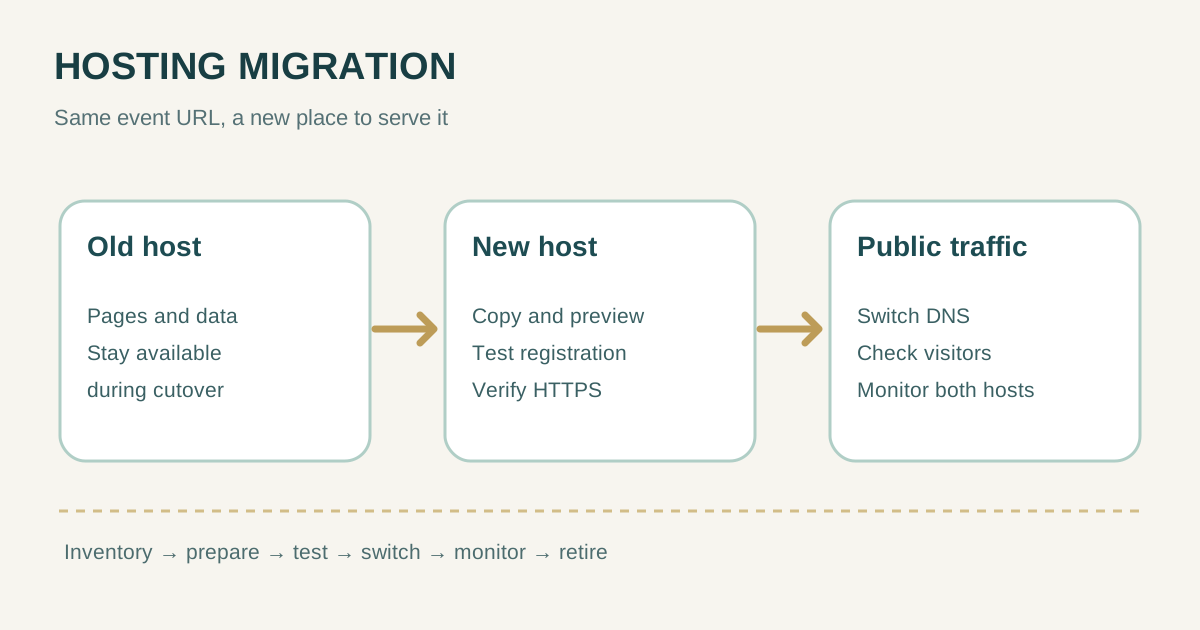
Changing the host of an event website is more than copying pages. A site may depend on registration, ticket checkout, confirmation emails, analytics, a CMS and DNS records that are managed elsewhere. This checklist covers a host change that keeps the same domain and public URLs. Prepare and test the new site before switching traffic, then monitor both environments. If the domain or URL paths will change too, plan that as a separate site move.
Boletolibre editorial team
Published
1. Define exactly what moves—and what stays
List the public domain, important event and registration URLs, hosting provider, CMS or application, database, media, forms, ticketing integration and mail sender. Record who owns each component and who can change its settings. A hosting move normally changes where pages are served; it need not change the domain registrar, authoritative DNS provider or mailbox provider. Google Search Central treats a host change with unchanged user-visible URLs as a distinct migration from a move that changes URLs.[2]
| Component | Before cutover, record | Question |
|---|---|---|
| Public pages | Canonical URL list, sitemap, key assets | Will every URL return the same useful content? |
| Registration and checkout | Form endpoint, redirect, payment provider | Can a real visitor complete the flow? |
| MX, SPF, DKIM and sending service owner | Will confirmations still send and arrive? | |
| Data and media | Database, uploads, storage location | What changes after the first copy? |
| Operations | Deploy access, logs, backup, rollback owner | Who can restore the old route? |
The first Google result for the broader keyword is a server-wide checklist that includes inventory, environment preparation, data transfer, DNS, validation and later shutdown. For a single event site, focus those stages on visitor journeys and the systems that support them rather than copying server-level tasks that may not apply.[1]
2. Build the new host and preserve a recovery path
- Capture a restorable copy of site files, database, media and configuration. Know how to restore it before changing traffic.
- Set up the required runtime, TLS certificate, environment variables, redirects, file storage and scheduled jobs on the new host.
- Agree a content freeze or final-sync procedure for registrations and CMS edits. Avoid letting both hosts accept independent writes without a reconciliation plan.
- Choose a cutover window away from ticket launches, event start, on-sale deadlines and other known peaks. Assign one person to make the switch and one to verify the visitor flow.
Google recommends preparing and testing the new infrastructure before changing DNS. If the preview copy uses a crawl block or noindex directive, remove that protection from the public version before the move; otherwise search engines may see an unavailable or excluded site.[2]
3. Preview the site as a visitor before switching traffic
Use a preview hostname or another controlled way to reach the new host while the public domain still points to the old one. Test on mobile and desktop with the same paths the audience will use. Preview pages must not create an accidental second public, indexable copy of the site. Confirm the new host can serve the public domain and valid HTTPS certificate at cutover.
- Open the homepage, event page, FAQs, policy pages and key organic landing pages. Check images, fonts and downloads.
- Complete a registration or approved test purchase through the actual integration; verify the confirmation page and email. Avoid creating a real charge merely to test.
- Check login or organizer workflows, form spam protection, analytics tags and consent controls that matter to the site.
- Inspect robots.txt, canonical tags, sitemap, redirects and HTTP status codes. Ensure no preview-only noindex setting will leak into production.
- Compare content and important URLs with the old site; keep titles, copy and internal links stable during the host move unless a separate change is planned.
Google’s host-change guide specifically calls for testing the new copy, checking that Googlebot can access it, and removing temporary crawl blocks at launch.[2]
4. Switch traffic with an explicit rollback decision
Perform the final data sync or freeze, confirm the new host is ready, then update the records that direct the public domain to it. Record the exact old and new values, time of change and person responsible. DNS timing depends on existing cached records and provider behavior; do not promise a universal propagation deadline. The detailed record-level sequence belongs in a separate DNS cutover plan.
| Checkpoint | Pass condition | If it fails |
|---|---|---|
| Domain and HTTPS | Public URL reaches the new host with valid TLS | Use documented rollback values |
| Registration | Visitor can finish the expected flow | Stop promotion; resolve or roll back |
| Confirmation email | Test message is received and authenticated | Inspect sender and DNS separately |
| Content and SEO | Important URLs return expected content and status | Fix routing or return to old host |
| Data consistency | New records appear in the chosen source of truth | Pause writes and reconcile before continuing |
Changing DNS to point at the new infrastructure is the actual move in Google’s sequence. Keep the old environment available while traffic shifts so you can compare responses and recover if a critical path fails.[2]
5. Monitor both hosts and retire the old one deliberately
After cutover, watch requests and errors on both hosts. Check the event page, registration funnel, transactions and confirmation messages from more than one network. In Search Console, inspect representative URLs and the site’s crawl and indexing signals. Google says a temporary crawl-rate dip can occur after a host change; investigate persistent access errors or serious slowdowns rather than treating a short fluctuation as proof of lost rankings.[2]
- Compare old-host traffic falling with new-host traffic rising, including crawler requests.
- Check scheduled jobs, webhooks and integrations for duplicate or missed processing.
- Reconcile registrations, payments and CMS edits made around the cutover window.
- Keep rollback details and backups until data and traffic have stabilized. Retire the old host only after its logs show it is no longer serving users or crawlers.
A host change with stable URLs usually does not need a new URL mapping or a site-wide redirect plan. If you also change the domain or paths, use Google’s separate guide for URL-changing moves and plan redirects accordingly.[3]
Sources and further reading
- Server Migration Checklist: A Comprehensive GuideInMotion Hosting · Accessed
- Changing your hostingGoogle Search Central · Accessed
- Site moves with URL changesGoogle Search Central · Accessed