How to choose hosting for an event website
The best host for an event website is the one that can run the pages and services you actually need during your busiest hour, with a named person responsible when something fails. A simple announcement page has different requirements from a site that takes registrations or runs its own checkout. Start with the jobs the site must do, then compare hosting models and written provider commitments. A larger server label alone is not a plan for launch day.
Boletolibre editorial team
Published
Start with the event, not a server plan
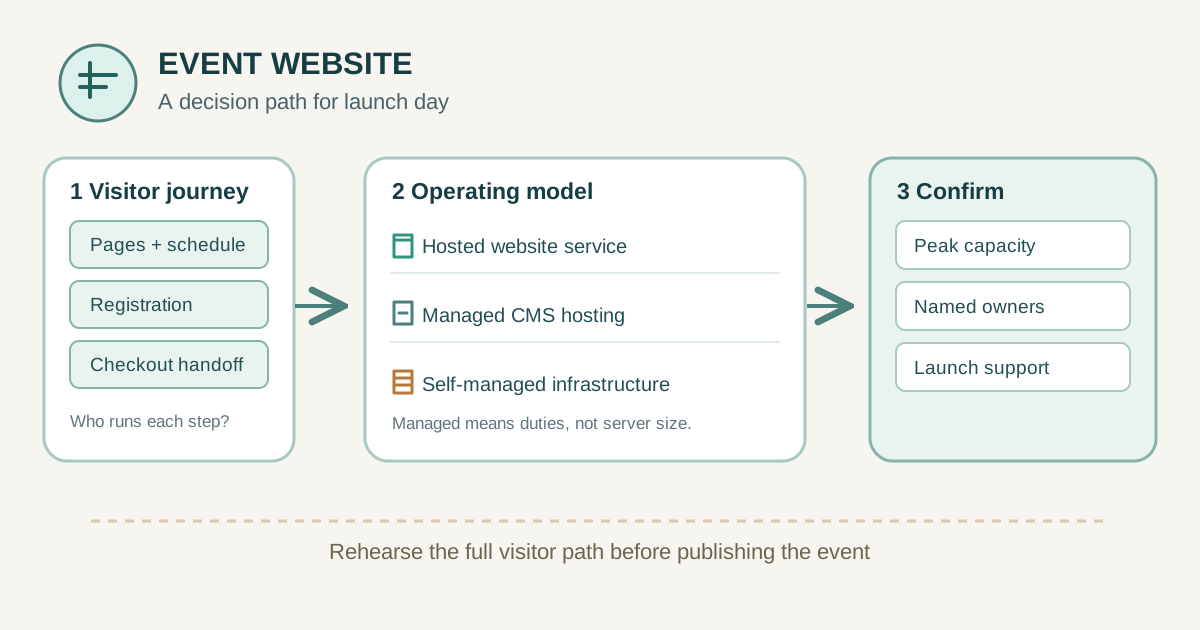
Write down the pages people will visit: schedule, venue, accessibility details, speaker information and contact. Then list actions: registration form, email confirmation, embedded map, video, member login or ticket purchase. For every action, name the system that actually processes it. A button that sends buyers to an external checkout does not make your website the checkout host. That distinction changes which provider must handle a failure.
Record the public launch date, ticket-release time, expected simultaneous visitors and the people who can edit the site. Estimate what happens if a newsletter or social post sends many visitors in a few minutes. If you have no traffic data, use a conservative scenario and ask providers how to test or raise capacity. Also decide whether your domain, email and website are controlled by separate accounts; hosting is not the same thing as owning the domain.
Compare the hosting arrangements
A hosted website service combines a page editor and hosting. It is often the fastest route for a small team because the vendor operates much of the platform. Check whether its forms, custom domain, exports and integrations actually meet your needs; easy setup can come with limits on layout or data portability.
Shared hosting places sites on shared server resources. A managed CMS plan may include server operations, backups or updates, but the contract must say exactly which layers it covers. A VPS or dedicated server gives a developer more control and more work: operating-system patches, monitoring, application updates and recovery need an owner. Cloud is an infrastructure arrangement, not a promise of automatic scaling for every plan. Managed describes who performs tasks, not a fixed server size. An agency can operate any of these models on your behalf.[1]
| Arrangement | Useful when | Check before choosing |
|---|---|---|
| Hosted website service | Small team needs pages and simple integrations | Form/export limits and checkout handoff |
| Managed CMS hosting | Team needs a CMS and vendor-operated tasks | Exact update, backup and restore scope |
| Self-managed VPS, dedicated or cloud | Custom application needs developer control | Operations owner, capacity test and on-call coverage |
Plan for the busiest hour
Ask for the limits that matter at the event's busiest moment: concurrent requests, CPU or worker limits, bandwidth or transfer allowances, caching, form submissions and any rate limits. A static information page may be easy to cache; a registration flow can depend on a database, email service or payment provider that the web host does not control. Test the whole visitor path, including mobile devices and the external checkout handoff.
Give the provider a concrete scenario, such as a ticket announcement at noon followed by a sharp burst of visits. Ask what happens after a limit is reached: queuing, throttling, overage charges, temporary upgrade or outage. Request a way to rehearse before launch and an upgrade path with lead time. A percentage uptime promise is useful only with its measurement window, exclusions, remedies and support process; it does not prove your particular page will stay usable.
Assign security, updates and recovery
Write a responsibility list for HTTPS certificates, software and plugin updates, access control, spam prevention, backups, restore tests and incident alerts. A provider may secure the physical or platform layer while you still control users, content and application configuration. WordPress.org recommends a backup before updating WordPress, so a CMS plan should answer who takes that backup and who restores it if the update breaks a page.[2][3]
Keep a copy of the event copy, images, form configuration and any data you are entitled to export. Ask how often backups run, what they include, how long they are kept and how long a restore normally takes. Do not assume an automatic backup is an independently tested recovery. For registration or payment information, also map the responsibilities of the form and checkout providers; a web host cannot restore data held only by another service.
Compare the full cost
Compare the price for the same operating period and feature set. Include the domain separately, the hosting subscription, required CMS or event plugins, storage, transfer overages, email sending, support tier, backup or restore charges and agency labor. Note introductory prices and the applicable renewal term rather than projecting the first-month price across a year. Ask which charges grow when traffic rises.
A cheap self-managed server can become expensive if a developer must be on call during ticket release. A hosted service can be economical until an essential integration, seat or export requires a higher tier. Neither conclusion is universal. Request a written quote for your scenario and compare total duties alongside money. Keep taxes and exchange-rate assumptions explicit where relevant instead of inventing an all-in number.
Get a launch-day support answer
Before launch, name the person who can edit the page, the person who can contact hosting support and the person who can reach the form or checkout provider. Ask each vendor for support hours, contact channel, initial response target and escalation path. Clarify whether support covers the infrastructure, the CMS, your code, integrations and visitor data. A response target is not a guaranteed fix time.
Run a rehearsal: publish a small change, submit a test form, follow a test purchase path if applicable, check confirmation messages and restore a harmless page from a backup or staging copy. Keep the previous working content and a rollback contact. If the website will move hosts, distinguish a hosting change that preserves public URLs from a URL-changing move; Google documents different migration work for those cases.[4]
Send the same worksheet to each provider
Send the same one-page requirements sheet to every shortlisted provider. State event date and time zone, busiest-hour scenario, page and integration list, expected data collected, editor roles, domain owner and current platform. Then request plan limits, scaling lead time, included security and backup work, recovery test, support coverage, export method, applicable price and renewal terms.
Use a simple comparison table with evidence, not a star rating. Mark any answer as confirmed in writing, to be tested, or unknown. An unknown answer for the critical registration path deserves a test or contract clarification before purchase. Keep provider marketing claims separate from the terms that apply to your account.
| Requirement | Evidence to collect |
|---|---|
| Peak hour | Expected visitors, tested path, limit and upgrade lead time |
| Ownership | Named owner for hosting, CMS, forms, checkout, domain and email |
| Recovery | Backup coverage, restore test and rollback contact |
| Commercial | Same-period total, overages, renewal and support scope |
Choose the smallest arrangement that meets the evidence
For an information-only event page, a hosted site with a reliable external registration or checkout link may be enough. For a team that edits a mature CMS and needs specific plugins, managed CMS hosting can fit if updates and restore duties are clear. For custom application behavior, self-managed infrastructure can fit when a developer owns operations and launch-day coverage. These are examples, not automatic rankings.
Choose once the required visitor journey passes a rehearsal, the capacity scenario has an answer, the price period is comparable and every operational task has an owner. Save the worksheet and the provider's written answers for the next event. If you later change hosts, plan the migration separately instead of treating the new subscription as a completed move.
Sources and further reading
- Definitions of shared, VPS, dedicated, cloud and managed hostingAWS · Accessed
- Illustration of customer and provider security dutiesAWS · Accessed
- Backup recommendation before WordPress updatesWordPress.org · Accessed
- Guidance for moving hosting while keeping public URLsGoogle Search Central · Accessed