CNAME points to the right target, but the site still fails? Diagnose each layer
An event site can fail at its custom address even while the platform’s default address opens. That is the problem in the leading Google discussion: the CNAME was treated as if it would redirect visitors to another URL. It only aliases a DNS name. Work through the exact hostname, DNS answer, destination service and HTTPS certificate in that order before changing records.
Boletolibre editorial team
Published
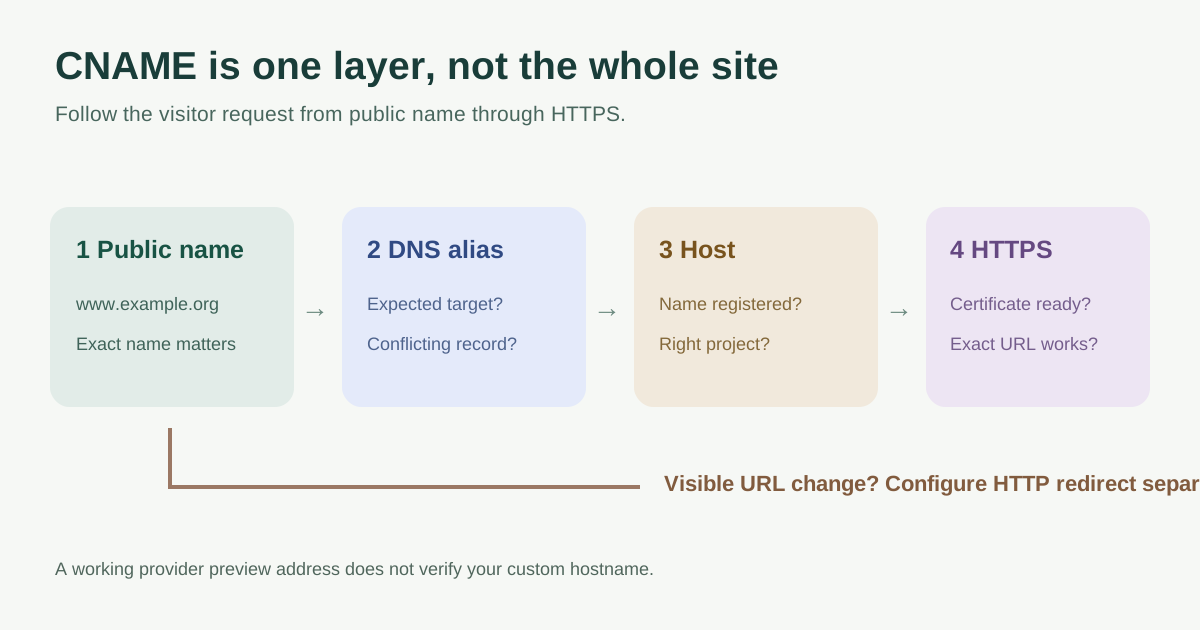
First separate an alias from a redirect
A CNAME for www.example.org pointing to event-host.example.net tells DNS where to look for address information. A visitor still requests www.example.org in the browser. The hosting service must accept that hostname, route it to the intended site and serve an appropriate HTTPS certificate. A CNAME does not change the browser address or create an HTTP 301/308 redirect. If the goal is to send visitors to another visible URL, configure a redirect at a web service that receives the request.[1][2][6]
Write down the exact public hostname before diagnosis. www.example.org, tickets.example.org and example.org are different names. Check the hosting provider’s current custom-domain instructions for the exact target it assigns; do not guess from a working preview URL.
Check the published DNS answer
| Observation | Likely question | Next evidence |
|---|---|---|
| No CNAME at the intended subdomain | Was the record added under the wrong name or DNS provider? | Compare authoritative nameservers, zone and full hostname |
| CNAME points elsewhere | Was an old vendor or typo retained? | Compare target with the provider’s current domain setup screen |
| CNAME cannot be added | Is an A, AAAA or other CNAME already at that same name? | Inventory records at that exact hostname before removing anything |
| DNS answer seems right, site fails | Does the host recognize this name and have HTTPS ready? | Check custom-domain and certificate status at the destination |
Query the authoritative DNS provider, or ask the domain administrator for a dated record export, then compare the full owner name and target. In a terminal, `dig CNAME www.example.org` can show a plain, unproxied alias. A proxy or flattening provider may return address records instead, so absence of a visible CNAME alone does not prove misconfiguration. Do not change MX, mail-authentication or unrelated records while fixing a web alias.[2][4]
A normal CNAME should not coexist with A or AAAA data at the same owner name; providers commonly reject that conflict. Do not delete a live record merely to make an editor accept a CNAME. Identify which service uses it, confirm the desired replacement and coordinate the change window.[3]
If DNS resolves, inspect the receiving host
Open the hosting or ticketing platform’s custom-domain screen. Confirm that the exact original hostname is added to the right project, ownership checks have passed, and the platform reports HTTPS/certificate readiness. Test the exact `https://` address, not only the provider’s default hostname. A working target URL demonstrates that the platform is available; it does not prove it is configured for your event domain. Fly’s custom-domain guide, for example, treats DNS and certificate attachment as separate steps.[1][6]
If the browser reports a certificate mismatch, record the hostname shown in the error and the platform’s certificate status. If the host serves the wrong site, check its domain-to-project mapping. If it shows an HTTP error, record the status code and whether the request reached the right application. Each symptom points beyond the DNS target itself.
Treat the root domain as a separate case
An ordinary CNAME cannot be used at the DNS zone apex under standard DNS rules. Some providers offer an alias or CNAME-flattening feature that presents address records while allowing an alias-like configuration. Read that provider’s instructions rather than copying a subdomain example into the root. Decide separately whether the root or www name should be canonical and where its HTTP redirect is implemented.[5][4]
Keep a change-safe diagnostic record
Record the expected name and target, observed authoritative answer, provider custom-host status, certificate status, exact failure and owner of the next step. Capture the pre-change value before editing. Recheck the same hostname from DNS through HTTPS after an approved change; do not infer success solely from the preview URL. Use the worksheet below to hand off evidence without passing account credentials.
Sources and further reading
- DNS CNAME Record not working, but target’s workingCloudflare Community · Accessed
- DNS record typesCloudflare · Accessed
- Cannot add DNS records with the same nameCloudflare · Accessed
- Set up CNAME flatteningCloudflare · Accessed
- Supported DNS record typesAmazon Route 53 · Accessed
- How to do Custom Domains with FlyFly.io · Accessed