Is that domain renewal invoice real? Verify it before paying
A domain-renewal demand can arrive just before an event launch, when losing the website or email feels catastrophic. The first organic Google result explains fake renewal invoices and registrar phishing. The safer response is neither to pay immediately nor to ignore a possibly real deadline. Pause the requested payment, identify the domain and current registrar through an independent route, then compare the claim with your actual account record.
Boletolibre editorial team
Published
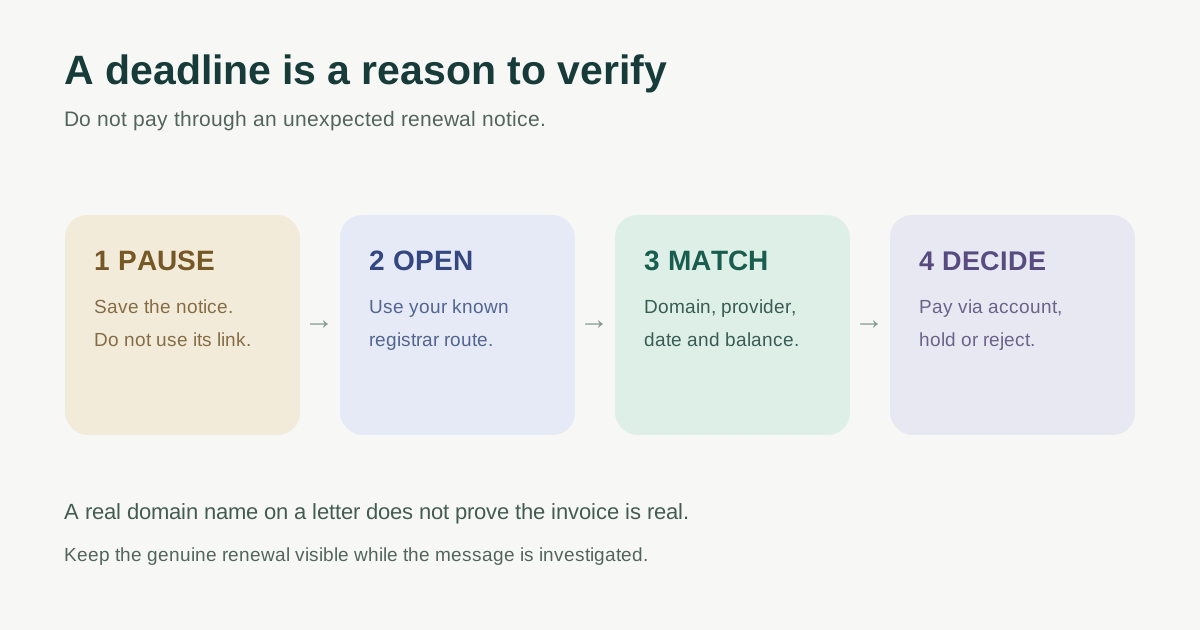
Pause the invoice, not the real renewal
Do not use the payment link, QR code, phone number or reply address printed in an unexpected notice as your verification path. Save the message for review without opening attachments or entering credentials. Send it to the organization’s named domain owner and finance approver through the usual internal channel. The FTC warns that business invoices for domain registration or SEO services may be fake and that some emailed invoices are phishing attempts.[2][3]
A legitimate renewal may still be due. Use the known registrar bookmark, a manually typed provider address from your own records, or a previously verified support contact. If the person who normally manages the account is unavailable, locate the organization’s registration record rather than letting a deadline claim force a payment.
Match four independent facts
| Check | What to compare | If it differs |
|---|---|---|
| Exact domain | Spelling and extension on the notice versus owned portfolio | Do not pay; ask owner to identify the asset |
| Provider | Known contract, dashboard and registration record versus sender | Treat an unfamiliar company as an unverified solicitation |
| Renewal state | Expiry/renewal date and balance in the account | Ask known-provider support to explain the difference |
| Requested action | Renewal versus transfer, listing, SEO or extra domain | Reject an unordered service or escalate for review |
ICANN’s public Lookup tool uses RDAP to show available registration data for gTLDs, including registrar information when returned. It can help identify a sponsoring registrar, but it cannot authenticate the email sender, invoice amount, payment destination or an internal reseller agreement. Some data is redacted, and country-code TLDs may use different registry processes. Use the dashboard and known provider contact for actual billing confirmation.[4][5]
An invoice can use a real domain name and still ask for a different service. Read the line item and small print: is it a domain transfer, listing, search submission, brand-variant purchase or a genuine renewal through your contracted provider? Do not assume an official-looking logo proves authority. ICANN has documented fake notices that copied its branding to collect payment information.[3][1]
Make a dated pay, hold or reject decision
Record who checked the account, which independent provider route they used, the exact domain, displayed renewal date, any real invoice identifier, and the decision. If the account shows a genuine amount due, pay only through the provider’s known billing route under the organization’s normal approval process. If evidence conflicts, mark HOLD and contact the known provider; if it is an unwanted solicitation, mark REJECT and notify accounts payable not to process it.
For multiple event domains, do this per domain. A reminder about an old campaign redirect is different from a charge for the current ticketing domain. The renewal owner should separately decide whether the old domain must stay active for printed tickets, email replies and redirects. Do not confuse “no bill in this message” with “safe to let the registration lapse.”
If somebody already clicked or paid
If credentials were entered on a suspicious page, use the known provider site or support route to secure the account and inspect recent domain, DNS and contact changes. If a payment was made, contact the payment provider promptly through its known channel and preserve the invoice and transaction evidence. If a transfer or DNS change appears unauthorized, contact the current registrar and relevant operators immediately. These are triage steps; recovery options depend on the provider and case. Do not send passwords or transfer codes to the sender.[1][2]
The FTC provides a US reporting route for business invoice and phishing scams; organizations elsewhere should use their applicable local reporting channels. The operational priority is to protect the account and keep the real domain renewal visible while the suspicious request is investigated.[2]
Download the renewal-notice verification log
Use the editable log for an accounts-payable handoff. It records independent account evidence, unresolved differences, approval and next action without storing payment credentials. Keeping one dated record reduces the chance that a second staff member pays the same unsolicited notice under launch pressure.
Sources and further reading
- Domain Renewal Scams - Fake Invoices and How to Spot ThemNewHost · Accessed
- Run a small business? Pay your bills, not scammersUS Federal Trade Commission · Accessed
- Be Careful What You Click: Fraudulent Domain Renewal EmailsICANN · Accessed
- Registration Data Lookup Tool and FAQsICANN · Accessed
- ICANN Update: Launching RDAP; Sunsetting WHOISICANN · Accessed