What to include in an event registration form: choose fields by purpose
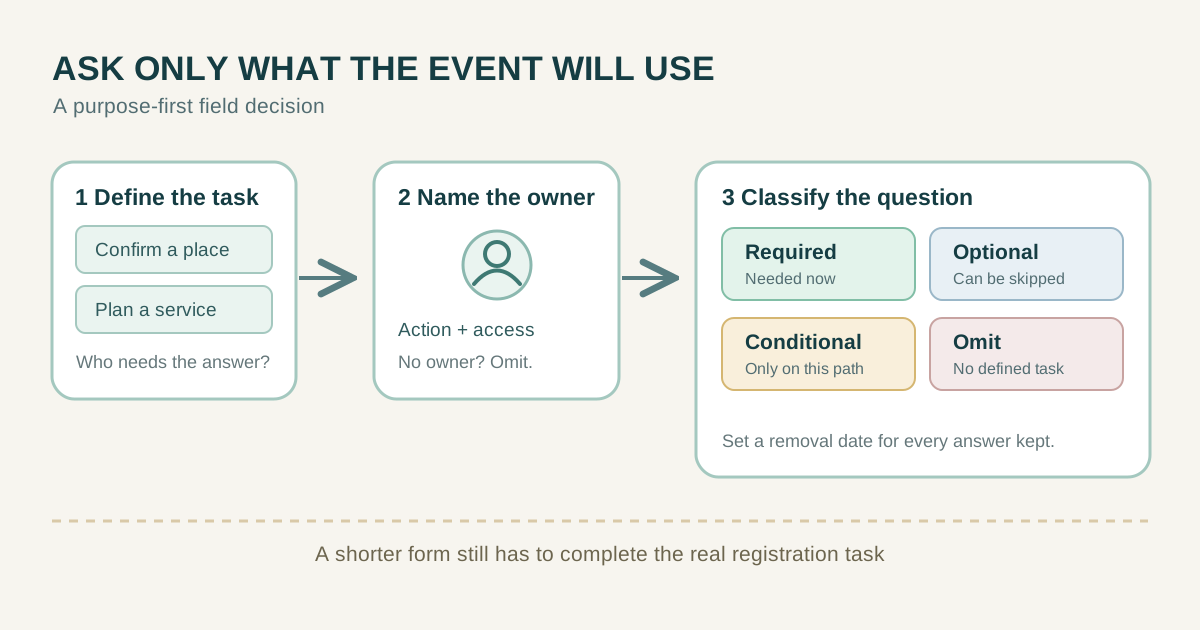
An event registration form should collect the information needed to complete a defined attendee task, then stop. A generic list of 'must-have' fields can create needless friction and collect data nobody uses. For a free workshop, a reply address may be essential while a phone number is not. For a meal, a dietary question may become relevant only after the attendee chooses that meal. Use the matrix below to connect each question to an action, its owner and a retention decision before you publish the form.
Boletolibre editorial team
Published
Start with the job the form must complete
Write one sentence for each task: reserve a place, send a confirmation, identify a person at check-in, prepare a meal, arrange an accommodation or issue an invoice. Then ask which answer actually enables that task and who will use it. A field with no defined action is a candidate for removal. A field that serves only a later task may be better requested later, through a separate step.
Decide whether the form records a request, immediately confirms attendance or starts a paid checkout. These are different states. If capacity is manually reviewed, a form submission must not promise an approved place. If registration is handled by an external platform, the organizer's website may need only a clear link and event details. W3C's forms tutorial recommends asking only for information required to complete the process; it does not prescribe a fixed field count.[1]
Make a field inventory with five columns: question, specific purpose, required/optional/conditional status, person or system that needs the answer, and when the answer can be removed. Include information already known from a chosen ticket type or signed-in account so you do not ask for it again without reason.
Choose a small core, not a universal checklist
A contact address is usually needed if confirmation and changes are sent by email. Ask for the attendee's name only to the precision your check-in, badge or attendance record requires; a legal name is not automatically necessary. A ticket or session choice is needed only when the event offers alternatives. Ask for a phone number only if a real communication or safety workflow relies on calling or texting and the participant understands that use.
Do not treat every common field as mandatory. An organizer may need an organization name for a business invoice, but not for a neighborhood workshop. A badge-name field can be optional if participants may choose how they are addressed. Mailing address, date of birth, job title, social handle and company size should not ride along simply because a template contains them. Use the decision table as a starting point, not a legal conclusion.
| Possible field | Default decision | Purpose test |
|---|---|---|
| Reply email | Required if decisions arrive by email | Who sends confirmation and changes? |
| Attendee or badge name | Required only to the precision needed | Who matches the person at check-in? |
| Ticket or session | Conditional on real options | What allocation does the choice change? |
| Phone | Omit unless a defined call/text workflow exists | Who calls, when and why? |
| Dietary or access request | Optional or conditional | Who fulfills it and who may read it? |
| Employer or social handle | Usually omit | Which attendee task cannot work without it? |
Ask extra questions only when they become relevant
Conditional questions follow a participant choice. If an attendee selects an in-person meal, ask about dietary needs in a way the catering team can act on. If they select a virtual ticket, do not ask for travel or venue details. If they request an accessibility adjustment, offer a clear way to describe the support needed and a private contact route; avoid demanding a diagnosis as a default. Consider whether an organizer can handle a request without storing sensitive details in the general attendee list.
Optional should mean the person can leave the answer blank and still complete registration. Conditional should mean the question appears only when the relevant branch applies, and its required status should be justified for that branch. Show why you ask before someone types. Limit who can read the answer and avoid exporting meal or access information to people who only need a check-in name.
Keep payment data out of an ordinary text form
For a paid event, the form may need ticket selection and a handoff to a payment service. Show the price and the next step clearly. Do not create a free-text field for card numbers or verification codes. The payment provider's hosted flow and contract should determine what information it collects and how it returns success, failure or cancellation to the organizer. A click toward checkout is not a completed payment.
Keep registration, payment and admission states distinct. If the checkout is external, explain when a place is held, when a receipt is issued and where the participant gets help. Collect billing details only when they are needed for the actual transaction or invoice and handled in the appropriate system. A free event does not need payment fields. The specific payment and privacy obligations depend on the provider and jurisdiction; do not infer them from a generic form template.
Separate event terms, privacy information and marketing
Describe what registration requires and link the applicable event terms, cancellation information and privacy notice. Do not use one vague checkbox to pretend every notice, contract and marketing permission has the same legal basis. A person may need to receive operational changes without agreeing to promotional messages. Ask for marketing permission separately when the applicable rules and chosen communication method call for it; do not preselect it or make unrelated marketing a condition of attendance.
For EU processing, GDPR Article 5 includes purpose limitation, data minimisation and storage limitation. The UK ICO explains a similar minimisation principle under UK GDPR. Those sources support a task-based review, not a universal field list or an automatic claim that every registration form must rely on consent. Confirm the rules for the organizer's location, attendees and processing before publishing legal wording. Keep a record of the actual purpose for each field.[5][6]
Make every selected field understandable and usable
Give each control a visible, descriptive label. Mark required and optional inputs in words, provide format instructions where needed, and keep the label tied to its control so assistive technology can identify it. A placeholder is not a reliable substitute for a label. Use short groups for related choices and make the order follow the attendee's task rather than an internal database schema.[2][3]
If an answer is invalid, explain what to correct without erasing other answers. A restrictive format should be necessary, communicated before entry and tolerant of reasonable variations. Test the form with a keyboard and on a phone, including conditional branches and any payment handoff. W3C WAI's guidance covers labels, instructions and validation. These practices improve usability; they are not a claim of automatic legal compliance.[4]
Example: a fictional community workshop
Imagine the fictional Cedar Street Workshop, a free two-hour session with 30 places and manual approval. The organizer sends decisions by email and checks a chosen display name at the door. Its first screen asks for email and display name, each with a stated purpose. It asks for one session choice only if the organizer offers simultaneous sessions. The form states that submission is a request until a confirmation message says otherwise.
The workshop offers tea but no catered meal, so it does not ask about dietary preferences. It offers a private contact link for access arrangements instead of a compulsory medical-information field. It omits phone, employer, date of birth, address, social handle and marketing opt-in from the registration task. If the organizer later adds paid places, the new checkout and billing flow must be designed and reviewed separately. The example is a decision exercise, not a universal recipe or a claim about Boletolibre features.
| Decision | Write down |
|---|---|
| Task | What happens when this answer is supplied? |
| Status | Required, optional, conditional or omitted? |
| Owner | Who sees and acts on the answer? |
| Timing | Ask now, later or never? |
| Retention | When can this answer and its exports be removed? |
Review access, exports and deletion after the event
Before launch, send a test request through each branch and confirm what the attendee and staff actually receive. Restrict the exported list to people who need it. A door volunteer may need a display name and status, not email history or private accommodation notes. Decide who corrects mistakes and how the attendee can contact that person. These operational choices are part of field design because they determine who will use an answer.
After the event, revisit every field against its purpose and retention rule. Remove unnecessary exports and close access for temporary staff, subject to applicable recordkeeping obligations. Document what worked: fields people could answer, questions they skipped, and information staff never used. The next form should inherit useful decisions, not every old field. A shorter form is only better when it still supports the real event.
Sources and further reading
- WAI guidance to ask only for information needed for the taskW3C WAI · Accessed
- WAI guidance for visible and associated field labelsW3C WAI · Accessed
- WAI guidance on required and optional instructionsW3C WAI · Accessed
- WAI guidance for useful input validationW3C WAI · Accessed
- EU GDPR Article 5 principles where EU law appliesEUR-Lex · Accessed
- UK GDPR data-minimisation guidance where UK law appliesUK Information Commissioner's Office · Accessed