Event website certificate renewal monitoring checklist
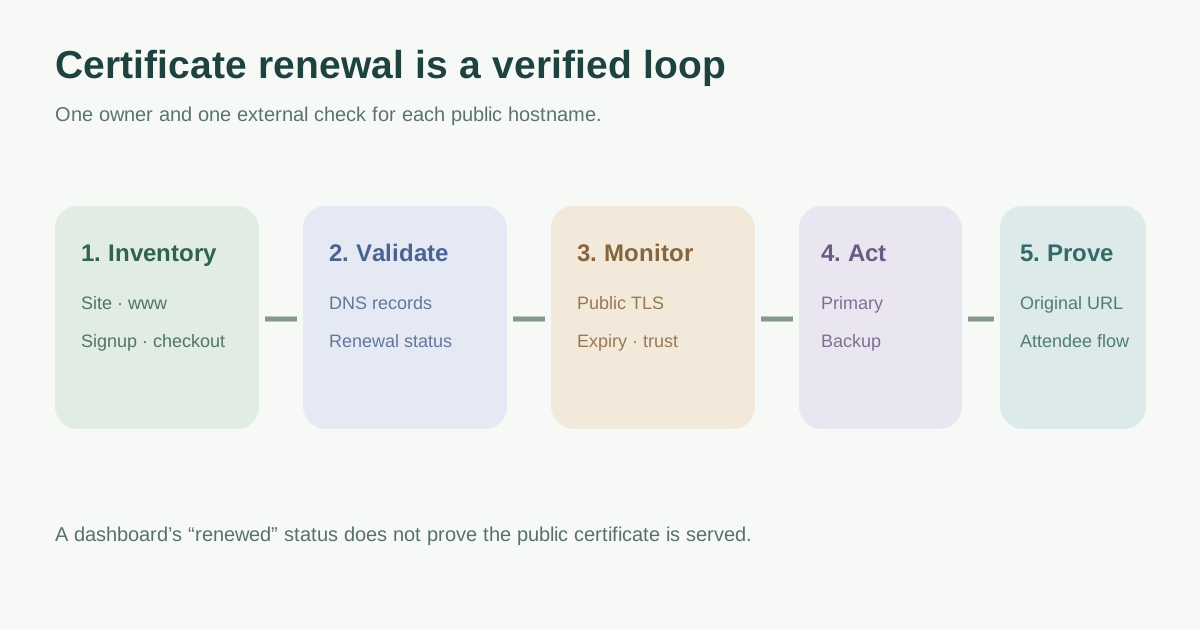
An automatic certificate is only useful if the public hostname continues to serve a trusted connection. Event websites often have several boundaries: the main site, www, registration subdomain, CDN and an external ticketing custom domain. Monitor the attendee-facing connection for each host, then make sure a named person can investigate renewal before the event or on-sale window.
Boletolibre editorial team
Published
List every public hostname and its serving provider
Record the exact hostname an attendee opens, where TLS terminates, certificate provider, renewal method, linked DNS validation record, and account owner. Include the main event site, www redirect host, registration and check-in subdomains, and any custom domains delegated to forms or ticketing. An external checkout on the vendor’s own domain belongs to that vendor, but its link remains part of the attendee journey. A host inventory is more useful than a single “SSL certificate” row.
| Host | Served by | Renewal/validation owner |
|---|---|---|
| event.example | CDN or hosting edge | Site operations |
| www.event.example | Redirect edge | Domain/site operations |
| register.event.example | Form or ticket provider | Integration owner |
| Vendor checkout domain | Vendor-managed TLS | Vendor plus organizer link owner |
Check what automatic renewal depends on
For AWS Certificate Manager DNS-validated certificates, AWS says automated renewal needs the certificate in use by an integrated service and the required validation CNAME records publicly available. A DNS cleanup or provider move can break this dependency, so record the validation record and confirm renewal status after such changes. Other issuers have different validation and deployment steps; document the actual provider workflow rather than assuming all “managed” certificates behave alike.[2]
Separate successful issuance from what visitors see. A newly renewed certificate may still need to reach the CDN, load balancer or application endpoint. An outside check of the exact hostname catches that boundary; an internal certificate list alone cannot prove the public connection is trusted.
Route alerts to people who can act
Choose warning lead time from the real time needed for domain validation, support escalation, approvals and deployment. Assign a primary and backup recipient, on-call route near an on-sale or event, and a clear escalation point if an alert is not acknowledged. Check expiry and handshake/trust from outside, because a valid date does not detect a wrong hostname or broken chain. Let’s Encrypt recognizes external certificate-status monitoring as useful for expiry and unexpected issuance.[3]
Make a failure ticket include host, observed expiry or trust symptom, issuer, affected attendee path, provider account, owner and deadline. Do not repeatedly send alerts to an inbox no one owns. Keep alert test evidence in the worksheet.
Close the loop after renewal and test a failure response
After renewal, verify the original public URL from an external environment and record the presented certificate expiry, hostname coverage and successful registration/checkout navigation. Close the alert only when the attendee path works, not when the provider dashboard says “renewed”. Periodically simulate an alert or use a safe test notification to confirm recipients and escalation without breaking production TLS.
If a warning is already visible, use the separate certificate-warning troubleshooting guide to triage date, name and trust errors. Do not instruct attendees to bypass browser warnings.
Download the certificate renewal ownership and alert worksheet (Markdown, English)
Sources and further reading
- How to Monitor SSL Certificate ExpiryMonitorion · Accessed
- Renewal for domains validated by DNSAWS Certificate Manager · Accessed
- Monitoring service optionsLet’s Encrypt · Accessed