Before enabling HSTS on an event website, audit every hostname
An event site can have a public page, registration host, image host and private staff tools under one domain. HTTP Strict Transport Security (HSTS) tells browsers to use HTTPS for later visits, but its scope can reach beyond the page where you add the header. Use this audit before a change to keep an overlooked hostname from becoming unreachable near an on-sale date.
Boletolibre editorial team
Published
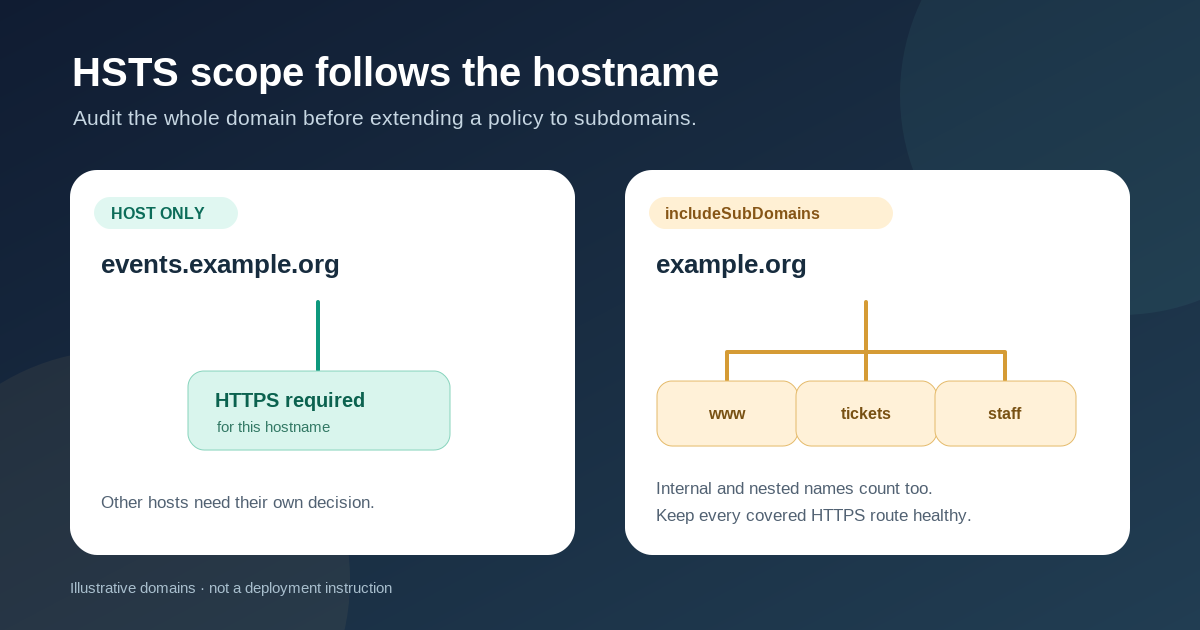
Understand exactly what the browser will enforce
The Strict-Transport-Security response header is accepted over HTTPS and tells a browser to upgrade future HTTP requests for that host. The max-age value is a lifetime in seconds; each new qualifying response can extend it. An HTTP redirect to HTTPS is still useful for a first visit, but an HSTS policy is learned only after a secure response. HSTS does not repair an invalid certificate or server that cannot speak HTTPS.[1][2]
Scope follows the hostname that sends the header. A policy on events.example.org does not automatically cover example.org. Adding includeSubDomains at example.org can cover www, tickets, staff and deeper names. An independently operated checkout on another registrable domain follows that provider's policy, even if your page links to it. Write down the actual domains and owners before changing a shared parent.[1]
| Header placement | Browser scope | Decision |
|---|---|---|
| events.example.org, no includeSubDomains | Only events.example.org | Good first stage when this host is verified |
| example.org with includeSubDomains | example.org and subdomains | Audit every covered name first |
| checkout.vendor.test | The provider's separate domain | Ask that provider; your parent header does not control it |
Make a hostname inventory before changing the parent domain
List active and planned names below the domain: public website, www alias, registration, assets, API, staging, staff tools, and any delegated service. Ask DNS, hosting, ticketing and IT owners to confirm names you cannot see from the website alone. The preload project's guidance explicitly includes internal and nested subdomains when includeSubDomains is used. An unused name can matter later if the same parent policy is still cached.[3]
For each hostname, record who controls DNS and HTTPS, whether a browser ever visits it, its certificate renewal owner, and a representative URL. Separate the domain you control from a provider's distinct domain. If any covered browser-facing host needs HTTP or has unreliable TLS, defer the parent-wide includeSubDomains decision. You may be able to apply host-only HSTS to a known-good site first; do not imply that this protects the other names.[1][3]
Test the HTTPS baseline on real visitor paths
Check the exact HTTP URL and confirm it redirects to the intended HTTPS URL on the same host where appropriate. Then open HTTPS in a clean browser profile and confirm the certificate, page, navigation and registration handoff. Inspect the HTTPS response headers on the apex and any alias or redirect response; a header only on the destination page may miss visitors who never reach it. Record the result for each hostname, including nested and internal hosts accessible to your team.[1][3]
Test more than a homepage. Follow the path through event details, schedule, checkout handoff, login and a representative asset. Check mobile and another network if these are important audiences. A green certificate on one URL says nothing about a different hostname or an expiring certificate tomorrow. Assign the owner of each failure before increasing an HSTS lifetime.[3]
Stage the policy and wait out each lifetime
On a host you control, start with a short policy such as Strict-Transport-Security: max-age=300 over HTTPS. Verify that the intended host behaves correctly, then increase to a week and later a month only after the earlier interval has elapsed and checks remain clean. The preload project suggests a 5-minute, 1-week and 1-month ramp for a fully audited includeSubDomains policy. Treat those values as a deployment sequence, not a requirement to cover every subdomain before it is ready.[3][1]
If the plan is to add includeSubDomains, repeat the inventory and HTTPS checks before that change: it changes the scope, not merely the duration. Configure the header at the actual HTTPS edge, host or CDN that responds to visitors; confirm it appears on the responses you intend, including HTTPS redirects. Keep the exact old header and a named rollback operator in the change record.[3][1]
Verify in a browser and monitor the whole event path
After each stage, inspect the response header for each tested hostname and use a browser profile that has received it. Request an HTTP URL for that host and confirm the browser upgrades it. Command-line header checks show what a server sends but do not prove a browser's cached policy or an attendee's full flow. Record UTC test time, tested hostname, response code, certificate result and who signed off.[1]
Watch certificate alerts, broken-page reports and changes in registration completion while the policy is active. Recheck after certificate renewal, DNS or host moves, CDN changes and new subdomain creation. A status dashboard can show a reachable homepage while a ticket link, staff portal or nested subdomain fails. Keep a short contact path to every service owner for event week.[3]
Plan for rollback; treat preload as a separate decision
Simply removing the header does not erase a policy already stored by a visitor's browser. To end a non-preloaded policy, serve Strict-Transport-Security: max-age=0 over valid HTTPS on the hostname that set the policy; the browser must receive it. If the certificate or HTTPS route has failed, restore that route first. A separately stored policy on a subdomain may also need its own HTTPS response. Keep a rollback and support plan through the longest max-age after the last nonzero header could have been received.[1][2]
Preloading puts a domain in browser software before the first visit. The preload list requires a valid certificate, HTTPS on all subdomains, a same-host HTTP-to-HTTPS redirect where port 80 is used, and an HSTS header on every base-domain HTTPS response, including any HTTPS redirect, with at least one year of max-age plus includeSubDomains and preload. The preload directive alone does not add a domain to browser lists; submission and acceptance are separate steps. Removal can take months to reach browsers. The preload project's current guidance recommends HSTS but does not recommend preloading by default. Leave the preload directive out unless the domain owner has separately accepted the long-term, whole-domain commitment.[3]
Use the editable worksheet below to decide the exact host and policy, capture evidence at each stage, and name the person who can restore HTTPS or serve max-age=0.
Download the HSTS hostname and rollout worksheet (Markdown, English)
Sources and further reading
- Strict-Transport-Security headerMDN Web Docs · Accessed
- RFC 6797: HTTP Strict Transport Security (HSTS)IETF / RFC Editor · Accessed
- HSTS Preload List Submission: deployment recommendations and requirementsHSTS Preload Project · Accessed