Check DMARC alignment after changing your email From domain
A new logo and a new visible From address can be ready while the mail system still authenticates the old domain. This check compares a message that actually arrived with the identity readers see, then records a safe send or hold decision.
Boletolibre editorial team
Published
Name the identity change before editing DNS
Download the From-domain alignment check card (Markdown)
Write the old and proposed visible From addresses, the date of the switch and who owns the new domain. A display-name change alone is different from changing the domain after @. The latter changes the identity that DMARC evaluates. Gmail’s sender guidance calls for direct mail’s From domain to align with an SPF or DKIM domain; a familiar sender name cannot substitute for this check.[2]
Use one card per sending stream, such as a newsletter platform, order-confirmation service or staff mailbox. Keep the recipient list and content decisions separate from this authentication check. A successful website DNS move, a working MX record or a verified account badge does not prove that a message from the new From domain will authenticate.
Understand what must align
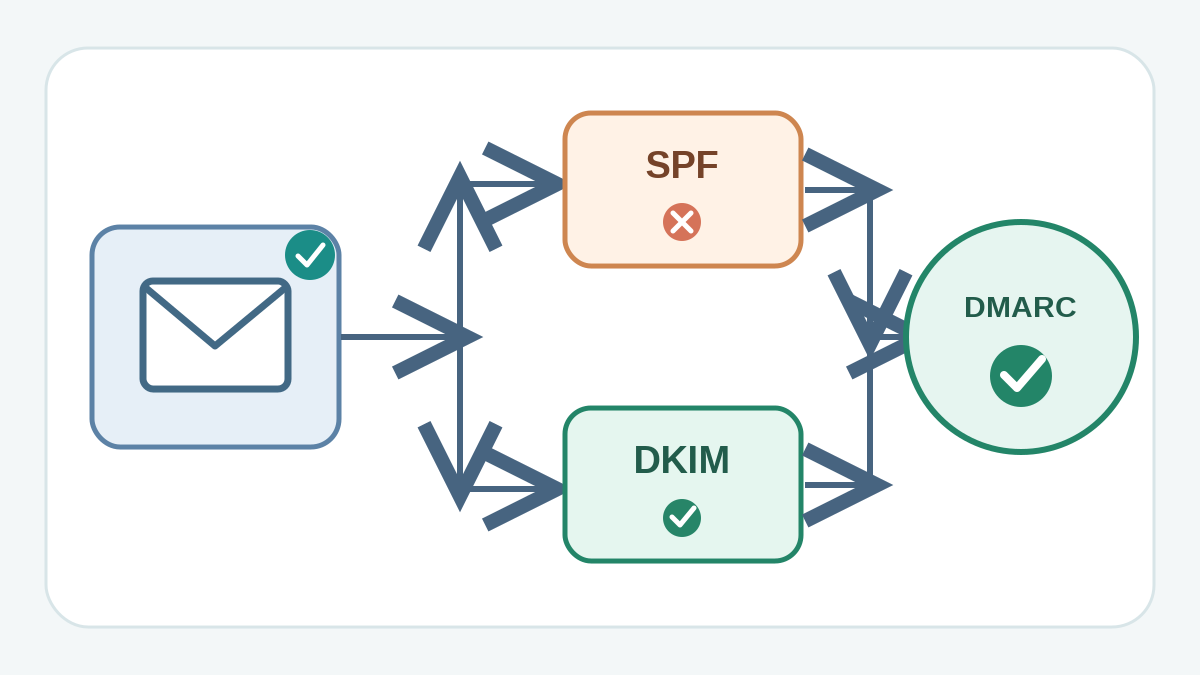
DMARC compares the domain in the visible RFC5322.From header with a domain that passed SPF or DKIM. For SPF, inspect the authenticated SMTP MAIL FROM domain, often reported as `smtp.mailfrom`; a delivered message’s Return-Path can help identify that envelope sender. For DKIM, inspect a passing signature’s `d=` domain. Reply-To is for replies and is not the DMARC identity being compared.[1]
At least one of those methods must both pass and align for a DMARC pass. In relaxed alignment, related subdomains can align through the same organizational domain; strict alignment requires an exact domain match. Check the published `aspf` and `adkim` modes rather than assuming a subdomain always qualifies. A raw `spf=pass` or `dkim=pass` for an unrelated provider domain is not, by itself, alignment with the new visible From. If either tag is absent, RFC 9989 defaults it to relaxed (`r`); check the effective policy, including a policy inherited by the From subdomain.[1][2][10]
List each sending path that will use the new From
List only the systems that will actually send with the new address. Record the platform, message type, account owner and whether it uses its own sending identity. A newsletter and a confirmation can leave different services even when they share the same brand, so one passing sample cannot approve both. Keep the old domain’s working path in the record until the switch has been checked.[5][4][6]
Confirm the new identity is authorized in each service. Mailchimp, for example, distinguishes access verification from DNS authentication and calls for separate subdomain verification when sending from a subdomain. Other providers have their own required records and account steps. Capture the exact instructions for the platform in use; do not copy an old record or assume a verified badge is an aligned message.
Apply only the provider’s requested setup
Ask the DNS owner to apply only the records requested for the new sending identity, after checking existing SPF, DKIM and DMARC ownership. Keep a record of who approved each change, the host and value, and the provider’s verification state. Mailchimp’s setup is an example of platform-specific DKIM CNAME and DMARC TXT instructions, not a universal record recipe.[4]
Do not relax a DMARC policy merely to make a failing test disappear. The useful fix is to identify which sender produced the message and make its supported SPF or DKIM identity align. Do not replace a shared SPF record without accounting for other authorized senders, and do not infer success from DNS syntax alone. Send a controlled message through the real production path after the provider reports setup complete.[1][6]
Read a received message, not a status badge
Send a low-risk message from each changed stream to a controlled mailbox through the same route the real message will use. In Gmail on a computer, open that received message, choose More beside Reply, then Show original. Save its time and message ID privately. Record the visible From, the receiver’s SPF, DKIM and DMARC results, `smtp.mailfrom` and every passing DKIM `d=` domain. Avoid forwarding the message for this check because that adds another route.[3]
Read the receiving system’s authentication result, not just a `DKIM-Signature` line; a signature may be present but fail verification. If multiple DKIM signatures appear, one passing, aligned signature can satisfy DMARC. Note which recipient system produced the result, because different receivers can evaluate or handle a message differently. Redact personal addresses and content before sharing a header outside the incident team.[1][3]
Use the final mailbox's own trusted authentication verdict, not just the first `Authentication-Results` line in a pasted header; an upstream header can be forged. Take a direct-to-mailbox sample as the baseline. If real recipients also use a forwarding alias or mailing list, collect a second sample through that route. Forwarding can change the last sending IP and cause SPF failure; an aligned DKIM signature may survive an unchanged relay, while content or header rewriting can invalidate it. Compare the direct and indirect results before changing the sender's DNS. A delivered forwarded copy does not by itself prove the original message passed DMARC.[7][8][9]
Work a passing and a failing example
Consider `From: tickets@newbrand.example` with `spf=pass` for `smtp.mailfrom=vendor.example` and `dkim=pass` for `d=newbrand.example`. SPF passed but is unaligned; DKIM passed and aligns, so DMARC can pass. The visible From and the service’s bounce domain do not have to be identical when another authenticated path aligns.[1]
Now keep the same visible From and SPF result, but change the only passing DKIM signature to `d=oldbrand.example`. Neither passing domain aligns with `newbrand.example`, so DMARC fails in this simplified case. A `p=none` policy could still observe that failure rather than reject it; it does not turn `dmarc=fail` into a pass. A DMARC pass also cannot prove inbox placement or that the intended recipient acted.[1]
| Observed sample | Alignment reading | Decision |
|---|---|---|
| SPF pass: vendor.example; DKIM pass: newbrand.example | DKIM aligns with newbrand.example | DMARC may pass |
| SPF pass: vendor.example; DKIM pass: oldbrand.example | Neither path aligns with newbrand.example | DMARC fails in this example |
| SPF pass: bounce.newbrand.example; DKIM fail | SPF aligns under relaxed mode; check aspf | Can pass if SPF alignment applies |
Decide whether each stream can move
Mark a stream ready only after the authorized new From is set, the received sample shows the expected aligned pass, and the operational owner has checked the message and its reply route. Hold a stream with missing evidence or a mismatch and ask its provider which supported signing or envelope-domain setting to use. A DNS owner should not guess at provider-specific bounce-domain controls.[2]
Cut over one stream at a time. Keep the previously approved From path and any DNS authorization it still needs available until the replacement has a passing received sample and its owner approves a small real send. If a stream fails, hold it or use the old identity only when it is still authorized and accurate for that message. Record the retest ID, decision time and rollback owner. Once no system uses the old route, ask the DNS owner to review and retire obsolete authorization; do not remove shared SPF or DKIM records while another legitimate stream depends on them. Monitor delivery evidence and aggregate reports after the switch, separately from the single-message pass.[11][6]
Sources and further reading
- RFC 9989, DMARC identifier alignmentRFC Editor · Accessed
- Email sender guidelinesGoogle Gmail Help · Accessed
- Trace an email with its full headerGoogle Gmail Help · Accessed
- Set Up Email Domain AuthenticationMailchimp · Accessed
- Verify an Email DomainMailchimp · Accessed
- Set up SPF: identify all email sendersGoogle Workspace Admin Help · Accessed
- RFC 8601, Authentication-Results trust boundaryRFC Editor · Accessed
- RFC 9989, interoperability considerationsRFC Editor · Accessed
- RFC 7960, indirect email flowsRFC Editor · Accessed
- RFC 9989, DMARC policy tags and defaultsRFC Editor · Accessed
- RFC 9989, SPF record reviewRFC Editor · Accessed