Do custom nameservers need DNS glue? A parent-and-child record checklist
A registrar asks for IP addresses while you assign custom nameservers such as ns1.example.com. That prompt is about DNS glue, not the IP address of your website. Glue matters only for particular delegations; entering an unverified address can make the domain unreachable. Use the checks below to separate the registrar, parent zone, child zone and DNS operator before changing anything.
Boletolibre editorial team
Published
First decide whether this delegation needs glue
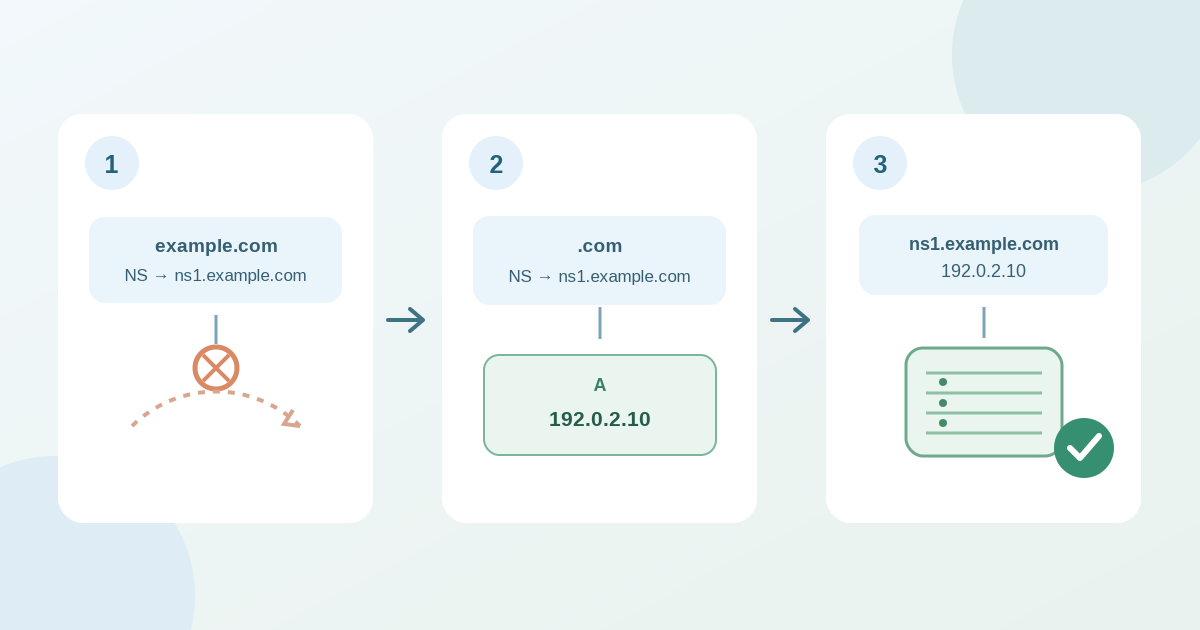
The key question is where each nameserver hostname sits relative to the domain being delegated. If example.com uses ns1.example.com, the nameserver is inside that domain: a resolver needs its address before it can ask that server for example.com. Parent-zone glue breaks the dependency. If example.com uses ns1.provider.example, that nameserver is outside example.com, so this delegation does not need example.com glue. Check each name separately; a list can mix the two cases. An external nameserver may still have a glue or cyclic-delegation problem in its own namespace, so verify that path separately.[1][3]
Do not add glue merely because a control panel offers a “private nameserver” feature. Many ordinary DNS providers assign out-of-domain nameservers and manage their own infrastructure. The requirement is about the relationship between the delegated domain and the nameserver name, not about whether the website uses a custom domain or HTTPS.[3]
| Nameserver for example.com | Glue decision | Reason |
|---|---|---|
| ns1.example.com | Needed at the parent | The server name is inside the delegated domain. |
| ns1.provider.example | Not needed for example.com | Its address is looked up through another namespace; verify that path separately. |
| ns1.example.com plus ns2.provider.example | Check each name | The in-domain name needs glue here; check the external name’s own path. |
See why the parent zone holds the address
The parent publishes an NS referral for the child domain. For an in-domain nameserver, that referral also needs an available A or AAAA address in its additional data so a resolver can reach the server. RFC 9471 clarifies how authoritative parent servers return available in-domain glue; it does not require every domain owner to run custom nameservers.[1]
For example, the .com parent can refer example.com to ns1.example.com and supply 192.0.2.10 as glue. That address is a documentation example, not an address to configure. The server at the real address must actually answer authoritatively for example.com. A glue entry that points to a web server rather than a DNS server does not solve the handoff.[1][2]
Keep parent glue and child records distinct
Treat the registrar or registry host-address entry, the parent-zone referral, and the authoritative child-zone address as different evidence. A normal A or AAAA record for ns1.example.com inside example.com is useful, but it cannot bootstrap the lookup if the only way to reach example.com is through ns1.example.com. Conversely, a parent glue address does not create or repair the child zone.[1][4]
Ask the DNS operator for the actual IPv4 and IPv6 addresses of each nameserver. Compare them with the registrar host entries and the child-zone A/AAAA answers. A mismatch can send some resolvers to an old server even while the website appears healthy from one location. Keep the parent NS names and the child NS set consistent as part of the same review.[4]
Prepare one address inventory before a change
Before requesting a change, record the domain, every delegated nameserver hostname, its address family, the current parent NS set, the child NS set and who operates each server. Confirm that the proposed address is assigned to an authoritative DNS endpoint and that it serves the intended zone. Have the DNS provider confirm the exact hostnames and addresses in writing; do not infer them from a website A record.[3][4]
Record the existing values and a rollback contact. If an address or provider is changing, plan a period when old and new DNS service remain available. AWS warns that wrong nameserver or glue values can make a domain unavailable, and advises confirming the new DNS service before cancelling the old one. The exact cache and rollout timing depends on the provider and resolvers.[3]
Hand off the registrar and DNS-provider work
The registrar or registry-facing account controls the nameserver registration and glue submission for a registered domain; the DNS operator controls the authoritative service and child-zone records. Some registrar interfaces call this “host records,” “child nameservers” or “white-label nameservers.” These labels describe an implementation workflow, not a new DNS record type for your website.[4]
Give the registrar owner only the verified nameserver names and IP addresses. Have the DNS operator confirm that every listed server answers for the zone, then coordinate the parent delegation and child-zone changes. If the nameserver belongs to another domain, ask that domain’s operator to check its own delegation and address records; do not assume the current domain’s registrar can edit them.[4][5]
| Owner | Evidence to confirm |
|---|---|
| Registrar owner | Parent NS and glue hostnames/IPs match the approved inventory |
| DNS operator | Each address reaches an authoritative server; child NS and A/AAAA agree |
| Site owner | Website and email still resolve before old DNS is retired |
Verify the referral before retiring the old service
After the change, compare the live parent referral with the intended NS names and available A/AAAA glue. Compare each returned address with the DNS operator’s inventory and child-zone answer, then confirm each nameserver responds authoritatively for the intended domain. Check from more than one resolver or location because cached delegations may differ temporarily.[1][5]
Verify website and email resolution as consequences of the DNS handoff, but use DNS evidence to locate a delegation error. Keep the old service until the new referral and authoritative answers are stable and the owner approves retirement. If the parent address is missing or stale, return to the registrar or registry path; if the server answers incorrectly, return to the DNS operator.[3]
Copy the nameserver-glue decision sheet
Use one copy per nameserver and record the observed parent answer, not only a planned value. The worksheet helps the registrar owner and DNS operator agree on the same facts without copying a provider-specific setup recipe.
Sources and further reading
- RFC 9471: DNS Glue Requirements in Referral ResponsesIETF / RFC Editor · Accessed
- RFC 5737: IPv4 Address Blocks Reserved for DocumentationIETF / RFC Editor · Accessed
- Adding or changing name servers and glue records for a domainAmazon Route 53 · Accessed
- Configuring white-label name serversAmazon Route 53 · Accessed
- Nameserver sets: in-bailiwick glueCloudflare · Accessed