A page changed but still returns 304? Check its validators
A page editor corrects a venue time, yet the browser's network panel shows 304 Not Modified. That status is often normal: the server is telling a conditional client to reuse a stored representation, and a 304 carries no new page body. The useful question is whether the client is validating the same public representation that was edited. This guide uses one stable URL and four evidence rows to separate a publication or routing problem from an ETag, Last-Modified, browser, or intermediary problem.
Boletolibre editorial team
Published
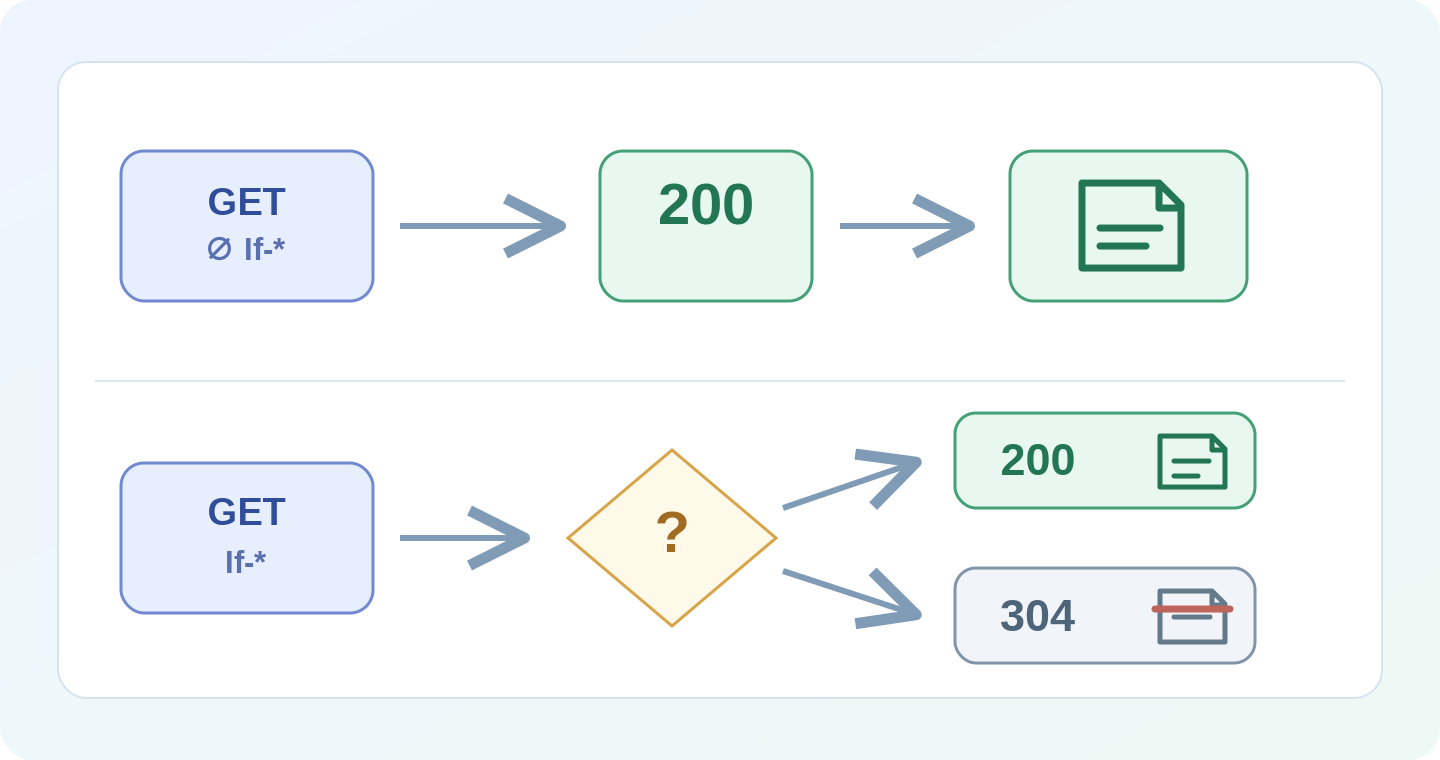
A 304 can be the correct answer after an edit
An HTTP 304 answers a conditional GET or HEAD. It says the request's condition failed and the client can use its stored representation; the 304 has no page body to inspect. A 304 is therefore normal when the saved copy still represents the selected page. It can even follow a real editorial edit if that edit was unpublished, made on another locale or URL, or omitted from this visitor's selected version. Do not infer a broken cache from the status alone. Record the exact changed fact, the public URL and the approved post-edit wording before testing.[1][2]
Keep comparisons tied to one representation. Record the final URL after redirects, method, language and encoding preferences, safe cookie-state label, signed-out state, and edit publication time. A query parameter added just for testing makes a different target URI, so it may hide the behavior you need to explain. Ask the site owner which route and variant should contain the new fact. If the page includes personal or account data, move the investigation into the site's authorized diagnostic process instead of pasting headers, cookies or content into a shared worksheet.[1][5]
First prove what the full page currently contains
Use a full GET for the public page without `If-None-Match` or `If-Modified-Since`. Capture the response status, visible heading and changed fact, `ETag`, `Last-Modified`, `Date`, `Cache-Control`, `Vary`, and any provider cache indicator. Confirm that no conditional header was sent; a browser reload can silently add one. Chrome DevTools can show request and response headers, and its Disable cache control isolates the browser cache, but it does not disable a CDN or another shared cache. A controlled HTTP client can be useful when you need to send exact request fields.[1][5]
Compare this full response with a pre-edit full response if one was saved. If the post-edit 200 still shows the old fact, stop the validator diagnosis: the route may point to an unpublished build, wrong variant, origin copy or stale edge object. A 200 with the new fact gives you a concrete representation to compare with the conditional requests. If you do not have a pre-edit capture, mark its validator unknown rather than inventing an old ETag. Do not use HEAD as a substitute for checking the changed sentence; HEAD has no response body. If an affected browser exposes a conditional value, record it as observed, not as a reconstructed pre-edit baseline.[2][4][6]
Test the old ETag without the date condition
If the old full response supplied an `ETag`, send a GET for the same selected page with only `If-None-Match` set to that old tag. Leave `If-Modified-Since` out of this controlled row. HTTP uses weak comparison for `If-None-Match`, even if the tag lacks the `W/` prefix. A matching selected representation can correctly yield 304; a changed representation whose old tag no longer matches should yield a full response. The tag is an opaque validator, not proof that the server computed a content hash. For a 304, preserve the response headers, especially `ETag`, `Date`, `Cache-Control`, and `Vary` when present: there is no response body to compare.[3][2][1]
A strong validator must change when a content change would be observable in a 200 GET. A weak tag may group representations the origin regards as equivalent and might not change for every byte difference. Compare the visible changed fact, variant and ETag type before declaring a defect. If a full 200 shows the new important fact while a comparable request with the old tag gets 304, preserve both request/response records and ask the owner to inspect the tag generator or the layer answering the conditional request. The worksheet below keeps the two requests comparable.[2][3]
| Evidence row | GET request | Question |
|---|---|---|
| A — old full response | Before edit, no `If-*` fields | What were the old content and validators? |
| B — new full response | After edit, no `If-*` fields | Does a 200 show the approved new fact? |
| C — ETag only | After edit, old `If-None-Match` only | Does the old tag still select a 304? |
| D — date only | After edit, old `If-Modified-Since` only | Does the old date still select a 304? |
Test Last-Modified separately and respect its precision
If the old full response supplied `Last-Modified`, make a second conditional GET with only `If-Modified-Since` set to that exact old date. Do not combine it with `If-None-Match`: HTTP says the date condition is ignored when the tag condition is present. Compare the 200/304 outcome with the ETag-only row. `Last-Modified` is what the origin believes is the selected representation's modification time, not necessarily the editor's save time. It can be absent or difficult to maintain consistently for generated pages.[3][2]
HTTP dates have one-second resolution. Two publications close together, an unchanged timestamp on generated output, or a corrected server clock can make date-based validation less precise than a suitable ETag. A date-only 304 after an edit warrants investigation, but the likely question is how the selected representation's timestamp was generated, not whether every 304 is wrong. If the ETag-only request returns a new 200 while the date-only request returns 304, check which validator the real client sends. The date condition cannot explain a browser request that also carries `If-None-Match`.[2][3][4]
Find which layer made the decision
The browser, a service worker, a CDN, and the origin can each affect what a visitor sees. Inspect the actual browser request in Network: whether it came from a local cache or service worker, which conditional fields went out, and which URL they targeted. Repeat the controlled GETs through the public edge. An `Age`, `Via`, or provider-specific cache label may help trace a response, but one label is not proof of the component that evaluated a condition. Record exact times and response identifiers so an operator can correlate the sample with logs.[4][5]
If the site's operator provides an authorized origin-facing route, repeat the same full and ETag-only GETs with equivalent host and variant selection. A new origin 200 paired with an old public-edge 200 suggests stored delivery or routing. A new origin 200 paired with a public-edge 304 to the old tag needs inspection of edge validation and its stored representation. If the origin itself returns 304 against an obsolete strong tag for visibly changed content, inspect origin validator generation. Change one confirmed layer at a time; a global purge before locating the problem can erase evidence and cause unnecessary load.[4][1]
Retest one correction and preserve the evidence
After the owner corrects the proven cause, repeat the full GET and each conditional GET with the same URL and request state. The full 200 should contain the approved new fact. A request carrying an obsolete tag or date should be interpreted according to the validator actually used; a later 304 with the *new* validator can be perfectly healthy. Check both the public path and any operator-confirmed origin path that was part of the diagnosis. Retest from the affected browser only after recording whether its local cache or service worker influenced the original observation.[1][4]
Keep a short handoff: old and new visible markers, publication time, final URL and variant, request headers, status, validators, cache diagnostics, layer evidence, change owner, and one rollback condition. Redact cookies, authorization fields and personal page data; even a sanitized network export should be reviewed for sensitive URLs or bodies. If the edit never appeared in an unconditional full response, say so plainly and send the issue to publication/routing ownership. A 304 is a clue about validation, not a universal command to flush every cache.[2][5]
Sources and further reading
- RFC 9110 §15.4.5: 304 Not ModifiedRFC Editor · Accessed
- RFC 9110 §8.8: Validator FieldsRFC Editor · Accessed
- RFC 9110 §13.1: PreconditionsRFC Editor · Accessed
- RFC 9111 §4.3: ValidationRFC Editor · Accessed
- Network features referenceChrome for Developers · Accessed
- curl manualcurl · Accessed