Website caching for event pages: a freshness policy your team can test
Caching can make a repeat visit quicker, but the wrong stored copy can show an old venue or ticket status. An event site needs a written answer to two questions for each response: who may reuse it, and how old may it be? This guide turns those answers into a small policy that an organizer, site editor, host and ticket provider can check together.
Boletolibre editorial team
Published
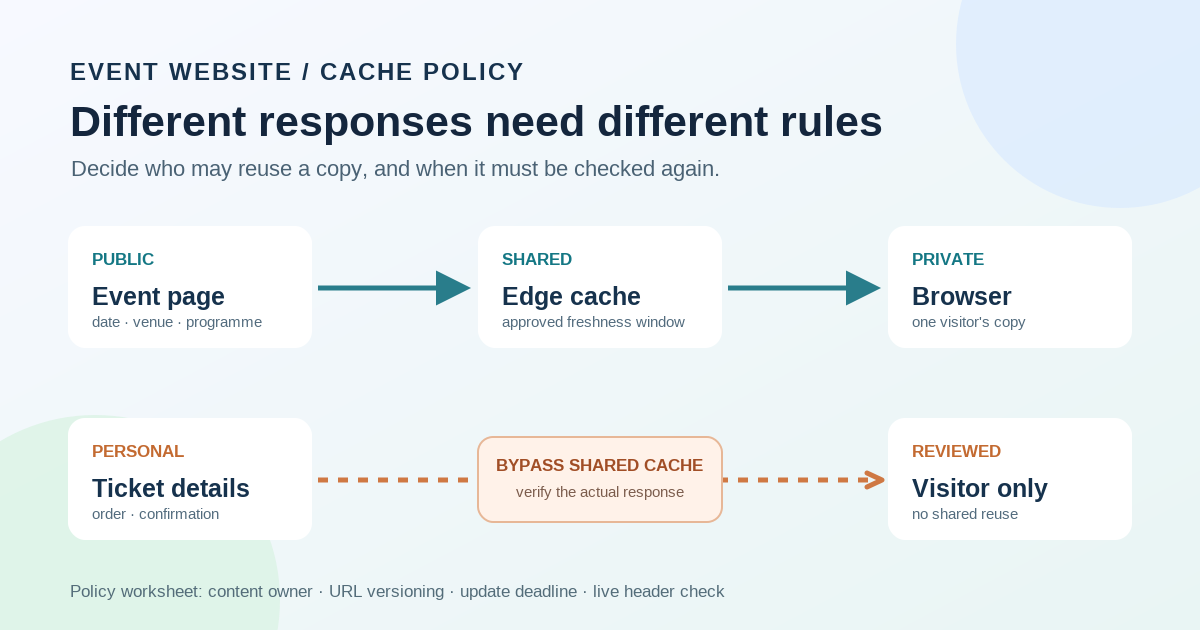
Classify the response before choosing a lifetime
Start with a list of real URLs, not one site-wide speed setting. A public event description, a poster with a versioned filename, a live availability response and a named attendee confirmation have different change rates and audiences. Record the content owner, whether two visitors should see identical bytes, and the latest acceptable update time. A schedule correction with a 10-minute tolerance calls for a different decision from a visual asset whose URL changes on every revision.
| Response class | Question to answer | Likely owner |
|---|---|---|
| Public event page or agenda | How quickly must a correction appear? | Editor and site developer |
| Versioned poster, CSS or script | Does every changed byte get a new URL? | Developer or asset publisher |
| Ticket availability or registration | Can the answer differ between visitors or moments? | Application or ticket provider |
| Named confirmation or account page | Does it contain attendee-specific information? | Application or ticket provider |
The table is a classification exercise, not a set of universal TTLs. Ticket inventory, purchase state and personal details need an application review before any caching rule is applied. If the checkout lives with another provider, ask that provider about its policy; changing your own page headers cannot change its responses.
Separate the browser copy from the edge copy
A browser cache belongs to one visitor. An edge or CDN cache is shared across visitors. RFC 9111 defines freshness and validation for both, and separates `max-age` from `s-maxage`, which controls the shared cache when both are present. A CDN purge can remove an edge copy, but it cannot reach a visitor’s already fresh browser copy. This is why a correction plan must consider both layers.[1]
`no-cache` means a stored response must be validated before reuse; it does not ban storage. `no-store` tells a cache not to store the response. `private` blocks shared caching while permitting a private cache under the normal rules. These are different choices. Do not use `no-store` as a substitute for authentication or access control.[1]
Write rules that match how each URL changes
For a file whose URL changes whenever its contents change, a long browser lifetime and `immutable` can avoid repeat requests while the file remains fresh. RFC 8246 describes this versioned-URL pattern. The release must update HTML to point at the new filename and keep old referenced files available long enough. Never put a long immutable policy on a poster or stylesheet that will be overwritten at the same URL.[2]
For a public event page or agenda whose date, venue or programme may change, agree on the maximum acceptable staleness with the content owner. You may choose revalidation on every reuse, or a measured short shared-cache window if that delay is acceptable. For a personalized registration, order or confirmation response, keep it out of shared caches and verify the actual response. Do not infer safety from the behavior of the public homepage.[1]
- Revalidation: use `no-cache` when a stored public document may be kept but must be checked before reuse.
- Shared freshness: use `s-maxage` only after the team accepts the possible delay and the provider rule is checked.
- Versioned assets: consider `max-age` plus `immutable` only when a changed file gets a new URL.
- Personal responses: use a reviewed private or no-store policy and test it on signed-in and anonymous paths.
Rehearse a date or venue correction
Before a ticket campaign, rehearse an approved factual correction in a safe environment: change a session time or venue note, publish it, and measure how long the old text remains visible in a fresh browser, a repeat browser and the CDN path. Record who may invalidate the affected URL and who confirms the new value. A broad purge can cause a burst of origin requests, so target the changed content when the host supports it.[7]
If an asset keeps the same URL, plan a shorter lifetime or validation and a documented replacement process. If the URL is versioned, publish the new asset and update the referring page. When a critical fact changes, check the page, linked files, social previews and ticket-provider handoff as separate surfaces; they do not all share one cache.
Check the live response, not just a dashboard setting
Open the browser Network panel on the real hostname and inspect the document, one poster, one stylesheet or script, and one registration or account response. Save the full `Cache-Control` value, `Age` where present, and the provider’s cache-status header if it supplies one. Compare first and repeat visits: the Network panel can show browser memory or disk reuse, while `Age` and CDN status can describe the edge response. It cannot by itself prove that the CDN fetched from the origin. When that distinction matters, confirm the request in origin access logs or a provider trace. One response and location do not prove behavior in every region.[3][1][4]
Check the provider policy against the origin header. CloudFront documents that a minimum TTL above zero can make it cache even when the origin sends `no-cache`, `no-store` or `private`; Cloudflare documents its own default rules. The host’s configuration can therefore change the result. Test anonymous and signed-in requests separately. Stop and correct any shared-cache hit that contains attendee-specific information.[5][6]
Keep a decision record that survives the next launch
Give the policy an owner and a retest trigger. Include URL pattern, whether the response varies by visitor, proposed browser and shared-cache behavior, acceptable delay for updates, header/rule owner, publish or purge step, and an observed live result. The downloadable worksheet provides these columns and a small correction drill.
Download the event website cache policy and correction drill (Markdown, English)
The policy is complete when an editor can name the update deadline, a developer can show the live headers, and the organizer can confirm a corrected event fact on an actual visitor route. Recheck after changing the host, CDN, theme, framework, ticket embed or deployment process; those changes can alter cache behavior without changing the article text.
Sources and further reading
- RFC 9111: HTTP CachingIETF / RFC Editor · Accessed
- RFC 8246: HTTP Immutable ResponsesIETF / RFC Editor · Accessed
- HTTP cachingMDN Web Docs · Accessed
- Network features referenceChrome for Developers · Accessed
- Manage how long content stays in the cacheAmazon CloudFront documentation · Accessed
- Default Cache BehaviorCloudflare documentation · Accessed
- Purge everythingCloudflare documentation · Accessed