Diagnose a CSP block on an external ticket widget
A blank ticket checkout does not identify which site blocked it. The event page may refuse to load the provider frame; the provider may refuse to be embedded; or a different resource may fail after the frame loads. Start with the exact browser message and the two document responses. This guide assumes a third-party ticket iframe on a site you can inspect, not a specific Boletolibre feature.
Boletolibre editorial team
Published
Capture one reproducible failure
Download the CSP ticket-widget diagnosis worksheet
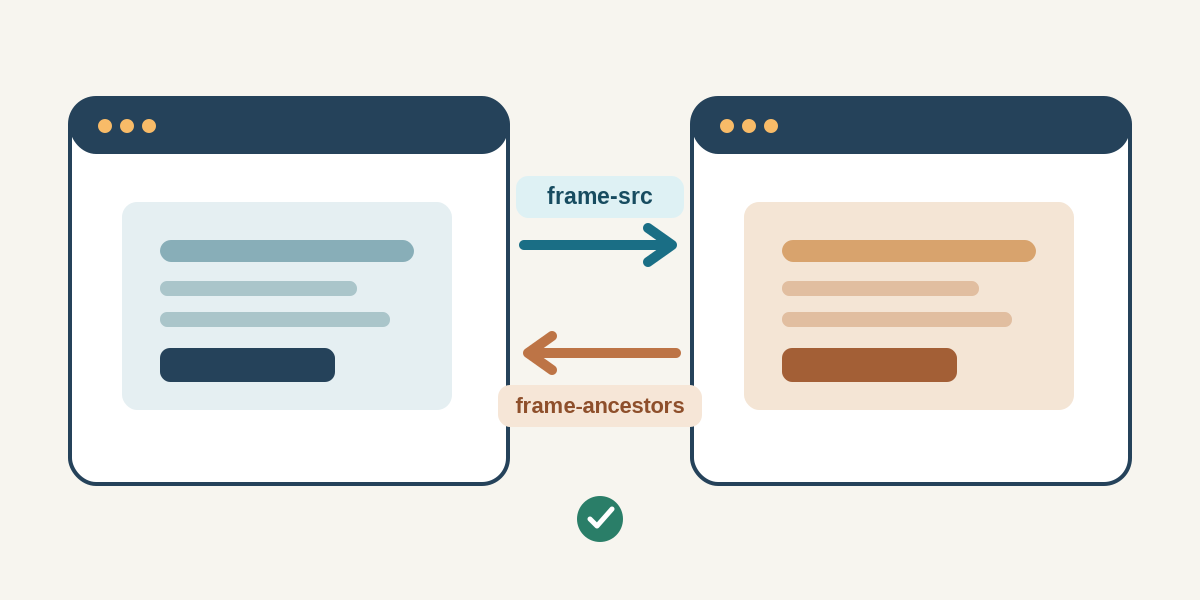
Open the published event page in a fresh browser session, trigger the ticket widget, and copy the exact console violation, blocked URL, and directive. In Network, inspect the event document response and any ticket-frame document response, including redirects. Record whether the frame request appeared at all. A `frame-src` violation on the event page points to its outbound frame rule; a `frame-ancestors` violation points to the response of the page being framed. A script or connection violation is a separate diagnosis, even if the widget is blank.[1][2]
A useful evidence line is: “event page → iframe URL → final frame URL → violating directive → response that supplied the policy.” Keep checkout tokens and buyer details out of shared notes.[1][2]
Identify which document owns the restriction
The event page’s `frame-src` lists permitted iframe sources; if absent, `child-src` and then `default-src` can act as fallbacks. The framed ticket page’s `frame-ancestors` lists acceptable parents and checks every ancestor in a nested frame chain. It has no `default-src` fallback and cannot be set through an HTML meta element. The site that serves the ticket page must change that response; widening your event page’s `frame-src` cannot override it.[1][2][3][5][6]
Compare all enforced `Content-Security-Policy` headers and any applicable CSP meta tag in the event document. Multiple enforced policies combine restrictively: adding the provider to one policy will not undo a second policy that still blocks it. Also inspect `X-Frame-Options` on the framed response when the browser reports an embedding refusal. Under the CSP specification, an enforced `frame-ancestors` on the framed response takes precedence over `X-Frame-Options`; the latter matters when no enforced `frame-ancestors` applies.[1][2][3][5][6]
Make a narrow change to each blocking policy
If the event page is the blocker and embedding is approved, add only the verified HTTPS ticket origin required by the observed iframe route to its effective `frame-src`; retain the other restrictions. For example, if the actual frame comes from `https://tickets.example`, a policy allowing only `'self'` will not admit it. Treat that hostname as an illustration, never as a vendor requirement. Check redirects and nested frames before selecting a source expression. If several enforced event-page policies block the frame, each blocking policy needs the narrow allowance; editing only one leaves the frame blocked.[1][2][3][4][6]
If the ticket response forbids your event origin via `frame-ancestors` or `X-Frame-Options`, ask the ticket provider whether this checkout route is intended for embedding. Do not turn off CSP or use a proxy to conceal the origin. Use the provider’s supported external checkout link if embedding is unavailable. Report-only CSP can help test a proposed event-page policy, but an enforced policy still governs loading.[1][2][3][4][6]
Verify checkout and retain a fallback
Reload the published page after the change and follow an approved test route through opening, form rendering, return or confirmation, and cancellation where available. Recheck Console and document response headers; a visual frame alone does not prove checkout works. Repeat on mobile and a second browser if those are important to your audience. Save the previous header and a rollback owner.[1][2]
Keep a clearly labeled direct ticket link outside the iframe so visitors have a route if the embed fails. Record the tested final frame origin, the policy owner, the precise policy change, and the observed outcome in the downloadable worksheet.[1][2]
Sources and further reading
- Content-Security-Policy: frame-src directiveMDN · Accessed
- Content-Security-Policy: frame-ancestors directiveMDN · Accessed
- Content-Security-Policy header: multiple policiesMDN · Accessed
- Content Security Policy: testing your policyMDN · Accessed
- X-Frame-Options headerMDN · Accessed
- Content Security Policy Level 3: relation to X-Frame-OptionsW3C · Accessed