Why one recipient domain bounced after an email campaign
A campaign can look healthy overall while messages to one organization or mailbox provider fail. A domain cluster is a clue, not a diagnosis. This guide shows how to isolate the affected sends, read the receiving server’s replies and choose a response without deleting valid contacts or retrying a rejected campaign blindly.
Boletolibre editorial team
Published
Use the domain-bounce worksheet
Download the editable domain-bounce review (Markdown)
Make a copy for one campaign and one recipient domain. Record counts and a few redacted response samples, not a spreadsheet of subscriber addresses. The worksheet separates observation, interpretation and action, so a teammate can audit why a segment was held or released.
Prove the cluster before naming a cause
Export or inspect the completed campaign report and note the send window, recipient-domain grouping, sent attempts and final bounced messages. Compare the affected domain with the rest of the same send, using the same report cutoff and provider definition. The useful rate is final bounced recipient-messages divided by recipient-messages attempted for that domain. Count each recipient-message once; an SMTP retry is not a new campaign send. Do not divide by the whole campaign list or count pre-send exclusions as attempted delivery.
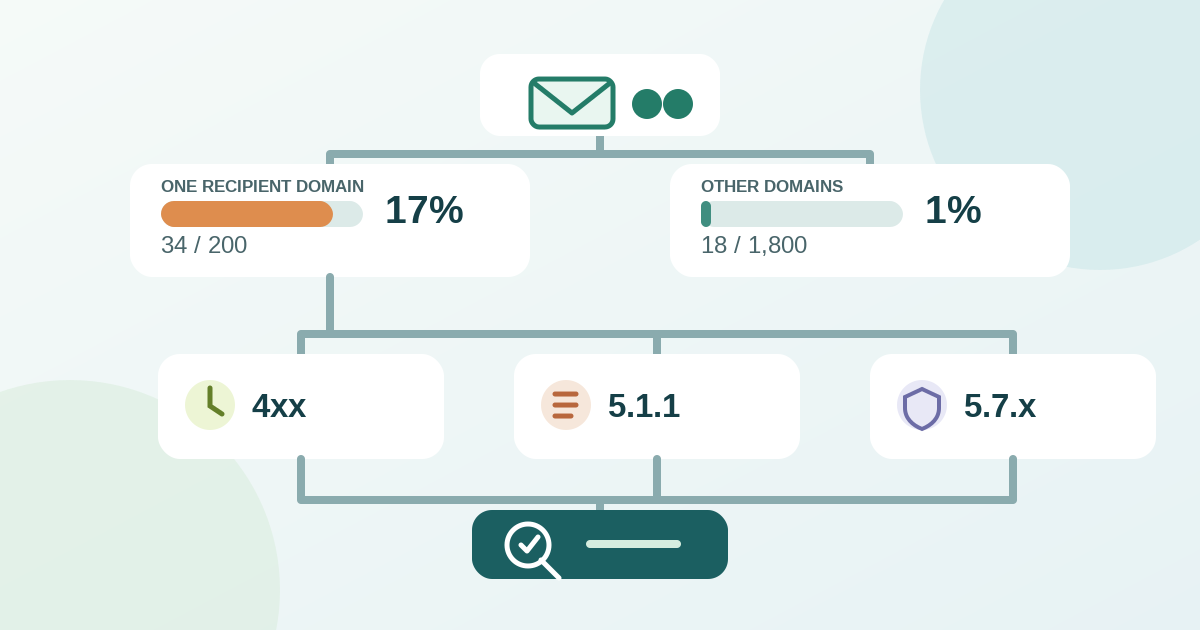
A domain with 34 bounces among 200 attempted messages has a 17% bounce rate; 18 bounces among 1,800 attempts to all other domains is 1%. That warrants investigation, but the comparison does not tell you whether the problem is old addresses, a recipient gateway, sender authentication or throttling. Check whether the apparent spike is based on only a few messages and whether the provider is still retrying. A final report and a live queue can show different states.
Keep the date, sending identity, campaign version and any recent import or sender-domain change beside the counts. Those details often explain why one domain is overrepresented without requiring the recipient organization to have changed anything.
Read the reply, not only the soft/hard label
Open the bounce reason for a representative set of failures from the affected domain. Preserve the SMTP response, enhanced status code when present, timestamp and whether the report says the failure is final. SMTP 4xx responses are transient negative replies; 5xx responses say the same request should not simply be repeated. Enhanced codes such as 4.x.x and 5.x.x add detail. A 5xx policy rejection is not proof that a mailbox is nonexistent.[1][2]
Mailchimp says its soft/hard classification may be an educated guess when a receiving server returns a malformed reply. Its bounce-reason view exposes the underlying SMTP text, but reasons are kept only for a limited time and cannot be bulk-exported there. Read the provider’s current handling rules before manually editing any contact status.[3][4]
- Many 5.1.1 recipient-address replies: inspect the source and accuracy of those specific addresses; avoid resending unchanged invalid entries.
- Many 4.x.x deferrals: check whether the provider’s normal retry window is still open; do not start a second full campaign while the first is retrying.
- Many 5.7.x or text about authentication/policy: inspect the exact message, sending identity and provider guidance; do not label every address invalid.
- Mixed replies: group by code and sending batch. A single domain can contain both individual-address failures and a shared gateway problem.
Choose a response for the failure pattern
For confirmed invalid recipient addresses, preserve the sending service’s suppression state and correct the upstream collection or import source. Do not move bounced contacts into a new audience to bypass suppression. For temporary failures, let the provider’s supported retries finish, then review the final state. Repeated deferrals may require provider support or recipient-domain administrator review rather than a new marketing blast.[4][1]
For policy or authentication replies, compare one affected sample with official guidance for that receiving domain and your provider’s sending logs. Google’s Gmail code list, for example, distinguishes rate limits and authentication failures using specific SMTP and enhanced codes; a generic “Gmail bounced” label is too coarse. If the recipient domain is a company rather than a public mailbox provider, its administrator may need the redacted reply, sending domain and time window to investigate. Share no subscriber list or unnecessary personal data.[5]
A sudden domain cluster after a new import points toward source quality; a cluster across known-good addresses after a sender-domain change points toward identity or policy. Both are hypotheses until the replies and timeline support them. A “catch-all” verdict or third-party address check cannot prove inbox placement or permission, so it should not override a real bounce reply.
Work through one fictional report
A campaign sends 200 messages to members at example.org and 1,800 to other domains. At the chosen report cutoff, 34 are marked bounced at example.org and 18 elsewhere. A separate review of 12 example.org delivery records finds one representative reply per record: seven 4xx deferrals, three 5.7.x policy rejections and two 5.1.1 bad-destination-mailbox replies. A 4xx event may still be retrying, may later be accepted, or may end as a final bounce; check its current state. This event sample is not the distribution of the 34 marked bounces; look for clusters by time or list source.
The team leaves confirmed address failures suppressed, checks whether retries remain for the deferred group and waits if so; it sends the policy replies to its email administrator or service provider with timestamps. It does not delete all 200 contacts and does not resend the campaign to them. The worksheet records which items remain unresolved and who can authorize the next action.
Check what changed and who else is affected
Put the bounce timeline beside changes to the audience, From domain, sending service, message content and volume. A new list segment can produce address-level failures even when the sending setup is unchanged. A sender-identity change can trigger a shared policy refusal across unrelated addresses. Neither correlation is proof; the receiving replies should support the explanation.
Compare other campaigns sent in the same period using the same identity. If only one campaign failed, inspect its segment, content and sending time. If several campaigns to the same recipient domain failed, investigate shared routing or policy. If several receiving domains failed, broaden the sender-side investigation. Keep the comparison within the same provider and reporting window so a change in measurement does not look like a delivery change.
Do not infer the recipient domain merely from the visible company name: subsidiaries may use different mail domains, and one domain can route through a third-party gateway. Group by the actual address domain, then use the SMTP reply to identify the receiving system where possible. Avoid collecting mailbox addresses in the handoff document.
Prepare an escalation that can be acted on
If the pattern remains after supported retries, ask the sending provider for the delivery-event timeline and its interpretation of the specific response. For a company domain, contact its mail administrator through an established channel. Provide the sending domain, date and time with timezone, approximate number of affected attempts, representative redacted SMTP replies and whether failures are temporary or final. Ask whether the receiver sees the same policy or gateway event.
Keep provider case numbers and any requested configuration changes in the worksheet. Apply only changes supported by the actual code and by the owner of that configuration. For example, a recipient policy reply is a reason to examine authentication and policy details, not to rotate sending domains or create a fresh list automatically. A temporary rate response is a reason to review the provider’s allowed pacing and retries, not to bypass its queue.[1][5]
Answers to three common follow-up questions
- Can a single domain have both soft and hard bounces? Yes. Classify each response and timestamp; do not assign one cause to every recipient.
- Does a successful address check prove the next campaign will arrive? No. It does not test the later receiving policy, a specific message, or inbox placement.
- When can the affected segment be mailed again? Only after the supported retry or suppression rules are understood, the relevant cause is corrected, and a real permissioned message is due. Keep confirmed invalid contacts suppressed.
Verify the fix against the next comparable send
Before the next campaign, verify the specific change: corrected import source, resolved authentication, recipient-domain exception or completed provider retries. Use a small, permissioned, supported send only when it serves a real message and the provider permits it; do not treat a test as evidence of inbox placement for everyone. Compare the next send’s domain-level sent, deferred, bounced and accepted counts using the same definitions.
Write the outcome plainly: “temporary deferrals resolved,” “policy block remains,” or “address-source errors corrected.” The report’s accepted or delivered label does not prove a person read the email. If the domain still fails, keep the issue open with the provider or receiving administrator rather than assuming another list-cleaning pass will solve it.
Sources and further reading
- RFC 5321: Simple Mail Transfer ProtocolIETF / RFC Editor · Accessed
- RFC 3463: Enhanced Mail System Status CodesIETF / RFC Editor · Accessed
- View Bounce ReasonsMailchimp · Accessed
- Soft vs. Hard BouncesMailchimp · Accessed
- Gmail SMTP errors and codesGoogle Gmail Help · Accessed