Bounced event confirmation email: an attendee support recovery checklist
An attendee says their ticket email never arrived. A bounce may explain the missing message, but it does not mean the registration failed or that an unverified caller may change the order. Use this checklist to separate ticket status, delivery evidence and the attendee’s access path. The steps depend on your ticketing and mail provider; the worksheet records decisions without storing a ticket barcode or password.
Boletolibre editorial team
Published
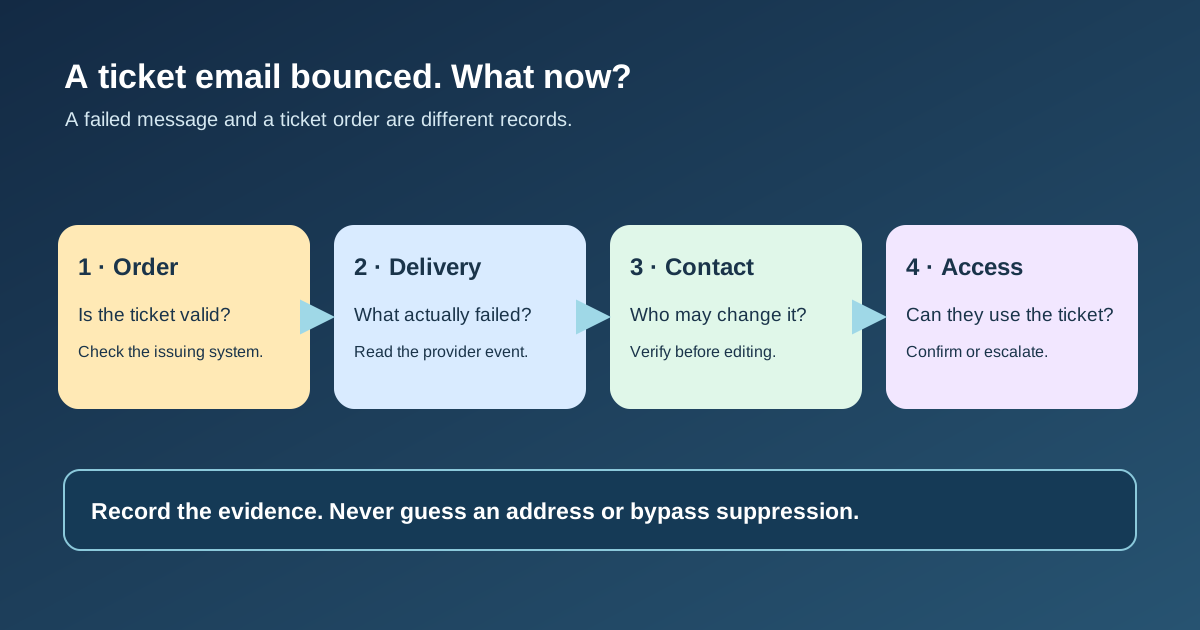
Open one case and check the order first
Download the editable bounced-confirmation case sheet (Markdown, English)
Find the event edition and order in the system that issued the ticket. Confirm whether it is paid, complimentary, pending, refunded, cancelled or otherwise held before promising admission. An email failure is a delivery state, not proof of a completed or failed order. Note the affected message type and when it was supposed to send. A marketing campaign bounce should not be silently treated as a missing transactional confirmation.
Give the attendee a safe support reference and tell them what you are checking. If the event is near, keep the door or exception-desk owner informed through an authorized channel; do not forward a live barcode to an address that has not been verified.
Read the actual delivery evidence
Inspect the sending provider’s event, bounce notice or diagnostic code, including recipient, timestamp, message identifier and any suppression state. Gmail advises checking the actual error message before choosing a fix. Amazon SES distinguishes permanent, transient and undetermined bounces; a transient event may be retried by SES before a final notification. “Accepted by sender” is not the same as delivered to an inbox or read by the attendee.[3][1]
Do not guess that every non-arrival is a bounce. Check whether the message was never queued, was rejected, went to spam, used the wrong address, or was delivered but cannot be found. Escalate a pattern affecting many recipients to the mail administrator, with minimal diagnostic details.
Confirm the right contact before editing
If the stored address has a typo or the attendee requests a new one, use the provider’s account or order verification process before making the change. A name and order number alone may be insufficient for a sensitive change; follow the provider’s current procedure. Ask the attendee to confirm the complete replacement address through an authorized support route rather than editing a guessed spelling. Record who approved the change and which order fields it affects.
Keep an unsubscribe or complaint separate from a delivery failure. Do not bypass suppression or revalidate a complained-about address as a routine fix. Cvent’s support documentation, for example, warns that its invalid flag must not be cleared when the guest unsubscribed. The available controls differ between RSVP and ticketed events and between providers.[4]
Use the provider’s supported recovery path
Use the ticket provider’s supported method to update the order contact and resend or reissue the confirmation. Eventbrite’s organizer guide describes editing attendee information on the relevant order, after which the attendee receives a claim email at the updated address. That is an Eventbrite-specific flow; other platforms may require support escalation. Never use a test order, delete an order or override a suppression flag merely because another vendor’s help page describes it.[2]
Give the attendee the official account or support route for finding tickets when email still fails. Check that the corrected address is now associated with the intended order and that a new send was accepted, then ask whether the attendee can access the ticket. A provider “delivered” event alone does not prove inbox placement or successful admission.
Close the case and prevent repeat failures
Record the final order state, bounce reason, approved address correction, resend or alternative access route, responsible owner and evidence of attendee receipt. Keep only the minimum personal details in a shared support sheet; the authoritative ticketing system should hold the order record. If unresolved before doors open, give the exception desk a restricted reference and clear escalation owner rather than an unverified ticket copy.
After closeout, inspect whether a form typo, address-validation issue, sending-domain failure or provider setting caused more than one case. If your Boletolibre.com listing links to a hosted checkout, confirm its published support route points people to the correct ticket provider and that the event facts match the confirmation. Do not claim the site can resend or edit tickets unless its actual integration supports that action.
Sources and further reading
- Amazon SNS notification contents for Amazon SESAmazon Web Services · Accessed
- Help an attendee access their ticketsEventbrite Help Centre · Accessed
- Fix bounced or rejected emailsGmail Help · Accessed
- Bounced Emails: How to identify and correct for a cleaner guest listCvent Knowledge Base · Accessed