HTTP 414 URI Too Long: Trace the Link That Keeps Growing
A campaign or event link can work when copied from the site but fail after an email, ad or redirect adds parameters. HTTP 414 points to the target URI becoming longer than a server is willing to interpret. The useful question is where the path or query grew—not which arbitrary character count to memorize.
Boletolibre editorial team
Published
What 414 means—and what it does not
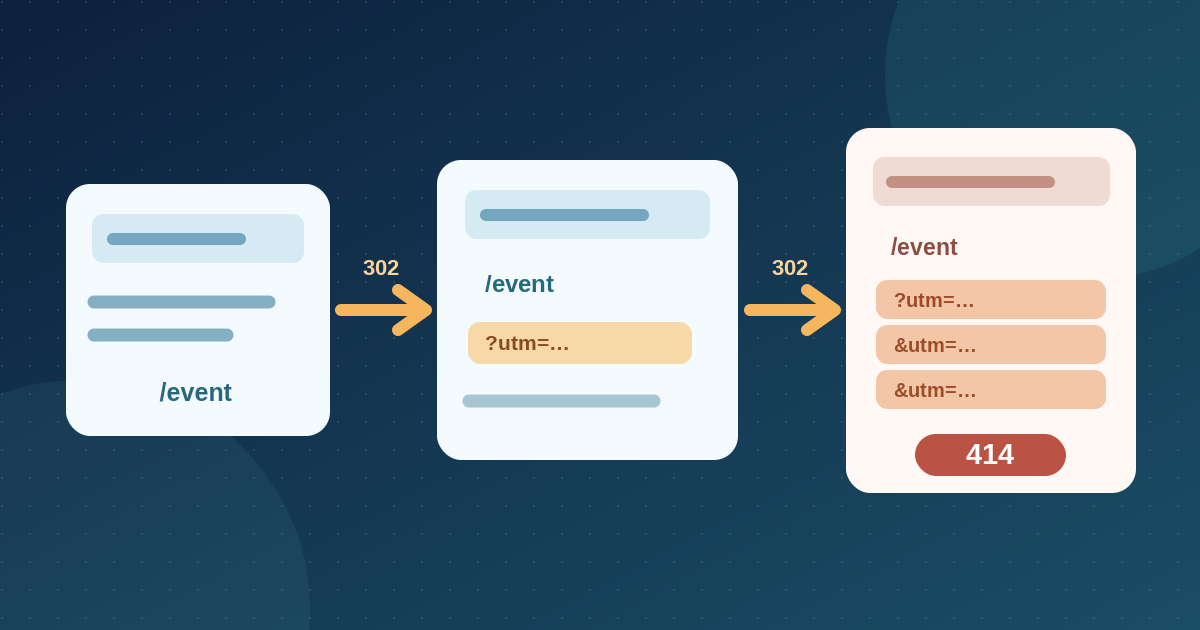
HTTP 414 means the server refuses a request because its target URI is longer than it will interpret. The standard calls out long GET queries and redirect loops as likely causes. A request body that is too large is a different status, 413; oversized request headers can be 431. There is no universal “8,000-character” threshold. Limits depend on the receiving software and every intermediary on the route.[1]
The path and query are the parts to inspect. A normal tracking parameter may add a modest amount, but repeated appending, nested return URLs, serialized form state or a redirect that points back into itself can turn a shareable link into a growing request target. A browser may show the final 414 while the first link looked short.
If you are following a link
Try the site’s official navigation or a known clean event page URL once. If that works, keep the failed link for the site owner; do not keep following a loop. You may remove clearly optional tracking parameters only if you know they are optional. Do not strip invitation, access, checkout or reset tokens from a link and assume it will still work. When you report it, give the source of the link, time with zone and a redacted URL rather than publishing a private token.
A clean page opening does not prove that registration or checkout works. Follow the intended path once and report the step at which the URL expands or the 414 appears. If an action might have created an order, check the order state before repeating it.
Capture the first hop where the URI grows
Open the browser Network panel, preserve the log, and follow the failing link once. Record each request’s method, status, host, path, approximate path-plus-query length, and each redirect’s Location destination. Compare the original href with the final request. If the browser omits a rejected request, align the timestamp and request ID with CDN, proxy and origin logs. Record approximate lengths and parameter names; do not paste live token values into a ticket.[5][6]
| Pattern in the chain | Likely source to inspect |
|---|---|
| The same parameter appears again on each 3xx hop | Redirect or attribution rule that appends instead of preserving once. |
| A return URL is nested inside another return URL | Login, booking or payment handoff that re-encodes the full destination. |
| One GET query already contains a large serialized object | Page state or search/filter form encoded entirely into the URL. |
| Only one edge rejects; origin accepts direct traffic | That edge’s documented request-target or request-line limit and logs. |
Fix the link producer, not just the last response
For repeated marketing parameters, make the redirect rule pass each required value at most once and avoid nesting the full return URL again at every hop. Encode each parameter correctly for its place in the new URL; an encoded value may need encoding again when it becomes a parameter of another URL. For an old-to-new event-page redirect, point directly to the canonical destination rather than chaining through several legacy routes. For a login or checkout return path, use a short, server-stored state reference if the full destination grows without bound. Validate the destination it resolves to; if the reference grants access, make it unguessable and treat it as sensitive. Keep it out of shared logs.[1][7][6]
If a form creates or updates a record, its data belongs in a request body handled by an appropriate endpoint, not a huge GET query. But do not convert an ordinary public event page to POST simply to avoid 414: GET is how a shareable, navigable resource is retrieved. For large search filters or preview state, use a shorter URL representation, a saved-state identifier, or a deliberately designed POST workflow where sharing is not required.[2][3]
Treat a higher server limit as a measured exception
A web server, CDN, load balancer and application may enforce different limits. Apache, for example, documents LimitRequestLine for its HTTP request line, which includes method, URI and protocol version; its documented default is an Apache setting, not an Internet-wide URL limit. Find the layer that returned 414, measure the legitimate request target at that layer, and check its documented setting before changing anything.[4][1]
If a larger target is genuinely required, make a bounded, reviewed change only at the rejecting layer and test the complete public route. Raising a limit cannot repair a redirect that keeps expanding. Do not disable security controls or set a huge global limit to accommodate one broken link.
Copy this hop-by-hop 414 worksheet
One row per request makes the first growth step visible. Use redacted paths and parameter names, never raw access tokens, email addresses or full private URLs. A character count is a useful comparison within the same captured chain; configured limits may be measured in bytes.
| Hop | Status / method | Host and redacted path | Approx. target length | New or repeated parameter | Next Location / owner |
|---|---|---|---|---|---|
| 0 — original | — | — | — | — | Link source |
| 1 — first request | — | — | — | — | — |
| 2 — redirect | — | — | — | — | — |
| 3 — failing request | 414 | — | — | — | Rejecting layer |
Verify a short, stable public journey
Open the fixed link through the same email, ad or referral path that failed. Confirm it reaches the intended page, keeps required parameters, drops unintended duplicates, and stops redirecting. Test a clean link and one with normal attribution parameters. Compare target length at each hop with the measured boundary; check that CDN and origin logs no longer report 414 for legitimate traffic.[5][1]
Watch the corrected route after release. If 414 remains, record the new first growth hop and the rejecting layer. A link can be short at the source and still lengthen later when a different integration adds its own redirect.
Sources and further reading
- RFC 9110 §15.5.15: 414 URI Too LongIETF / RFC Editor · Accessed
- RFC 9110 §9.3.1: GETIETF / RFC Editor · Accessed
- RFC 9110 §9.3.3: POSTIETF / RFC Editor · Accessed
- Apache HTTP Server: LimitRequestLine directiveApache Software Foundation · Accessed
- Network features reference: redirects and request detailsChrome for Developers · Accessed
- Logging Cheat Sheet: data to excludeOWASP · Accessed
- Unvalidated Redirects and Forwards Cheat SheetOWASP · Accessed