UTM naming convention for event marketing: examples and a review checklist
A partner newsletter, your own email and a paid social post can all send people to the same event page. If each person invents a different campaign tag, the traffic report splits one launch into several names. A UTM naming convention is a small shared vocabulary for the query parameters on outbound campaign links. It helps you compare where visits came from, but it does not by itself prove a registration, ticket sale or attendance.
Boletolibre editorial team
Published
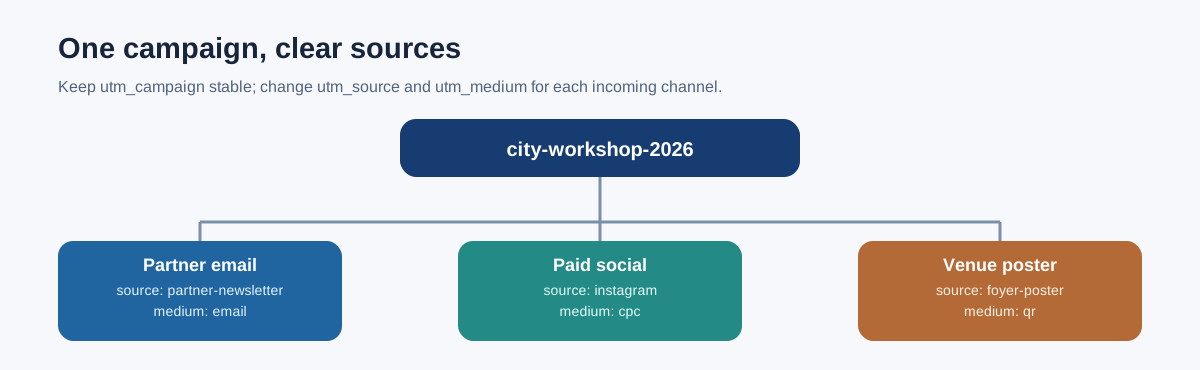
Use the standard parameters for one clear purpose each
Google Analytics documents utm_source for the referrer, utm_medium for the channel, utm_campaign for the initiative, and optional utm_content and utm_term for more detail. For an event, source might be a partner or platform; medium might be email or cpc; campaign might be the stable event launch name. Content can distinguish the hero button from the footer link or one creative from another. Leave optional values out when you will not analyze them. Do not squeeze every audience detail into the URL.[2]
| Parameter | Event example | Rule to agree |
|---|---|---|
| utm_source | partner-newsletter | Use the approved sender or platform name |
| utm_medium | Use one channel value for comparable sends | |
| utm_campaign | city-workshop-2026 | Keep the same campaign name across channels |
| utm_content | speaker-card | Use only when comparing placements or creative |
| utm_term | Optional paid-search term | Omit when it adds no reporting value |
Write a short event naming rule
A workable convention for a small team is lowercase words joined by hyphens, with a stable event code and year in the campaign value. For example: city-workshop-2026. The separators are a team choice; consistency is the real requirement. Google warns that variations such as SpringSale and Spring_Sale can fragment a single campaign into separate rows. Maintain a short approved list of source and medium values so a partner does not become partner, Partner, partner-email and newsletter-partner in different sends.[4][1]
Choose a campaign owner and a place to record the canonical event name, permitted source/medium pairs and the purpose of optional content values. If a name changes mid-campaign, record the old and new spellings in the same log. Avoid retroactively rewriting past reporting labels without documenting the change.
Apply the same campaign name to different links
Example landing-page link from a partner email: https://example.com/event/city-workshop?utm_source=partner-newsletter&utm_medium=email&utm_campaign=city-workshop-2026&utm_content=body-link . The URL is illustrative; replace the domain and event path. A paid social link to the same page could use utm_source=instagram and utm_medium=cpc while retaining utm_campaign=city-workshop-2026. A poster QR code could use a stable offline source such as foyer-poster and a documented medium such as qr, if that classification is useful to your reports.[2]
Tag links that bring people from another channel into the event site. Do not add a second campaign tag to a link between pages on your own site; that can replace the original acquisition context in analytics. Keep ticketing-provider redirects in the review: confirm that the destination works and that the parameters you need survive the path you actually use.[1]
Keep people and tickets out of public parameters
A campaign URL can be copied, forwarded, saved in browser history, logged by systems along the route and sent to analytics. Never put a guest's name, email, phone number, ticket ID, order ID or other personal identifier into utm_source, utm_medium, utm_campaign, utm_content or utm_term. Google's Analytics policy explicitly warns against PII in custom campaign parameters. Use an event-level code or a general placement label instead, and handle attendee-specific links in an appropriate secure system.[3]
A label such as vip-attendees can itself disclose targeting or create an awkward public URL. Prefer neutral creative or placement descriptions and review the complete URL before publication. URL parameters are not a substitute for consent or for a private registration record.
Review the link before you send it
- Confirm the destination, event date and locale are correct; open the final shared link after any shortening or redirect.
- Check that source, medium and campaign use the approved spelling and that optional content has one clear meaning.
- Look for personal data or secret identifiers in every parameter and in the destination path.
- Verify that the page and checkout still work and that your analytics report receives a test visit in the expected campaign row.
- Keep the exact approved URL, owner and send date in the launch calendar so a later editor does not invent a variant.
Use campaign tags to diagnose which link brought a visitor. For confirmed registrations, settled purchases and check-ins, reconcile against the ticketing and attendance records defined in your event measurement plan. A tagged visit is only a visit. Google's docs describe campaign parameters as traffic-source data, not proof of an event outcome.[2]
Sources and further reading
- An Advanced Guide to UTM Naming Conventions & Best PracticesImprovado · Accessed
- URL builders: Collect campaign data with custom URLsGoogle Analytics Help · Accessed
- Best practices to avoid sending Personally Identifiable Information (PII)Google Analytics Help · Accessed
- Import campaign dataGoogle Analytics Help · Accessed