Event URL redirect mapping checklist: keep old links useful
An event URL may appear in printed QR codes, confirmation emails, partner calendars, search results and old social posts long after the page changes. A redirect should take each visitor to the closest useful destination, not erase the distinction between past and upcoming events. The leading Google result recommends a URL map and post-launch checks; for events, that map must also account for date, ticket state and language.
Boletolibre editorial team
Published
Inventory the links before changing the slug
Export or list current event pages and the URLs used in navigation, email templates, ads, QR codes, ticket confirmations, venue and partner sites, and structured data. Record the full old URL—including locale, trailing slash and query parameters that carry legitimate campaign information—and the reason it is changing. Mark high-risk links that attendees may still open close to the event. Update links you control directly; redirects are for links you cannot update immediately.[1][3]
| Old link | Decision | Example destination |
|---|---|---|
| Event page renamed for the same event | Permanent move | New page for the same date and event |
| Old event has a useful recap or archive | Keep or update the old page | Archive/recap at the existing URL |
| Registration moved for a short interruption | Temporary route if appropriate | Current status or alternate registration path |
| No meaningful replacement exists | Useful 404/410 response | Navigation to current events, without false equivalence |
Choose a destination that matches attendee intent
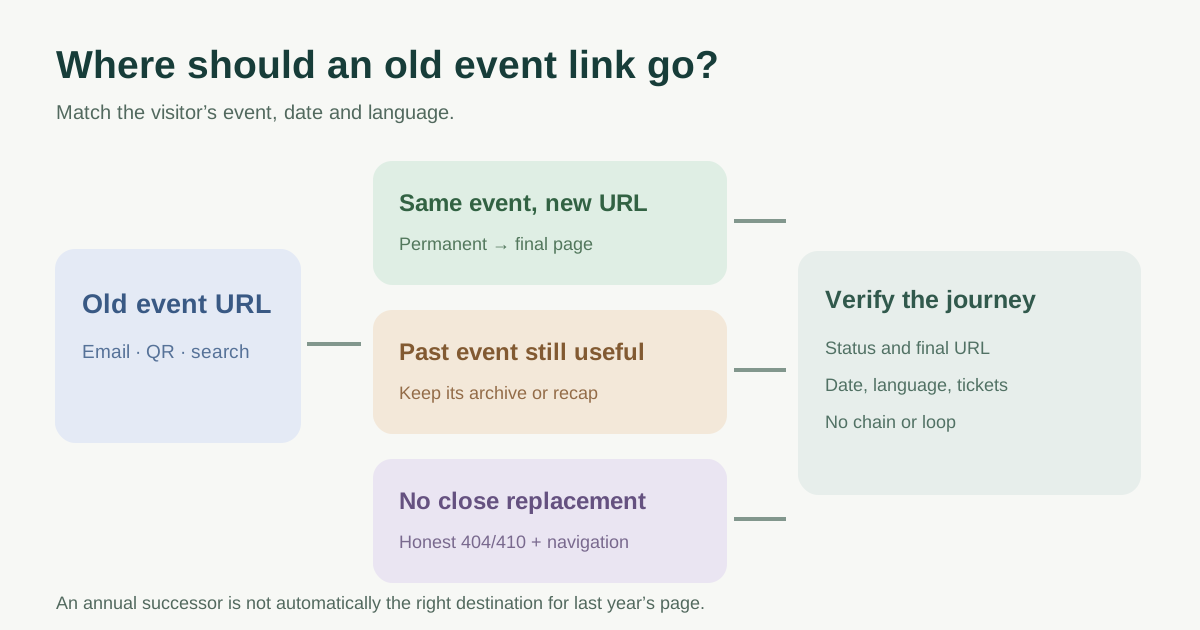
A changed event page usually needs a one-to-one destination with the same event, date and language. Do not automatically route every old event to the homepage or the next annual edition: an attendee looking for last year’s photos or an old receipt may be misled. If the content is gone and has no similar replacement, Google recommends a true 404 or 410; make that page useful with links to current events.[4]
For a permanent move, a server-side 301 or 308 is a strong signal to visitors and Google that the new URL is the destination. For a genuinely temporary route, choose a temporary redirect only when the old URL will return. Keep the reason and reviewer in the map. Canonical tags and redirects solve different problems: the redirect moves a request; a canonical signal does not transport a visitor.[2]
Test every source and final destination
Before rollout, check that each old URL returns the intended status and Location, reaches the final page directly, preserves the expected language and shows the right event/date and ticket availability. Reject loops, chains, wrong-language targets, expired checkout links and a generic homepage for unrelated content. Google advises direct final destinations instead of multiple hops.[3]
After rollout, open real examples from email, QR code and partner links on mobile. Check site navigation, sitemap, canonical URL and structured data for the current destination. Watch request logs and Search Console for old 404s and unexpected redirect behavior; update high-traffic external links where feasible. Google’s Change of Address tool applies to domain moves, not a single event slug.[3]
Keep the map as an operational record
Assign an owner for the old URL, new destination, launch date, validation evidence and next review. Preserve redirects while old links remain valuable; a whole-site migration has different retention guidance from a single event slug, so do not delete a rule on an arbitrary calendar date. When the event becomes historical, revisit whether the archive itself should stay accessible.
Sources and further reading
- URL Redirection Checklist for Website RedesignLinkedIn Top Content · Accessed
- Redirects and Google SearchGoogle Search Central · Accessed
- Site moves with URL changesGoogle Search Central · Accessed
- Troubleshoot Google Search crawling errorsGoogle Search Central · Accessed