Event email performance metrics: measure useful attendee outcomes
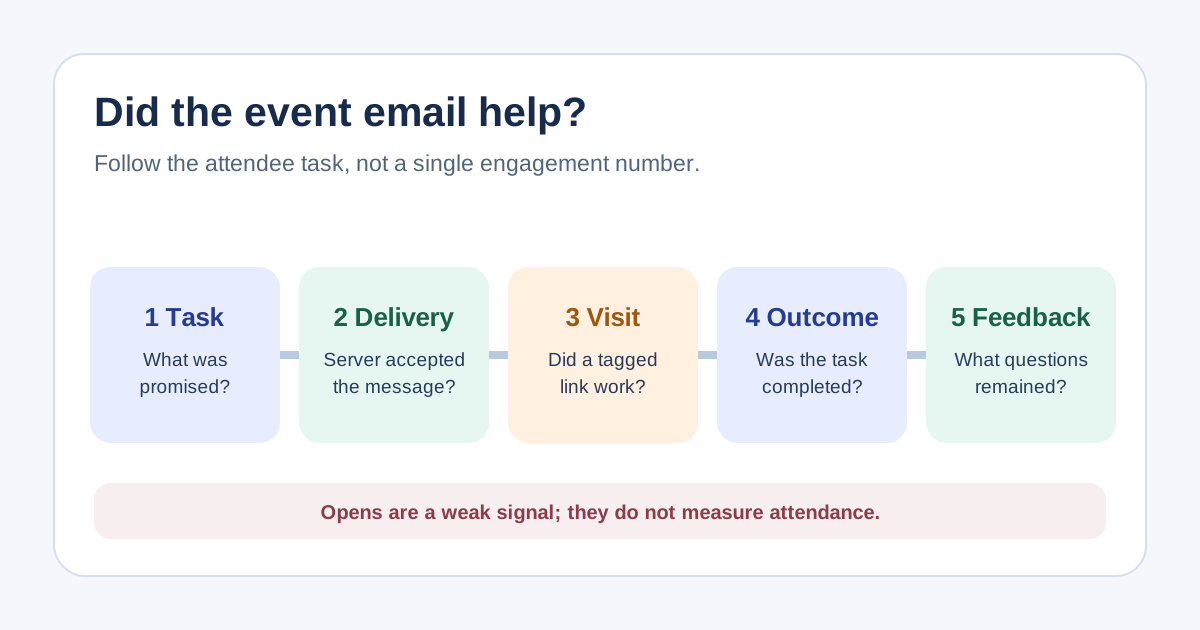
An event email is useful when people can complete the job it promises: register, retrieve a ticket, check a schedule change or find the right entrance. A generic dashboard of opens and clicks cannot answer that on its own. Set one intended task per message, then use the scorecard to join sending evidence, destination behavior and support feedback without treating any one number as proof of impact.
Boletolibre editorial team
Published
Start with the task, audience and denominator
Download the event email usefulness scorecard (Markdown, English)
For each message, record its audience, purpose, send window and single next action. A promotional announcement might seek a completed registration; a confirmation should help a registered person find a ticket and arrival details. Do not compare their click rates as if they were the same task. Keep recipients, accepted sends, delivered messages, unique link visitors and completed tasks in separate columns, with each rate clearly naming its denominator.[1]
Separate sending signals from attendee action
Provider events tell you whether a send was accepted, delivered to the recipient mail server, bounced or complained about; they do not prove inbox placement or reading. Open tracking is especially weak evidence: Apple Mail Privacy Protection can fetch remote content in the background even when a person does not engage. Treat opens as a rough diagnostic at most. Review bounce and complaint patterns with the delivery owner; essential attendee notices need a visible fallback on the event site.[3][2]
Connect links to destination outcomes
Give links to your own event pages consistent campaign tags and confirm the destination actually works. Google Analytics documents source, medium and campaign parameters. Measure relevant downstream events such as registration completion, ticket retrieval or access-information visits only where your systems record them. If checkout or ticket delivery happens on another provider, name that boundary and reconcile its own report rather than assuming the website sees the whole journey.[4]
Read the gaps and decide one change
A low click count can mean the message already answered the question, the call to action was buried, a link failed or the audience was wrong. Combine quantitative data with support themes and a small manual review of the actual email and landing page. For critical changes, check whether attendees asked where or when to arrive, whether ticket links failed, and whether a correction was needed. Choose one specific revision and an owner instead of optimizing a generic “engagement” score.
Review the result without overstating attribution
Compare like-for-like sends and record date, audience, template change and known confounders. A campaign-tagged registration shows a traceable route, not that the email alone caused the sale. Opens never equal arrivals; tickets sold never equal check-ins. Log missing tracking and hosted-checkout gaps explicitly. At the next event, retest the revised message and decide whether the attendee task became easier.
Sources and further reading
- Email Campaign Performance + Metrics [GUIDE]Sellizer · Accessed
- Mail Privacy Protection & PrivacyApple · Accessed
- Contents of event data that Amazon SES publishes to Amazon SNSAmazon Web Services · Accessed
- URL builders: Collect campaign data with custom URLsGoogle Analytics Help · Accessed