Event email localization checklist: preview every message before sending
An event confirmation can have a translated subject and still send the wrong venue time, English-only ticket instructions or a link to another language. The first Google result is a developer guide to localized email templates. This event-specific checklist turns that broad advice into a review of real attendee messages and a send-preview matrix.
Boletolibre editorial team
Published
Inventory the messages that must work
Download the editable locale-by-message preview matrix (Markdown, English)
List registration receipts, payment or application status, ticket delivery, arrival details, schedule or venue changes, accessibility information and cancellation notices. Keep optional marketing separate from messages a registrant needs to attend. For each message, record its trigger, owner, recipient language source, sender system and link destination. A translated web page does not prove the ticketing or email provider supports the same languages.[1][2][3][4]
Use one verified fact source, then format for the locale
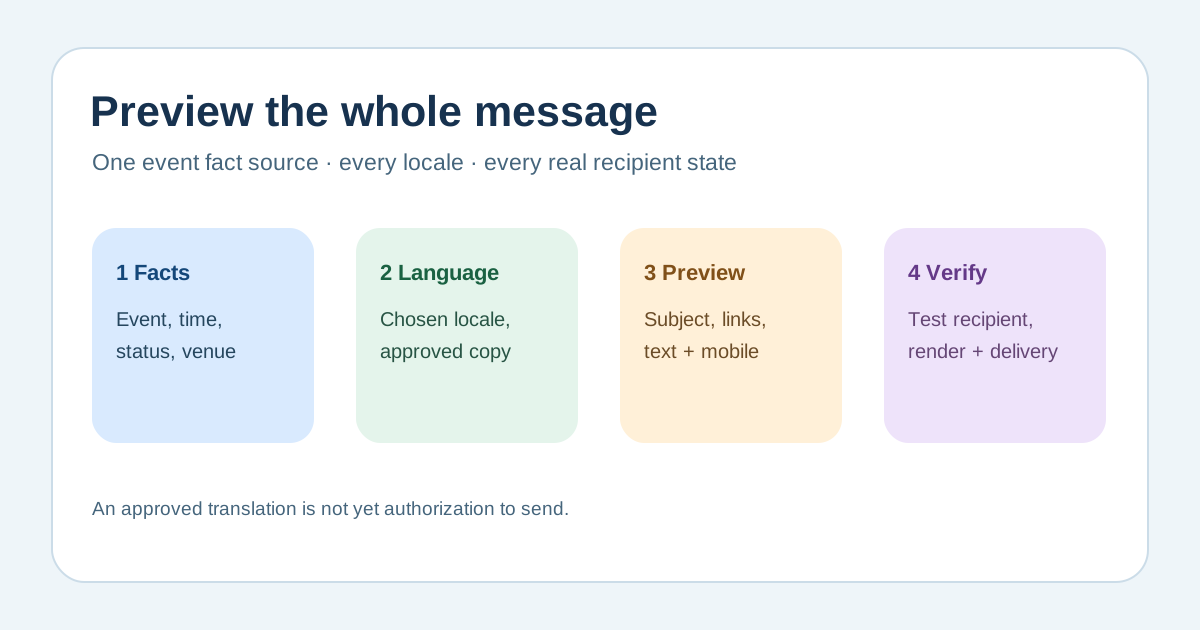
Resolve the event edition, venue, address, start time, time zone, ticket status and policy URL from approved records before translation. Pass structured dates and amounts into the rendering process; do not paste an English-formatted date into every translation. Unicode CLDR documents locale-specific date and time patterns, but the event time itself must stay the same instant. Preview long and short names, missing optional fields, prices and zero/one/many quantities where applicable. Keep a human-readable time-zone label when an attendee may travel.[1][2][3][4]
Review the whole message, not just the body
Check subject, preheader, greeting, status statement, action button, fallback plain text, image alternative text, footer, reply address and any linked page. In HTML email, identify the language of the content and mark passages that switch language where your template system supports it. Use the attendee’s chosen language when it is recorded and an approved translation exists; otherwise document an explicit fallback and what the attendee will see. Do not silently imply that an external checkout or ticket attachment is localized.[1][2][3][4]
Preview each state and verify the provider boundary
Make safe test previews for confirmed, payment pending, waitlisted, rejected or cancelled states only where the event uses them. Check that status text, ticket or QR link, attendee name, date, currency and support route agree with the actual state. Send only to designated test addresses in an approved mode, never to real attendees while testing. Inspect desktop and mobile rendering plus the plain-text version. If your sender uses templates, missing variables may cause a rendering failure; monitor the actual provider’s event and delivery signals rather than treating a successful API call as an inbox receipt.[1][2][3][4]
Sign off translations and keep them current
Have a language reviewer check meaning, tone and consequential policy or access text in context. Record the source-copy version, locale version, reviewer, preview evidence, provider limitation and approval date in the worksheet. When a venue, schedule, ticket rule or support contact changes, identify every affected email locale and preview those states again before the next send. A successful translation review is separate from authorization to send the campaign.[1][2][3][4]
Sources and further reading
- How to Localize Email Templates: A Complete Developer GuideBetter I18N · Accessed
- Date/Time PatternsUnicode CLDR · Accessed
- Language tags in HTML and XMLW3C Internationalization · Accessed
- Monitoring SES events using Amazon EventBridgeAmazon Web Services · Accessed