Event registration accessibility checklist: audit the full journey
An accessible event invitation is not enough if a guest cannot finish registration. The first Google result for “event registration accessibility checklist” is Cornell’s wider event checklist: it asks planners to explain accommodations and follow up on requests. This guide narrows the lens to the digital journey from event page to confirmation, including a hosted ticket checkout if one is used. The worksheet is a first-pass audit record, not a claim of WCAG conformance or a substitute for testing with disabled people.
Boletolibre editorial team
Published
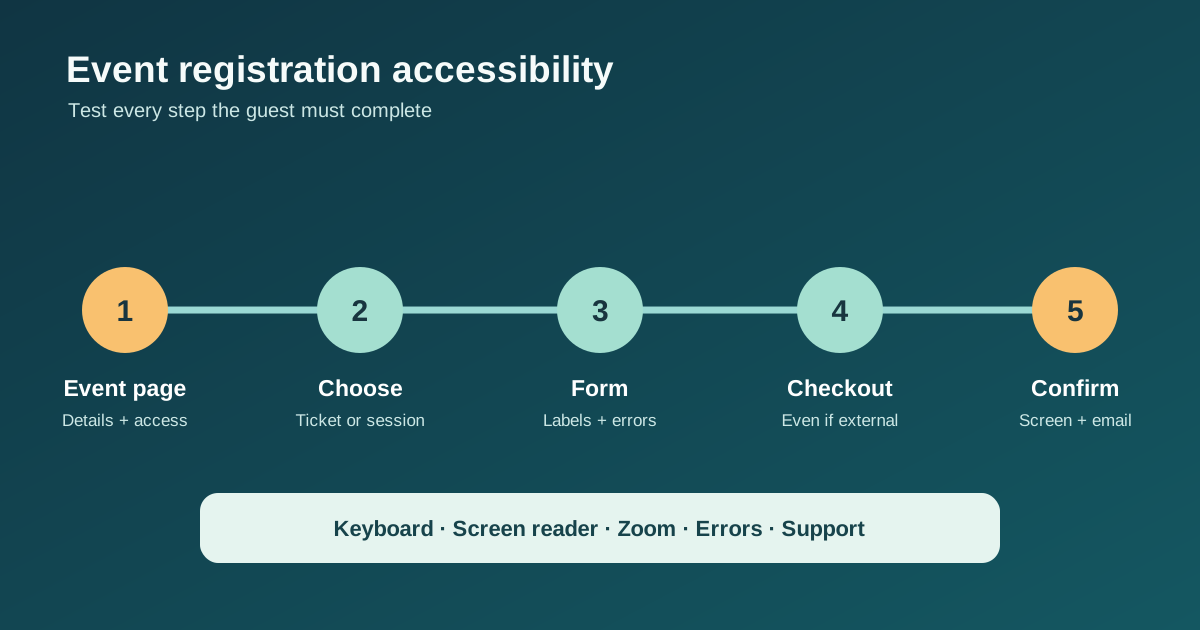
Map every step and owner before testing
Start a fresh journey as a guest. List the event page, ticket or session selection, account or sign-in step, registration form, payment or third-party checkout, confirmation screen, email and support route. Record the URL and the organization that controls each step. Test a free and a paid path if both exist, and include the mobile layout and the language versions offered to guests. A button leading to another platform does not remove that platform from the attendee journey. Cornell’s event checklist also puts the accommodation request and follow-up into the invitation and registration process.[1]
- Write the expected task and success evidence for each step.
- Use a safe test registration or provider sandbox; avoid a real charge.
- Record barriers with the exact step, device and browser so the owner can reproduce them.
Check information, labels and instructions
Can a guest find the date, time zone, venue, ticket conditions and a clear way to ask about access before committing? Check the name and purpose of every field, including ticket quantity, participant names, consent choices and accommodation requests. Visible labels should identify controls; placeholders alone are not labels. Explain required fields and formats before the guest needs them. Use grouping and meaningful headings when a form spans several sections. W3C’s forms tutorial recommends clear labels, instructions and feedback, while Cornell recommends an accommodation contact and a response to requests.[2][1]
Complete the route with keyboard and assistive technology
Starting at the event page, use the keyboard to reach and operate every link, selection, date control, modal, payment step and submit button. Watch for visible focus, logical order, traps and focus lost after a page or step changes. Recheck at zoom and on a narrow screen without assuming a desktop pass covers mobile. With a screen reader, confirm field names, required state, group context, changed totals and the final success message are announced. Automated scans can help find problems, but W3C calls its easy checks only a first review; record the actual user-facing result.[3][2]
Try errors and support requests safely
Submit a blank required field and a realistic formatting error. Can the guest find a specific error, identify the affected field, correct it and keep the rest of their data? Check whether a timed session warns the guest and whether there is a practical recovery path. W3C recommends understandable validation and feedback. Test an accommodation request using dummy data: confirm who receives it, how the guest can follow up, and whether the organizer responds without asking for unnecessary medical detail. Use the approved privacy and incident process for real requests.[4][1]
Verify confirmation, fix ownership and retest
A successful submit should produce an understandable confirmation with the right ticket or registration state, event details and support route. Verify both screen and email; do not assume an email sent means it arrived or is usable. Put each barrier into the downloadable worksheet with severity, evidence, owner, next action and retest result. Prioritize blockers that stop completion or hide an important choice. Retest the full route after a fix, including third-party steps and language variants. This checklist is a starting audit, not a certification or exhaustive WCAG assessment.[3]
Download the original event registration accessibility audit (CSV)
Sources and further reading
- Accessible Meeting and Event ChecklistCornell University · Accessed
- Forms TutorialW3C Web Accessibility Initiative · Accessed
- Easy Checks: A First Review of Web AccessibilityW3C Web Accessibility Initiative · Accessed
- Validating InputW3C Web Accessibility Initiative · Accessed