Event website launch checklist: test the path to registration
A polished homepage is not enough to launch an event website. Visitors need the right event facts and a working path from the invitation to registration or ticket purchase. This checklist is an acceptance pass for a specific event site: assign an owner, record evidence, stop launch on critical failures and repeat the most important checks after the site is public. It is designed for a small event team, including sites that send visitors to a separate checkout provider.
Boletolibre editorial team
Published
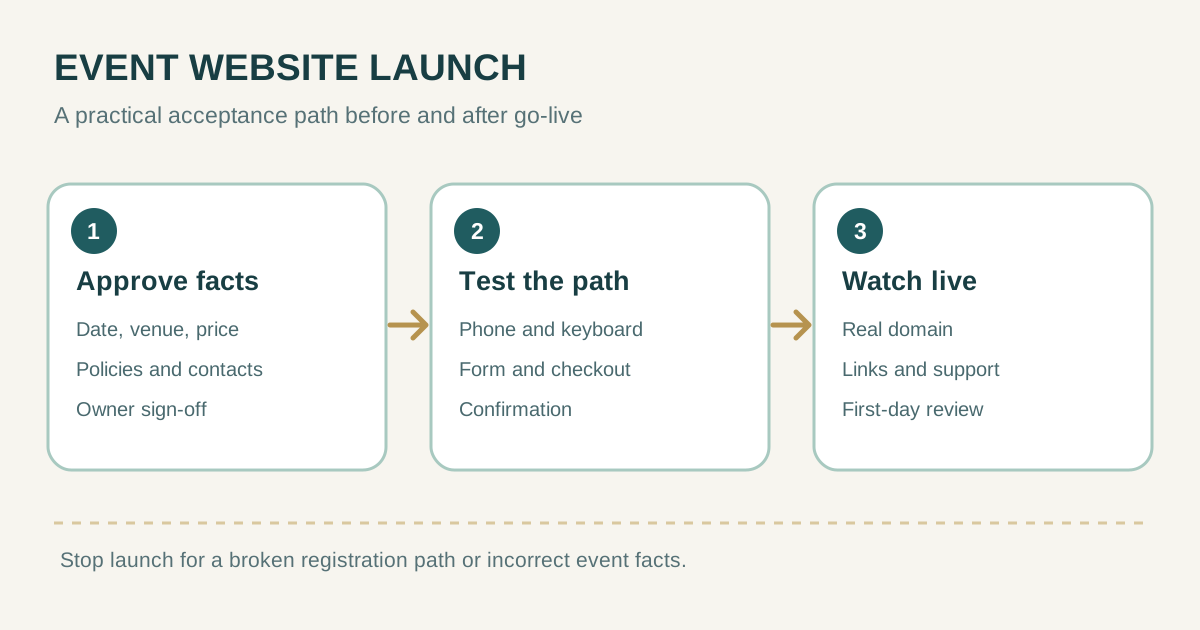
Set a launch owner and a clear go or no-go decision
Name one person who can approve the final event facts and one who can correct the website or contact the provider. Make a short acceptance record with the public URL, intended launch time and timezone, test devices, test transaction details, issue owner and final decision. If the event has several organizers, decide who may change ticket inventory, prices, refund wording and contact details.
Treat a broken registration path, wrong date or venue, inaccessible required form, wrong currency, or unapproved policy text as a stop condition. Minor cosmetic edits can have a named post-launch owner and deadline. This keeps “almost ready” from becoming an ambiguous approval.
Proofread every event fact that affects a decision
Read the page as a first-time visitor. Confirm event name, date, day of week, start and end time, timezone, venue address or online access method, age limits if relevant, price and included benefits, capacity or availability, accessibility information, refund terms, organizer identity and support contact. Compare them against the approved event brief, ticketing setup and confirmation email; do not rely on memory.
- Check the hero, schedule, FAQ, tickets, footer, metadata and social preview for conflicting dates or prices.
- Open map links and test that the destination is the correct entrance, not just the general venue pin.
- Remove placeholder text, draft images, outdated sponsor logos and test-only ticket offers.
- Ask a second person to proofread the exact published language in each locale.
Record who approved a change and when. For a late venue or schedule change, identify every surface that repeats the fact, including ads, email and the checkout provider. A correct homepage cannot compensate for a stale checkout page.
Walk through registration or purchase from a phone
Start from the same link that will appear in an email or ad, preferably in a fresh browser session. On a narrow screen, find the event, choose a ticket or registration option, submit the form, reach any external checkout, and follow the return or confirmation path. Use a provider-sanctioned test mode or no-charge test item; never create an unapproved live charge. Confirm the final price and currency before the payment step.
- All primary buttons lead to the intended event and ticket type; sold-out or closed states make sense.
- The external checkout displays the same date, venue, ticket name, quantity and refund terms as the website.
- Validation errors identify the field and preserve correctly entered data where appropriate.
- Confirmation reaches the correct address and provides the promised admission or next-step information.
- A support route exists for a failed payment, duplicate order or accessibility request.
Repeat the critical path on a second browser and from a direct event URL, not only through the homepage. Have someone unfamiliar with the project describe what they expect to happen before each click; confusing handoffs often appear before any technical error does.
Check mobile layout, keyboard use and form labels
Inspect the actual site on a small phone and a desktop. Make sure the price, date, call to action, checkout transition and error messages remain visible without sideways scrolling. Zoom text, rotate the screen and check that sticky elements do not cover the purchase control.
Move through navigation, ticket choices and forms using only a keyboard. Check a visible focus indicator, logical order, descriptive link and button text, image alternatives where images carry meaning, and readable contrast. Forms need labels that identify each control; placeholder text alone is not a dependable replacement. W3C WAI provides practical label and preliminary accessibility checks.[3][4]
If the external checkout is provided by another company, test it too and send defects to that provider. The visitor experiences the entire journey, regardless of which team owns each page.
Verify technical basics and search previews
Open the final HTTPS address, test the preferred www or non-www variant, and verify old links redirect to the intended page. Follow every important internal link, a missing page, map, calendar, email and social link. A useful 404 page should offer a route back to current events. Check that a staging or password-protected copy is not the link you plan to share.
Review each page title, description, main heading and canonical URL for the actual event. Preview the shared link image and text in the channels you will use. If search indexing is desired, check that the public page is not accidentally blocked and that the canonical URL appears in the site’s sitemap. A sitemap helps discovery but does not guarantee indexing or ranking.[1][2]
Test page speed on a real mobile connection or suitable audit tool. Prioritize a slow event hero image, delayed purchase control and third-party scripts that block the first action. Record the measurement and revisit it after adding pixels or widgets; one score does not replace a human journey check.
Record acceptance, then watch the live release
Keep the final check list small enough to execute. A pass should name the exact page, expected behavior and evidence. For example, “mobile Safari: general-admission button opens the correct checkout event with the approved price and currency,” is reviewable; “checkout looks fine” is not.
| Gate | Minimum acceptance evidence | Owner |
|---|---|---|
| Event facts | Approved brief matches site and checkout | Organizer |
| Registration | Test journey reaches confirmation | Ticketing owner |
| Access | Phone and keyboard path usable | Website owner |
| Search and share | Public URL, title and preview checked | Website owner |
| Release | Live page and support contact checked | Launch owner |
After publishing, repeat the critical path on the real domain. Watch for broken pages, wrong redirects, failed form submissions, missing confirmation messages and support requests. Record any change made after launch and its owner. A final review after the first day should compare visits, registrations and provider settlements, with the limits of each data source understood.
Sources and further reading
- Google SEO starter guideGoogle Search Central · Accessed
- Google sitemap guidanceGoogle Search Central · Accessed
- W3C form-label guidanceW3C Web Accessibility Initiative · Accessed
- W3C preliminary accessibility checksW3C Web Accessibility Initiative · Accessed