20 event registration questions you can adapt for your form
A registration form is easier to complete when every question sounds like something an attendee can answer and leads to a real organizer action. The 20 examples below are a question bank, not a 20-field form. Choose only those that fit your event, define who uses each answer, and decide whether the question belongs at checkout, after confirmation or in a private conversation. The examples deliberately separate confirmed choices from expressions of interest.
Boletolibre editorial team
Published
Before you copy a question
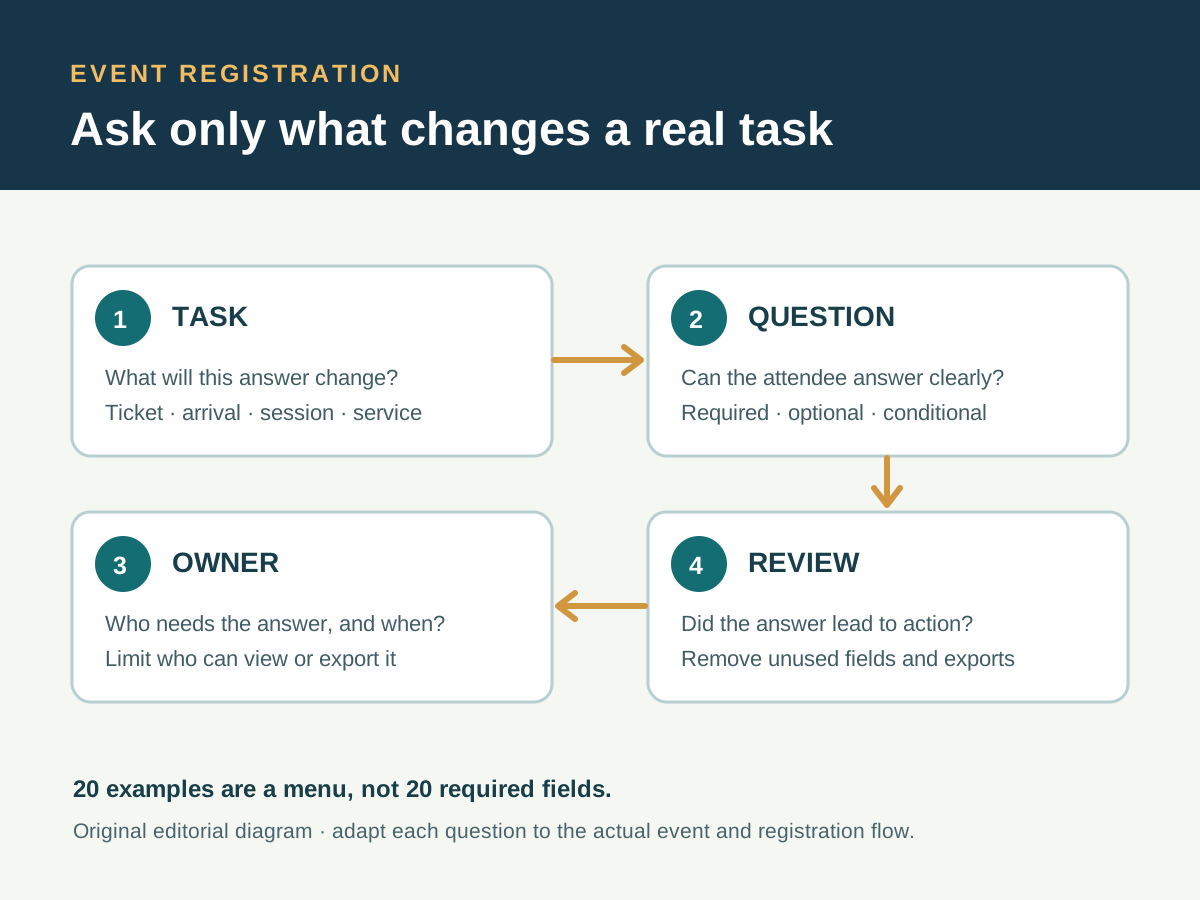
Write down the decision that the answer changes, the person who needs it, and the moment they need it. A ticket category is a real selection if inventory differs; a session-interest question is only a preference unless it actually reserves a place. Mark optional questions as optional and explain conditional questions before they appear. W3C WAI recommends short forms that ask only for information needed for the process, with clear labels and instructions.[1]
For personal information, keep access and retention tied to the stated purpose. The UK ICO's data-minimisation guidance is a useful example for UK processing; the applicable rules depend on your location and audience. Do not turn this menu into a compulsory questionnaire, and do not collect health details or social profiles merely because an example includes a related topic.[2]
Ticket and contact questions
| # | Attendee-facing question | Use only when |
|---|---|---|
| 1 | What name should appear on your ticket or badge? | A ticket, badge or door list needs a display name; explain any identity rule separately. |
| 2 | Which email address should receive your confirmation and event updates? | Email is the actual delivery route; let the person correct a typo before submission. |
| 3 | Which event date are you attending? | The event has more than one date and the answer selects real inventory. |
| 4 | Which ticket or admission option do you want? | Options differ in price, access or eligibility; show those differences first. |
| 5 | Are you registering yourself or another attendee? | One purchaser may register someone else and you have a clear contact and authority workflow. |
A confirmation address is not the same as permission to send future marketing. Keep the event transaction, operational notices and optional promotion clear in the interface. If your Boletolibre.com event page sends a visitor to an external registration provider, check that its published event facts, ticket labels and confirmation promise match the provider's actual form.
Arrival and access questions
| # | Attendee-facing question | Use only when |
|---|---|---|
| 6 | Which arrival window would you like? | Arrival is timed and selecting a window actually reserves or requests one. |
| 7 | Which entrance will you use? | There are genuine entrance choices and staff can route people accordingly. |
| 8 | Would you like us to contact you privately about an access arrangement? | A trained owner and private response channel exist; avoid asking for a diagnosis in the general form. |
| 9 | Will an approved companion or plus-one attend with you? | The published admission rules allow one and capacity is tracked separately. |
| 10 | Are you part of a group booking? If so, what is its reference? | A group reference helps staff reconcile an existing booking; do not create a new entitlement from free text. |
Give access information publicly before asking for a request. An access question should reach the person who can answer it, with restricted visibility and a clear reply route. If an attendee has no need to disclose details in the checkout, offer a separate contact path. A companion answer is not proof that admission has been allocated.
Programme and participation questions
| # | Attendee-facing question | Use only when |
|---|---|---|
| 11 | Which workshop session would you like to reserve? | Session capacity is managed and the form can confirm or clearly label a request. |
| 12 | Which topic are you most interested in? | The programme team can use optional aggregate preferences; this does not book a seat. |
| 13 | Will you attend in person or online? | The event truly supports both routes and can send the correct joining information. |
| 14 | Which available language should we use for your event updates? | The event can actually deliver updates in the listed languages. |
| 15 | Is there a question you would like the moderator to consider? | A moderator reviews submissions and the form explains that submission does not guarantee airtime. |
Do not ask for a track preference if the schedule is fixed and nobody will use the answer. If a session choice is a request rather than a confirmed reservation, say that beside the control and repeat it in the confirmation. Avoid offering a language you cannot support during a schedule change.
On-site services and optional follow-up questions
| # | Attendee-facing question | Use only when |
|---|---|---|
| 16 | Will you use the catered meal? | A meal is actually offered and the count informs an approved order. |
| 17 | Is there a dietary requirement we should pass to the catering contact? | Food is provided, a restricted handoff exists and the person can answer privately. |
| 18 | Which available workshop-material format would help you participate? | You can provide the listed formats and route the request to the materials owner. |
| 19 | How did you find this event? | An optional answer will inform a defined promotion review; do not block registration on it. |
| 20 | Would you like to receive news about future events? | This is a separate, unselected marketing choice with the notice and controls your applicable rules require. |
A dietary response belongs with the catering owner, not in a general door list. A future-news choice is separate from the information needed to deliver the event. Do not treat silence as permission. If a question serves only a post-event survey, ask it later rather than lengthening the initial form.
Example: assemble a short form for a fictional workshop
Suppose a fictional half-day workshop offers two sessions, a catered lunch and email confirmations. Its first screen might use questions 1, 2 and 11. If lunch is optional, show question 16; show question 17 only to people using the meal. Offer the private access-contact route in question 8. Leave out arrival windows, group booking, hybrid mode and future-event marketing unless those workflows really exist.
Before publishing, try every branch on a phone and with a keyboard. Check that labels and instructions say whether a choice is required, optional, requested or confirmed. Have the ticket, catering and access owners read only the answers needed for their work. After the event, review whether each question produced a useful action and remove unused fields and exports under the applicable retention rules. The selection diagram is an editorial aid, not a live form or a claim about platform features.[1][2]
Sources and further reading
- Forms TutorialW3C Web Accessibility Initiative · Accessed
- Principle (c): Data minimisation (UK guidance)UK Information Commissioner's Office · Accessed