Event website security update checklist and rollback record
A security update is not complete when the package manager or CMS says “done.” The event page must still load, registration must still work, and the team needs a way to recover if the release breaks a dependency. Use this checklist for the software you actually control, whether that is a CMS, plugin, framework or hosting runtime. A vendor-managed ticket checkout needs its own owner and verification step.
Boletolibre editorial team
Published
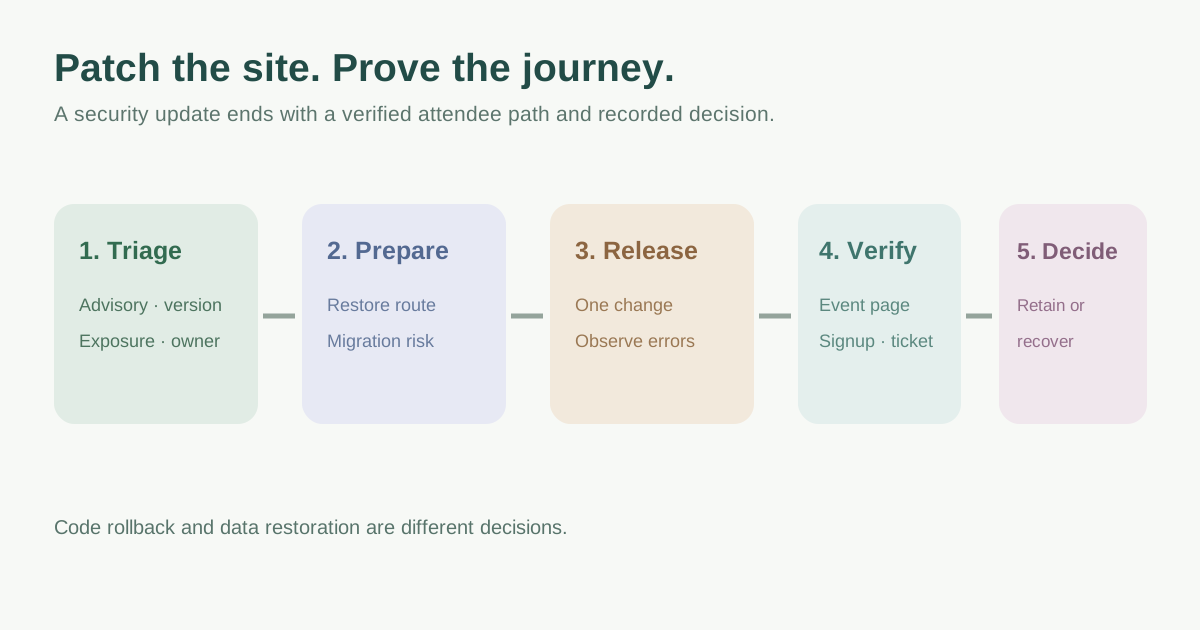
Identify the affected component and urgency
Record the exact product, installed version, target version, affected host and owner. Read the vendor advisory and release notes before scheduling. An update affecting a publicly exposed component or a vulnerability reported as exploited deserves faster triage than a routine feature release. CISA’s Known Exploited Vulnerabilities catalog is one useful prioritization input; verify that the listed product and version actually apply to your stack rather than treating every entry as relevant.[2]
| Question | Evidence to record |
|---|---|
| What is affected? | Product, version, site/host and vendor advisory |
| What is exposed? | Public page, admin, form, API or back-end only |
| Who decides? | Technical owner, event lead and escalation contact |
Prepare a recoverable change, not just a backup checkbox
Inventory code, configuration, database, media and secrets that the change could touch. Confirm a recent restorable copy and the person who can retrieve it. WordPress documents database and file backups before upgrades; other stacks need their own procedure. A previous code version may not understand a new database schema, so identify non-reversible migrations before promising a one-click rollback.[4][3]
Rehearse the change in a representative non-production environment where practical. Check the public event page, sign-up form, confirmation email, ticket link and admin login. Do not fire a real payment or attendee email as a test. Name the release operator, verifier, rollback decision maker and communication owner. Choose the maintenance window around on-sale and event dates based on actual risk; there is no universal safe hour.
Apply in controlled steps and verify attendee journeys
Make one documented change at a time when dependencies allow. Capture versions and start time, then watch errors and the paths attendees use. If the update touches a CMS, plugin or theme, follow that vendor’s order and compatibility notes. WordPress, for example, documents its own update and recovery workflow; it is not a command set for other platforms.[3]
| Path | Verification |
|---|---|
| Public event page | Loads at its canonical URL; date, venue and CTA remain correct |
| Registration | Form renders and safe test submission follows approved sandbox flow |
| Ticket handoff | Outbound link reaches the expected provider and event |
| Admin access | Authorized operator can sign in without broadening permissions |
| Monitoring | Relevant error, availability and security signals are reviewed |
Set a decision point and record the outcome
Before release, write the symptom that triggers pause or rollback, who makes the call and the exact platform-specific recovery steps. Distinguish reverting code/configuration from restoring database content. A full database restore can discard registrations or changes made after the backup; coordinate any data recovery with the responsible operator. If the issue appears to be active compromise, use the incident-response route instead of silently reverting and losing evidence.
After the change, record versions, checks, failures, remediation and the next review date. Tell the event and support teams if an attendee-facing flow changed. Close only after the real public URL and registration/ticket route are verified. The downloadable record gives one place to capture preparation, go/no-go and outcome.
Download the editable event website update and rollback record (Markdown, English)
Sources and further reading
- Rollback Plan ChecklistManifestly · Accessed
- Known Exploited Vulnerabilities CatalogCISA · Accessed
- Updating WordPressWordPress.org · Accessed
- BackupsWordPress Developer Resources · Accessed