Website backup restore test checklist for an event site
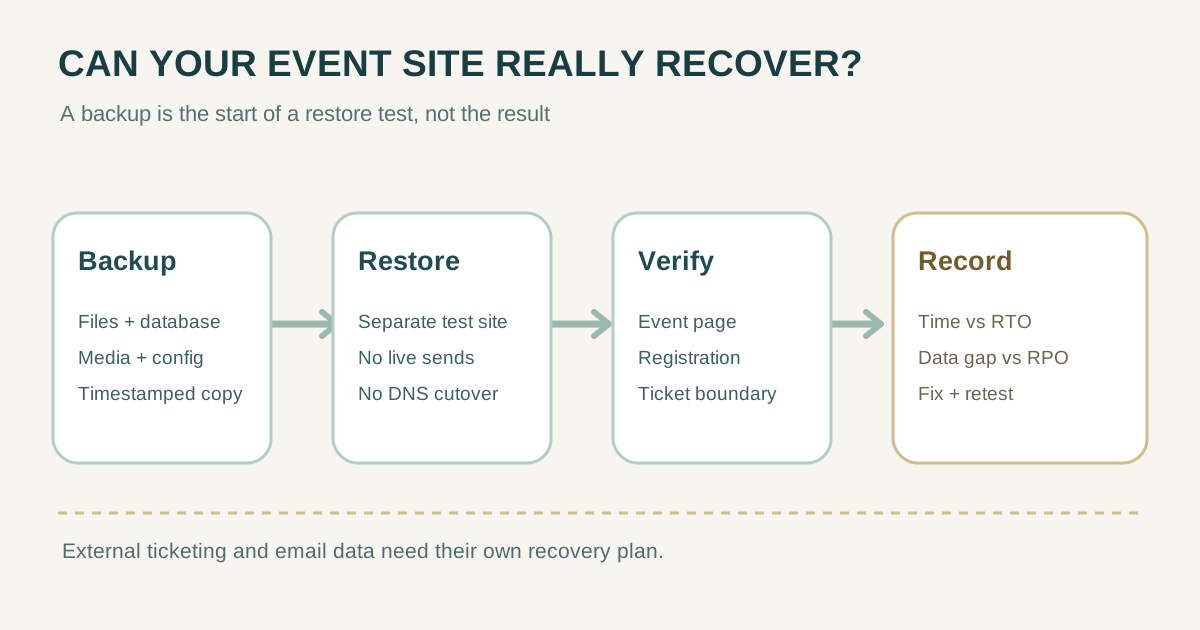
A backup file is only a starting point. Before a ticket launch, prove that your team can restore the event website and the visitor journey it supports. This checklist turns the restore into a small exercise: choose a recovery point, rebuild in an isolated environment, verify what visitors need, then record the time and data gap. Keep live attendee records, payment flows and production DNS out of the rehearsal.
Boletolibre editorial team
Published
1. Define the exercise before touching a backup
Record the business goal first. Recovery time objective (RTO) is the maximum acceptable interruption; recovery point objective (RPO) is the maximum acceptable data loss measured back from an incident. Choose targets for this event, not numbers copied from a hosting plan. AWS recommends testing restores to see whether actual recovery meets those objectives; a successful backup job alone does not demonstrate recoverability.[3][2]
| Write down | Example to replace with your own value |
|---|---|
| Critical visitor journey | Event details → registration or ticket link → safe confirmation |
| Recovery point | Backup or snapshot timestamp, timezone and storage location |
| Target RTO / RPO | Team-approved maximum interruption / maximum data age |
| Exercise owner | Person restoring; person checking content; person recording results |
| Safe environment | Separate test domain or restricted staging site, no production DNS change |
Pick a quiet period and notify anyone who manages the site, ticketing or email. Note whether the exercise tests a full rebuild or only a component restore. Keep this scope in the result so a partial success is not mistaken for full recovery.
2. Confirm what the backup actually contains
Inventory each part of the site and its source of truth. A WordPress database backup, for example, covers database content but does not include the site files, themes, plugins, uploads or configuration file. Hosting snapshots also cannot be assumed to contain records held by an outside ticketing or email service. Check the backup and contract for each system instead of treating “the website” as one recoverable object.[4]
| Component | Restore or verify separately | Evidence to keep |
|---|---|---|
| Pages and CMS data | Event date, venue, prices, policies, redirects | Version or database recovery point |
| Files and media | Images, downloads, theme or application code | Sample asset loads and file inventory |
| Configuration and secrets | Environment settings, integrations and secret re-entry procedure | Named custodian; never paste credentials into the log |
| Domain and TLS | Document DNS records and certificate procedure | Read-only record of current settings; do not cut over live DNS |
| Registration, tickets, email | Determine if each vendor has its own export or recovery plan | Vendor owner, data boundary and safe test method |
If a dependency is outside this rehearsal, mark it “not tested” and identify who would restore or contact that provider during a real incident. Do not mark an untested ticketing database as recovered because the landing page loads.
3. Restore into isolation and contain side effects
- Prepare a separate destination and restrict public access or indexing as appropriate. Verify it cannot write to production attendee records.
- Disable or redirect outbound email, webhooks, analytics events and live payments before opening restored forms. Use test accounts and the provider’s test environment where available.
- Record the exercise start time. Restore the chosen files, database, uploads and configuration according to your runbook; record any missing credential or manual step.
- Check application startup, database connectivity, media paths and logs. Keep the production site and DNS untouched.
The leading restore checklist recommends an isolated test environment and checking files, database, uploads, forms and integrations. Treat isolation as a requirement for an event site with real attendee and payment data, not merely a convenience.[1]
4. Test the visitor journey, not only the homepage
| Check | Pass evidence |
|---|---|
| Event page | Correct event, date, timezone, venue, price and policy version at the recovery point |
| Links and media | Images and downloads load; registration and ticket links point where intended |
| Registration | A synthetic entry reaches only a sandbox or safe test destination |
| Checkout boundary | A test-mode journey works if supported; no live charge or real inventory change |
| Confirmation | Test message reaches a sink or test inbox; no real attendee is contacted |
| Administration | Authorized staff can sign in and make a harmless test edit |
| URLs and TLS | Expected paths resolve in the isolated environment; production DNS remains unchanged |
Record each result as pass, fail or not tested. Capture a screenshot or log reference for failures, then clean up synthetic records. A working static event page is not proof that registration, checkout or confirmation recovered.
5. Record the outcome and schedule a retest
Stop the clock only when the agreed visitor journey works, not when the restore command finishes. Compare elapsed time with the target RTO. Compare the restored data timestamp with the exercise incident time to estimate the data gap against the RPO. A test cannot prove the exact behavior of a future incident, but it exposes missing backups, people and steps now.[2][3]
| Exercise record | Fill in after the drill |
|---|---|
| Date, owner, environment | ________ |
| Scenario and recovery point (timezone) | ________ |
| Target RTO / actual elapsed time | ________ / ________ |
| Target RPO / observed data gap | ________ / ________ |
| Page / media / registration / ticket / email | Pass, fail or not tested for each |
| Blocker, fix owner and due date | ________ |
| Retest date and approver | ________ |
If a critical check fails, call the drill incomplete and assign a fix and retest. Save the exercise record outside the site being restored. Repeat after major CMS, hosting, registration or ticketing changes and before a high-stakes sales window.
Sources and further reading
- Website Backup Restore Testing Checklistmybox.com · Accessed
- Perform periodic recovery testingAWS Well-Architected Framework · Accessed
- Define recovery objectives for downtime and data lossAWS Well-Architected Framework · Accessed
- Backing up your databaseWordPress Developer Resources · Accessed