Event website uptime monitoring setup checklist
An event site can return HTTP 200 while the registration action is broken, or an external ticketing service can fail while the public page stays healthy. The leading Google result is a general 12-step uptime checklist. This event-specific setup sheet names each attendee-critical URL, the success signal, the person who receives an alert and the follow-up check. It does not promise uninterrupted availability.
Boletolibre editorial team
Published
Decide what availability means for this event
Download the editable event website monitoring setup sheet (Markdown, English)
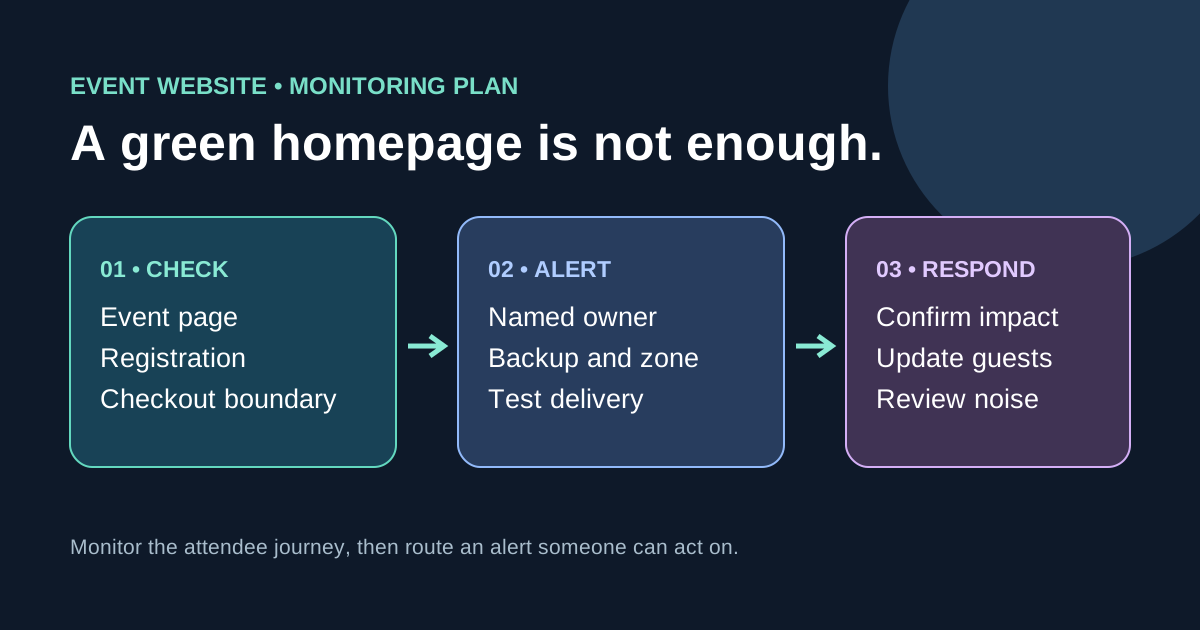
List the public event page, schedule or access-information page, registration entry, and the official hosted-checkout link as separate surfaces. Decide whether each is owned by your site or a provider. An HTTP probe can confirm a URL and optional expected text; it cannot prove that a real attendee can complete an authorized registration or payment. Keep deeper synthetic journeys separate and never submit real purchases or personal data from a monitor. Add domain and certificate expiry checks where operationally useful, but do not assume an HTTPS endpoint check validates certificate expiry: Route 53 documents that its HTTPS health checks do not validate certificates.[1][2][3][4][5]
Set a useful success signal and probe scope
For each public URL, record expected response status, stable content marker if supported, allowed redirects, geographic probe locations and the service owner. A homepage that always returns a generic shell can look healthy while event details are missing; a suitable content signal can expose that failure. Confirm the monitoring service’s actual treatment of 2xx/3xx, redirects and string matching before configuring it. Choose frequency, timeout and consecutive-failure behavior for your event risk and plan costs; there is no universal interval. Do not put secret tokens in monitored URLs.[1][2][3][4][5]
Route actionable alerts to an accountable person
Give each check a primary receiver, backup, escalation path, time zone and coverage period, especially for ticket launches and event day. Alert on attendee-visible symptoms, not every internal fluctuation. Confirm failures from another probe or manual check where possible to reduce local-network false positives, but do not delay a clear critical outage behind arbitrary retries. Send recovery notices to the same owners. Test the alert destination before relying on it: an alert routed only to an unattended inbox is not coverage.[1][2][3][4][5]
Pair the alert with the first response
The run card should say which URL to open, how to check registration and checkout boundaries, which owner to call, and where to post an update if the event domain or its email is down. Record start time, affected regions, attendee impact and next update time rather than guessing a root cause or restoration ETA. A ticketing provider’s incident and an event-site outage may need different responders and public messages. Keep the status channel reachable independently of the failing domain when practical.[1][2][3][4][5]
Exercise and maintain the monitors
Before launch, deliberately test notification delivery with a safe test endpoint or provider test-alert feature, then confirm the right person receives it and the run card is usable. Do not intentionally break live ticket sales just to prove a probe works. After a real alert, record whether it represented attendee impact, whether the owner acted and whether the threshold was too noisy or too slow. Update monitored URLs, owners and expected text when the event page, provider or edition changes. Uptime percentages describe the checks and period measured, not every attendee’s end-to-end experience.[1][2][3][4][5]
Sources and further reading
- Uptime Monitoring Checklist: 12 Steps to Ensure 24/7 AvailabilityWatchman Tower · Accessed
- Values that you specify when you create or update health checksAmazon Route 53 Developer Guide · Accessed
- How Amazon Route 53 determines whether a health check is healthyAmazon Route 53 Developer Guide · Accessed
- Health Checks notificationsCloudflare Docs · Accessed
- Incident management and responseGoogle SRE · Accessed