Plan hosting storage for an event photo archive
A past-event gallery may have few daily visitors yet occupy more hosting space every year. Visitor traffic and stored bytes answer different questions: low traffic does not make a large archive fit a small disk quota. This worksheet-led guide helps you measure the files, forecast growth and decide what must stay ready to load on the public site.
Boletolibre editorial team
Published
Measure stored bytes before comparing hosting plans
Start with a current storage report from the host, media library or object store. Record the date, storage pool, total bytes and file count. Break out website code and database, original uploaded photos, generated web images, videos, logs, temporary files and backups if they share the quota. A single account total cannot show what will grow after the next event. If the provider reports allocated disk rather than actual file bytes, label that difference.
Storage is the space occupied by retained files; transfer is the data sent to visitors. A gallery can use substantial storage and little transfer when few people visit, or the reverse during a campaign. Keep separate estimates for storage quota, monthly transfer and request charges. As one provider example, Amazon S3 prices storage, requests or retrieval, and data transfer as distinct dimensions; another host may bundle or limit them differently. A browser or CDN cache is a delivery copy, not the master archive or a verified backup. If a provider separately bills cached bytes, record that as another pool.[2][5]
Count originals, display variants and retained versions
Take a representative sample from this year's event: perhaps the source photos, the sizes actually used on the website and any old replacements still retained. Sum the bytes in each group. Do not multiply by an assumed number of thumbnails. WordPress, for example, can create several intermediate image sizes and themes may add more; the actual generated files determine storage. A managed image service may store variants differently, so use its usage report.[1]
Record videos separately: a single video can dominate the estimate. If object versioning is enabled, include current and noncurrent versions in the relevant storage pool. Amazon S3, for example, stores each version as a full object and bills for each, so one frequently replaced poster may occupy more than its latest file size suggests. Do not count a backup twice if its bytes are already included in the same provider's total.[3]
Forecast growth by event, not by a vague percentage
Use a simple scenario: future photo count × measured average original bytes, plus future photo count × measured average combined display-variant bytes. Add planned video bytes and other new files, then add the existing retained total. For illustration, 900 photos averaging 5 MB of originals and 1.2 MB of combined variants add 5.58 GB in decimal units. A similar second year makes 11.16 GB before old versions, videos, backups or operating headroom. Replace every sample number with your own measured values.
Choose a planning horizon: next launch, next annual edition and the intended archive life. Note how many prior years remain public and whether older masters are retained privately. Add a deliberate margin for uncertain uploads, regeneration or temporary migration copies; explain the margin rather than treating a fixed percentage as universal. Compare each storage pool to its actual quota, alert threshold and upgrade lead time.
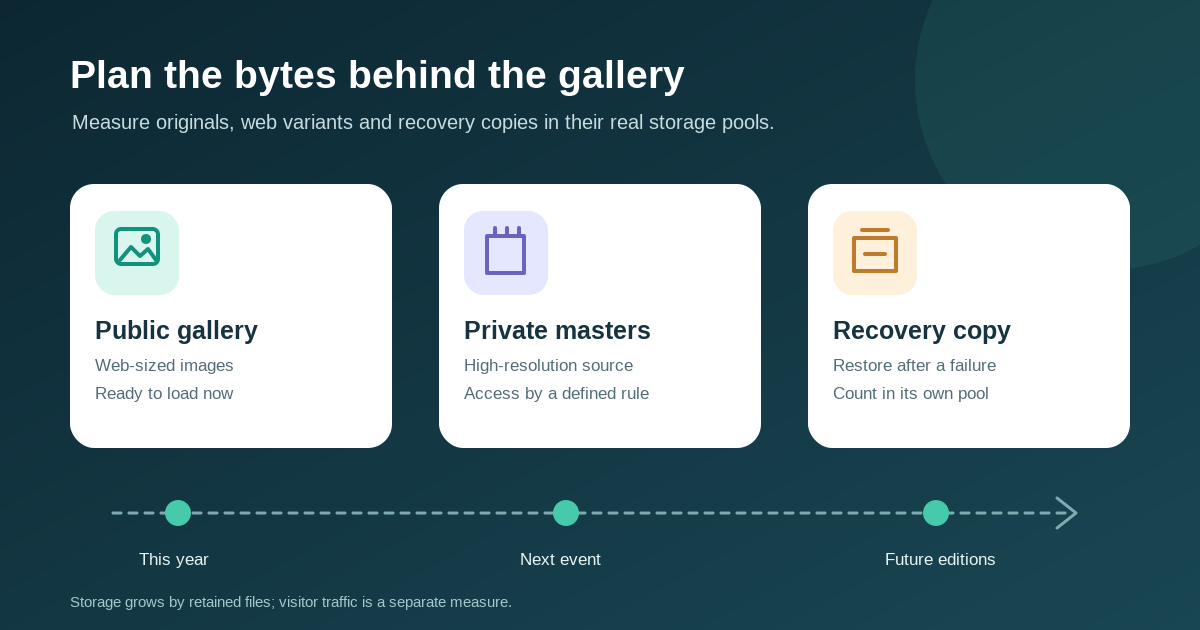
Separate public delivery, masters and recovery copies
Ask which files must load immediately for a visitor: web-sized photos, poster images and any downloadable files. Keep those in a storage tier and delivery path that can serve them on demand. The high-resolution camera masters may have a different access requirement and permission model. A backup is a recovery copy, not the file serving the live gallery. Map each class to its owner, location, retention decision and restore method.
Moving rarely viewed masters to a cheaper archive can save active storage, but some archival tiers require a restore before access. Amazon S3's Flexible Retrieval and Deep Archive are examples that cannot serve an image instantly. Do not place public gallery files in a delayed-retrieval tier merely because traffic is low. If organizers promise downloads of originals, decide whether that promise needs immediate access, a request process or a changed public description.[4]
| File class | Visitor access | Count it in |
|---|---|---|
| Web-sized gallery variants | Immediate, if public | Live delivery storage |
| High-resolution masters | As promised, often private | Master storage |
| Backups | For recovery, not page delivery | Backup storage or shared quota |
Compare storage options using the full operating cost
Keeping everything on the website host may be simplest when the measured growth fits its quota and backups. A separate object store can remove media bytes from a constrained host but adds URL mapping, access controls, backups and another vendor boundary. A managed gallery can simplify delivery while changing export and retention duties. No option is automatically cheaper or safer; compare the exact terms for stored bytes, included transfer, requests, retrieval, minimum retention and support.[2]
Ask the provider whether generated variants, backups, staging files and old versions count toward the same quota; what happens at the limit; and how long a storage increase takes. Check whether billing uses decimal GB or binary GiB. If the gallery includes restricted photos, do not make an entire storage container public as a shortcut. Access design and publication permission must survive a storage move.[2]
Change storage locations with a verified cutover
Before moving files, export an inventory of old public URLs and the corresponding new paths. Preserve an independent copy, move a small representative set, and test full-size pages, thumbnails, mobile display and permitted downloads. Then transfer the remainder, compare file counts and byte totals, update references, and sample older event pages. Keep the former location available until the new route and rollback are verified. An apparent copy completion does not prove every old page points to a working image.
After cutover, monitor stored bytes by class, failures to upload or generate variants, missing-image requests and monthly transfer or request usage. Revisit the forecast after each event and when the gallery format changes. The editable sheet below turns a host quote into a storage decision with an explicit owner and review date.
Download the event photo storage forecast worksheet (Markdown, English)
Sources and further reading
- Responsive Images: generated image sizesWordPress Developer Resources · Accessed
- Amazon S3 pricing dimensionsAmazon Web Services · Accessed
- Retaining multiple versions of objects with S3 VersioningAmazon Web Services · Accessed
- Working with archived objectsAmazon Web Services · Accessed
- Manage how long content stays in the cacheAmazon CloudFront documentation · Accessed