Your host gives a CNAME for the root domain: choose an apex DNS route
A host may say “point your domain to this CNAME” while the address you want is the bare domain, such as example.com. The missing detail is whether the instruction applies to www.example.com or the DNS zone apex. Use this decision sheet to identify a supported route, then verify both names without disturbing unrelated records.
Boletolibre editorial team
Published
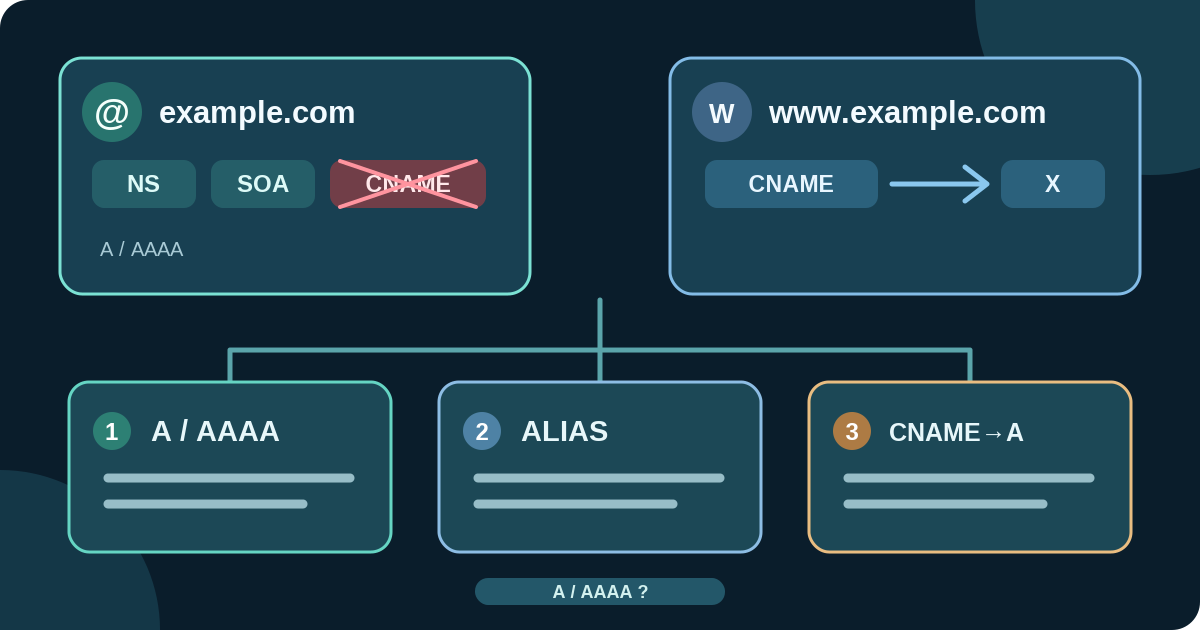
Why a conventional apex CNAME is different
The zone apex is the bare name, such as example.com. Its DNS zone must contain NS and SOA records. A conventional CNAME cannot coexist with other data at that same name, so placing an ordinary CNAME at the apex conflicts with those required records. The restriction concerns the record at that name; a www subdomain can ordinarily be a CNAME when it has no conflicting records.[1]
A provider may still offer an “apex CNAME” button. That can be a product feature which answers address queries with A or AAAA data after resolving a target, rather than publishing an ordinary CNAME alongside the apex NS and SOA. Do not infer that two DNS products implement the button the same way.[1][3][4]
Collect the two providers’ requirements
Ask the web host for the exact required hostname or stable IPv4/IPv6 addresses, the names it accepts, and its HTTPS and redirect setup for both the bare and www names. Ask the authoritative DNS provider which apex mechanisms and target types it supports. Record the active nameservers so the change is made in the serving zone, not an unused dashboard.[2][4][5]
Preserve existing MX, TXT, NS, SOA and other unrelated records. The apex web record is one owner name in a larger zone; an in-place web-record change does not require replacing mail records or moving the whole zone. Write down the current A and AAAA answers before changing them, including who can restore them if the host is not ready.[2][4][5]
Choose a supported route
Use a host-provided stable IP with apex A (and AAAA only for a supported IPv6 endpoint) when the host explicitly documents it. If the DNS provider supports an apex alias/ANAME-type feature to this target, confirm its target restrictions: Route 53 alias, for example, supports selected AWS resources and records in the same hosted zone, not an arbitrary CNAME target. If your provider offers CNAME flattening at the apex, confirm that it resolves the supplied hostname and returns address answers.[1][2][3][4][5]
If the web host and DNS provider cannot support an apex route together, put its ordinary CNAME on www and ask a separate HTTPS redirect service for an apex-compatible DNS target that sends the bare name to www. If no such target is available, change DNS provider or hosting plan; DNS alone cannot perform a browser redirect. Never copy a provider’s current resolved IP into an A record unless the host explicitly guarantees that address for your site.[1][2][3][4][5]
| Situation | Candidate route | Confirm before changing |
|---|---|---|
| Host supplies stable address | A; AAAA only if IPv6 is supported | Host guarantees address and accepts apex name |
| DNS provider supports an apex alias to that target | Provider alias or ANAME-type control | Target is supported; public A/AAAA answer |
| DNS provider offers apex flattening | Provider-managed flattened target | Target resolves and provider serves address answers |
| None of these is available | CNAME on www plus HTTPS redirect for apex | Redirect service supplies an apex-compatible DNS target and certificate |
Write a change request with one owner
Give the DNS and web owners one record plan: exact owner name, target, record mechanism, current value, intended value, TTL, change window and rollback value. Keep the apex and www plans separate. A label such as “ALIAS” or “flattened CNAME” is a provider control; check the actual public A and AAAA replies after publication. Route 53 alias responses appear as the configured address type, not as a CNAME.[2][3][4][5]
Before a switch, confirm that the web host recognizes every name it will serve and that the host or separate redirect service can serve HTTPS for every name visitors will use. If only one should be primary, record the web-layer redirect for the other. Preserve mail and verification records throughout. The DNS change can succeed while HTTPS or the virtual host is still wrong, so assign an owner to each layer.[2][3][4][5]
Verify DNS and the visitor path separately
Query A and AAAA for the bare name and the planned record type for www (CNAME if chosen) against the authoritative nameservers, then compare with a public resolver after the change. The expected apex answer depends on the chosen provider mechanism; do not expect to see a standard CNAME merely because the dashboard calls it one. If a flattened target has no address records, the provider may return no address data.[2][3][4][5]
Open both https://example.com and https://www.example.com in a clean browser session. Check that each reaches the intended site or redirect, the certificate covers each visited name, and the final URL matches the agreed primary host. If one path fails, distinguish DNS answer, TLS/host setup and redirect behavior before changing another record. Recheck after caches have had time to expire.[2][3][4][5]
Copy the apex handoff worksheet
Copy one row per field. Use documentation from the actual host and authoritative DNS provider for the final record values; the example names here are placeholders. Keep the old values and a rollback owner in the same change request.
| Field | Record |
|---|---|
| Public names | Bare domain; www name; chosen primary |
| Active DNS owner | Nameservers; provider; change approver |
| Host requirement | Exact target or guaranteed A/AAAA; accepted names |
| Selected apex method | A/AAAA, supported alias, flattening or redirect endpoint |
| Current state and rollback | Old apex and www answers; restoring owner |
| HTTPS and redirect | Certificate coverage; alternate-name destination |
| Post-change evidence | Authoritative and public apex A/AAAA; planned www record; browser result |
Download the six-language apex DNS handoff worksheet (Markdown)
Sources and further reading
- RFC 2181, sections 6.1 and 10.1: zone authority and CNAME recordsRFC Editor · Accessed
- Choosing between alias and non-alias recordsAmazon Route 53 · Accessed
- CNAME flatteningCloudflare DNS · Accessed
- Create zone apex recordCloudflare DNS · Accessed
- Requirements for using SSL/TLS certificates with CloudFrontAmazon CloudFront · Accessed