How to report a fake event ticket website: evidence and takedown checklist
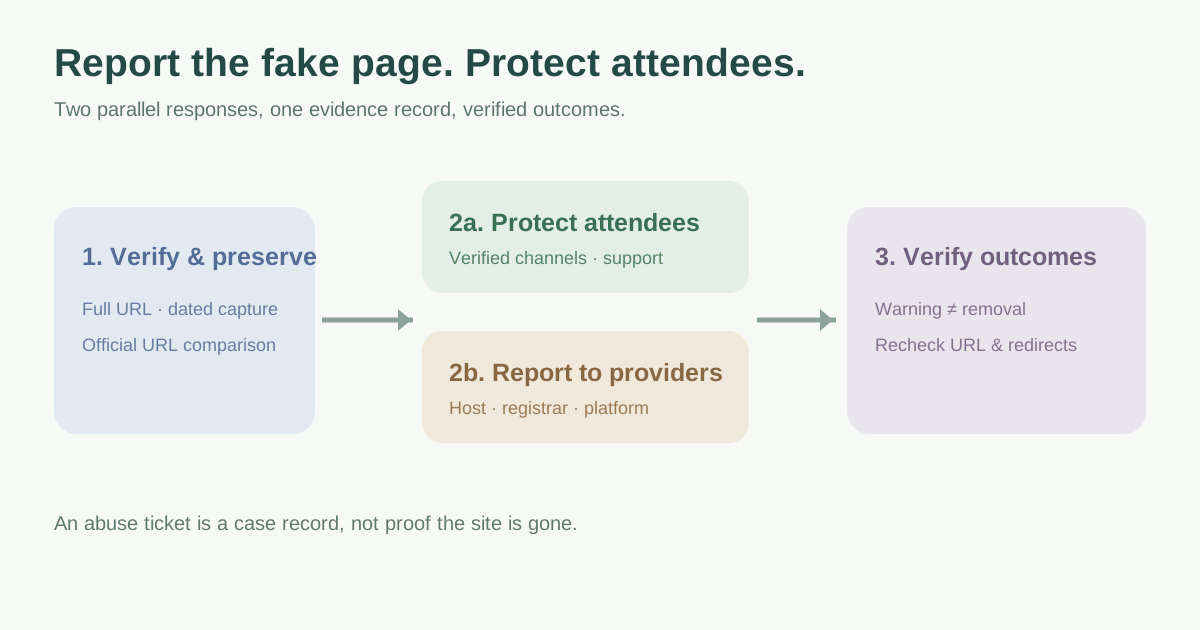
A copied event page can send attendees to a false checkout or ask for personal information. The first job is to establish the exact URL and what it does, then protect people while the relevant provider investigates. Reporting a site, showing a browser warning and removing its hosting are different outcomes. This checklist helps an event team coordinate them without promising an instant takedown.
Boletolibre editorial team
Published
Confirm the report without trusting the suspicious link
Compare the reported address with the event’s published domain and approved ticketing URLs. Check whether the page actually impersonates the event, or whether the report concerns an authorized reseller, a fan page or an old official link. Do not sign in, pay or upload documents to investigate. Route review of a suspicious page to someone with a safe inspection process. If there is evidence of a compromised official site, use the site-incident procedure as well.
| Record | Why it matters |
|---|---|
| Full suspect URL and discovery time | The harmful page may be at a path, not just the home domain |
| Official event and ticket URLs | Gives the provider a verifiable comparison |
| Observed impersonation or payment request | Explains the harm without assuming every similar name is fraud |
| Who reviewed and how | Keeps unverified reports separate from confirmed cases |
Preserve evidence before the page changes
Capture the complete URL, dated screenshots of the visible claim or checkout, copied event identity and the original email, ad or message that led to it. Preserve message headers when relevant and safe to do so. Record what you observed, not an inference that a particular person owns the site. NCSC guidance recommends evidence such as phishing page screenshots with the full location and timing; the page may change or disappear while a provider reviews it.[2]
Keep the evidence in a restricted case folder. Remove unnecessary attendee personal information before sending a report. If someone entered payment details or credentials, direct them to the appropriate bank, payment provider or account-recovery process; the event team should not ask them to send card numbers or passwords as proof.
Protect attendees while reports are pending
Use verified event channels to state the official domain and ticket seller, with a clear support route for affected attendees. Avoid amplifying a clickable link to the suspected site in a public warning. Ask the ticketing provider, ad platform or social platform to review any fraudulent listing or promotion under its own process. A browser safety report can add a warning, but it does not itself take the site offline. Google documents a phishing-site reporting path through Safe Browsing.[4]
Choose message timing and wording with the event lead, support team and incident owner so attendees hear one accurate account. If a false checkout is active, prioritize immediate attendee guidance while removal requests proceed.
Send evidence to the provider that can act
Identify the hosting provider and registrar from current infrastructure records, then use each provider’s official abuse channel. A host may remove content; a registrar may investigate domain-level abuse. Neither result is guaranteed, and a site on a compromised legitimate domain may need a different remedy. ICANN requires accredited registrars to publish abuse contacts and investigate reports, but ICANN is not a universal first-stop takedown button.[2][3]
| Channel | Appropriate request |
|---|---|
| Host or platform abuse team | Review the specific fraudulent page or hosted content |
| Registrar abuse contact | Investigate phishing or deceptive use of the registered domain |
| Browser safety program | Review for a warning or blocking signal |
| Ticketing, ad or social platform | Remove an impersonating listing, ad or post on that platform |
Track each case until the attendee risk changes
Log each report ID, recipient, timestamp, requested action, response and next follow-up owner. Recheck the exact URL and any redirect, and watch for a replacement domain. Mark “reported,” “warning shown,” “content removed” and “domain suspended” as different states. Do not close merely because one party acknowledged a ticket; verify the attendee-facing risk and keep the warning current.[1]
Escalate unclear legal claims, copyright notices or suspected financial crime to the relevant qualified team and jurisdiction. A copyright complaint is a separate route and should not be presented as an automatic answer to phishing. The worksheet below captures evidence, provider routing and closure decisions.
Download the fake event website report and follow-up log (Markdown, English)
Sources and further reading
- How to Report and Take Down a Phishing Domain EffectivelyNetcraft · Accessed
- Takedown: removing malicious content to protect your brandUK National Cyber Security Centre · Accessed
- Registrar Abuse ReportsICANN · Accessed
- Safe Browsing FAQsGoogle Transparency Report Help Center · Accessed