What to do after an email campaign gets a spam-complaint spike
A sudden increase in spam complaints deserves a prompt review, but it does not identify the cause by itself. The useful response is to preserve what the sending provider knows, stop another avoidable send to the same risky audience, and compare the complaint signal with the actual audience source and message. This guide gives a small incident record you can use before approving the next campaign.
Boletolibre editorial team
Published
Use the complaint-spike review sheet
Download the editable complaint-spike review (Markdown)
Make one copy for a campaign and a fixed reporting cutoff. Keep aggregate counts, a description of the audience source and a decision owner. Do not turn the sheet into a list of people who complained; a provider may not disclose their identities, and a complaint is not an invitation to contact them.
Confirm the signal before explaining it
Record the campaign, send time, reporting cutoff, complaint count and the sending provider’s denominator. Compute a rate only from counts defined by that provider, then compare it with earlier, similarly measured sends. Nine complaints among 3,000 delivered messages would be 0.30% if “delivered” is that report’s denominator. A single complaint in a very small campaign can produce a large percentage, so keep counts beside rates.
Check whether the alert refers to one campaign, one segment, one sending identity, or several sends. Preserve screenshots or exports of the report and any provider notice before dashboards change. Mailchimp shows complaints in campaign reports and moves known complainers out of the active audience; other services may expose only aggregates or use different labels.[2][1]
Do not equate a campaign report with Google Postmaster Tools. Google says its spam-rate dashboard concerns DKIM-authenticated mail to personal Gmail accounts, is not real-time, and can omit low-volume data. A low displayed rate can also occur when more mail is automatically placed in spam. Compare each metric only with its own definition and time window.[4]
Protect the next send and existing suppressions
Review scheduled promotional sends that use the same audience source or message promise. Hold the next affected promotional send while its owner checks eligibility and content; do not start a “cleaned” duplicate campaign to evade a provider hold. Keep recipients marked as complainers suppressed under the provider’s rules. In Mailchimp, even an accidental spam report is not reversed by the sender simply adding the contact back.[1]
Separate a marketing pause from a genuine service notice that people still need. Route any urgent operational message through the organization’s approved service process and provider guidance; a complaint does not authorize a workaround send to a suppressed address. If the provider has issued a warning or suspension, follow its case instructions before attempting more marketing mail.[1]
Trace the audience promise and the actual email
For the affected portion, document where and when recipients joined, what they were told they would receive, and whether that permission covers this campaign. Compare new imports, older dormant contacts, partner-supplied addresses and your usual opted-in audience without assuming any one group is guilty. A valid mailbox or a past purchase does not, by itself, establish eligibility for this particular promotion.[3]
Read the subject, From name, preview, opening, frequency and unsubscribe route as a recipient would. Did the message match the signup promise? Was the sender recognizable? Did the link and topic make sense for that segment? Was the opt-out easy to find and working? Mailchimp names permission, expectations, recognizable branding and a visible unsubscribe path as complaint-prevention practices.[3]
Avoid treating an address-verification score or an inbox test as proof of consent. Those checks can answer narrower questions about an address or a sample message; they cannot explain why people judged this campaign unwanted. Record competing hypotheses and the evidence that would distinguish them.
Walk through a fictional spike
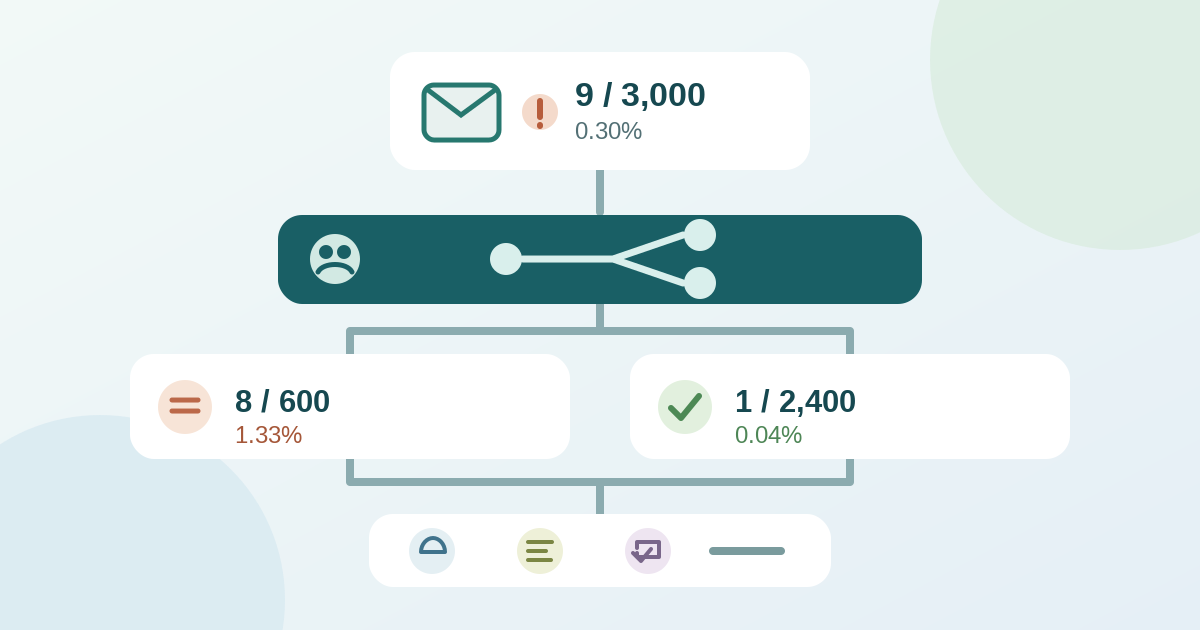
A completed campaign report shows 9 complaints among 3,000 delivered messages: 0.30% by that report’s definition. The previous comparable send showed 2 among 3,200: 0.0625%. Two separately tagged audience cohorts in the new send show 8 complaints among 600 delivered messages to recently imported contacts (1.33%) and 1 among 2,400 delivered messages to established opt-ins (about 0.04%). These cohorts account for the nine reports, but the arithmetic does not prove why anyone complained.
The owner holds the next promotion to the imported cohort, checks its original collection wording and source, and compares this campaign’s subject and offer with that promise. The established cohort is also reviewed for frequency and unsubscribe usability. The owner does not remove complaint suppressions, email complainers, or resume the imported cohort just because an address checker says its mailboxes exist.
Decide what changes before another campaign
Write a specific change and an approval condition for each affected segment. Examples: exclude records without a documented basis to receive this promotion; correct a misleading subject or sender; reduce a frequency that departed from the signup expectation; repair a broken unsubscribe route. Verify the actual change in a reviewed message and in the planned recipient selection. Avoid a universal “wait seven days” rule or a promise that one small test restores reputation.
Google’s guidance for mail to personal Gmail accounts asks senders to keep user-reported spam rates below 0.1% and prevent them reaching 0.3% or higher. Those numbers apply to Google’s defined metric, not as a universal cutoff for every campaign report. Your sending provider may have separate thresholds and instructions; follow its current notice and requirements.[5][4]
After a permitted next send, use the same provider definitions and cutoff to compare complaints, delivered count, affected cohort, opt-outs and provider notices. An improved rate is useful evidence but not proof that every recipient wanted the message. Keep the issue open if the same segment or promise continues to generate complaints.
Three questions that prevent a bad shortcut
- Should we email someone who complained to ask why? No. Respect the suppression; Mailchimp specifically advises against following up with those contacts through the complaint view.
- Can we clean the list by deleting every inactive contact? Not from this signal alone. First identify the affected source, permission and message mismatch; protect legitimate records and suppression history.
- Does a low Google Postmaster rate clear the campaign? No. Its Gmail-only, delayed, privacy-limited view is not the same as your provider’s campaign complaint count.
Sources and further reading
- About Abuse ComplaintsMailchimp · Accessed
- View Abuse ComplaintsMailchimp · Accessed
- How Legitimate Marketers Can Prevent Spam ComplaintsMailchimp · Accessed
- Postmaster Tools dashboardsGoogle Gmail Help · Accessed
- Email sender guidelines FAQGoogle Gmail Help · Accessed