Event website works for some visitors? Check the IPv6 route
An event page can appear healthy to staff yet fail for a subset of visitors just as tickets go on sale. A public AAAA answer may lead IPv6-capable clients along a path that differs from the A answer used over IPv4. The leading Google result walks through the full path rather than assuming that every failure is DNS. Capture the exact hostname and symptom, then compare IPv4 and IPv6 from a network that actually supports both.
Boletolibre editorial team
Published
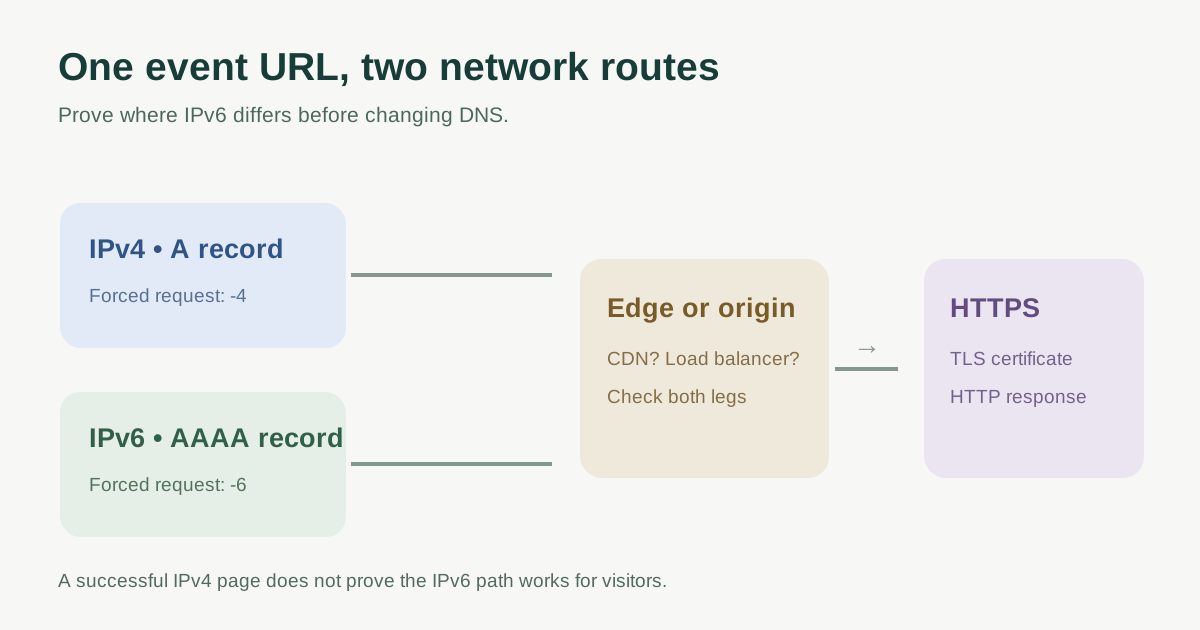
First prove which address family fails
Record the exact event URL, error, time, visitor network and whether the site sits behind a CDN or load balancer. Query A and AAAA for that hostname, then compare an IPv4-only and IPv6-only HTTPS request. For example, `curl -4 -I https://events.example.org/` and `curl -6 -I https://events.example.org/` ask curl to use the corresponding address family. These are diagnostics, not a substitute for checking the complete registration flow. If the testing device lacks IPv6 connectivity, a failed -6 request does not prove a site fault.[1][2]
Repeat from a second known IPv6-capable network when possible. Keep the output: DNS answer, connection result, TLS outcome, HTTP status and any redirect target. A timeout before TCP, certificate error after connection and HTTP 5xx after TLS are different faults.
Compare the advertised route with the intended architecture
| Observed evidence | Question to ask | Next owner |
|---|---|---|
| AAAA absent | Is IPv6 intentionally unsupported or provided by a proxy? | DNS/CDN owner |
| AAAA points to an old or unknown address | Is this a stale origin, CDN edge or wrong hostname? | DNS and hosting owners |
| A works; AAAA connects but TLS fails | Does the IPv6 endpoint serve the right certificate and SNI host? | Host/CDN owner |
| Both connect; event page fails only over one path | Are redirects, WAF, origin routing or app responses different? | App and edge owners |
An AAAA record maps a hostname to an IPv6 address, but the address may belong to a CDN edge rather than the event site’s origin. Cloudflare can publish AAAA answers for proxied names while connecting to the origin over IPv4. AWS Application Load Balancers similarly expose A and AAAA for dualstack mode while their target connection follows the target group’s address type. Read the actual provider configuration before declaring a public AAAA “wrong” because it is not the origin address.[3][4]
Compare the current authoritative answers with the provider’s intended DNS target. Do not delete a public AAAA merely because one IPv6 test failed: it may be provider-managed or serve other traffic. If a stale, independently managed record is confirmed, prepare an approved scoped correction and retain the previous value for reversal.
Follow the IPv6 request beyond DNS
For direct hosting, check that the advertised IPv6 is assigned and routed to a service that accepts the intended HTTPS hostname. Inspect load-balancer listeners, firewall/security rules, web-server bind addresses and certificate selection with the responsible operators. Do not open broad inbound access or turn off the firewall just to make a test pass. For a CDN, split visitor-to-edge from edge-to-origin: success on one leg proves nothing about the other.[1][3][4]
If necessary, a qualified operator can use curl `--resolve` to test a specific IPv6 endpoint while preserving the requested hostname for HTTP and TLS; curl documents bracketed IPv6 addresses for this option. That bypasses normal DNS only for the local test. It must not be treated as proof that public delegation, CDN behavior or all visitor networks work.[2]
Fix the evidenced layer and verify again
Choose one action only after the failing layer is known: correct a stale AAAA value, repair the IPv6 listener or route, update the CDN origin configuration, fix the HTTPS certificate mapping, or investigate application errors. Assign an owner and an observation window. If disabling an independently managed AAAA is the approved temporary response, verify that the provider supports IPv4 service for the hostname and consider cached old answers; it is not a universal fix.
After the change, repeat forced IPv4 and IPv6 HTTPS checks, an uncached event page, a registration or ticketing handoff, and a check from a second IPv6 network. Watch relevant edge/origin logs and note the response codes. The worksheet below keeps the failure evidence and recheck in one place.
Download the IPv6 event-site diagnostic card (Markdown, English)
Sources and further reading
- IPv6 Enabled, but Your Website Fails for Some Visitors?CloudFlew · Accessed
- curl man page: IPv4, IPv6 and resolvecurl project · Accessed
- IPv6 compatibilityCloudflare · Accessed
- Application Load Balancers: IP address typeAmazon Web Services · Accessed