Give a contractor domain access without sharing the owner login
A designer may need to publish one event-site DNS record while the organizer still owns the domain, pays renewals and approves transfers. The first organic Google result explains GoDaddy delegate access, which avoids sharing the account password. That is a useful example, but “delegate” does not mean “DNS only.” Before inviting a contractor, write down the exact task, domain, duration and actions that must remain with the owner. Then verify the provider’s actual effective permissions.
Boletolibre editorial team
Published
Separate domain registration from DNS and the website
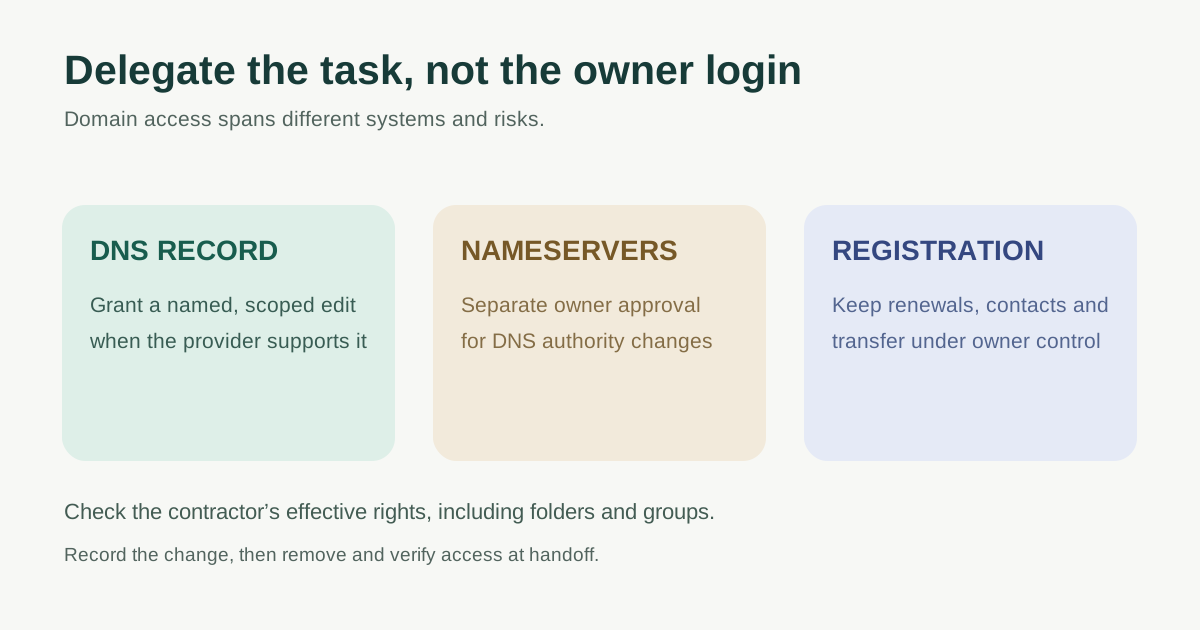
The registrar controls the registration relationship and may expose renewal, contact, nameserver, lock and transfer actions. The authoritative DNS operator controls records that point website and mail traffic. The website host, email provider and ticketing platform may be different companies again. Giving a contractor access to the website editor does not automatically let them edit DNS; giving registrar access can expose more than the one record they need. Start by identifying which service actually owns the requested change.
| Requested task | Likely control surface | Ask before granting |
|---|---|---|
| Add a verification TXT record | Authoritative DNS zone | Can the role target this record or domain only? |
| Point event site to a new host | Authoritative DNS and hosting | Which A, CNAME or other records, and who approves cutover? |
| Change nameservers | Registration/delegation control | Does this also move authority for web and mail DNS? |
| Renew or update registrant details | Registrar account | Why does a contractor need this owner-level action? |
| Transfer domain away | Registrar transfer process | Can this stay with the authorized organization owner? |
Write a narrow access request before inviting anyone
Use the worksheet to record a named contractor and their own account, the exact domains or zones, required actions, planned start/end or review dates, approving owner and rollback contact. Keep passwords, recovery codes, payment details and transfer authorization codes out of shared project documents. Require a separate owner decision for high-impact steps such as changing nameservers, mail records, transfer settings or renewal ownership.
Ask the provider whether it supports a role limited to the requested domain and function. If it does not, choose a different work pattern: the contractor can provide a proposed change for the owner to apply, or a trusted operator can supervise the edit. Do not treat a broadly privileged account as narrow merely because its invitation was temporary.
Check the provider’s effective permissions, not the role name
GoDaddy allows account delegates without sharing passwords and uses domain folders to scope access. Its current help says delegates with domain access automatically receive Management Access to the All Domains folder unless the owner changes that folder. Management Access includes nameserver changes, forwarding, lock/unlock and auto-renew; Transfer Access goes further into contact updates, transfers, deletion and sale. For a DNS task, inspect the folder and both access levels for every affected domain before inviting. The exact account UI and policy may change.[1][2]
Cloudflare describes policies made from a member, role and scope. Its domain-scoped Domain DNS role can edit DNS settings, but effective access can combine direct and group policies. Review the person’s full membership and the domains in scope rather than one visible role alone. Cloudflare’s website zone controls and registrar registration actions are not interchangeable simply because the same company supplies both.[3][4]
Amazon Route 53 can restrict DNS record changes by hosted zone, normalized record name, record type and action through IAM conditions. Its documentation says domain-registration permissions cannot be granted or denied for individual domain resources. A narrow DNS policy is possible for some tasks; it is not proof of per-domain registrar administration. An AWS operator should review and test the policy before use.[5][6]
Test the boundary with a safe task
Before launch week, have the contractor sign in with their own identity and confirm what they can see. The owner or administrator checks that unrelated domains and registration/transfer settings are absent where the provider supports such isolation. For a DNS change, agree on the exact old and proposed values, purpose, approval and a return path. A read-only or sandbox review is useful before a live write when available. Keep a dated change record and independently confirm the final record and site/email behavior.
Avoid using the owner’s password as a shortcut when a delegated role exists. If a provider cannot express the boundary you need, do not distribute the owner credentials; ask the contractor for change instructions and let the authorized owner execute them. Keep two-step verification on each person’s account according to the provider’s supported controls.
Remove access and verify control after the job
At handoff, compare the work to the request: which DNS records changed, where the site and mail now point, and which tasks remain open. Remove or expire the contractor’s access, then confirm their effective permissions are gone, including group membership and provider-specific folder grants. Recheck that the organization still controls registration, renewal, recovery contacts and the authoritative DNS provider. File the change record where a future event team can find it without storing secrets.
If the contractor must return for the next event, create a new scoped request and review the current role definitions rather than leaving open-ended access. The worksheet is a decision and audit aid; it does not grant permissions or replace your registrar’s actual controls.
Download the contractor domain-access worksheet
The editable sheet includes service mapping, exact proposed permissions, an approval gate, a change record and removal evidence. It highlights the difference between “can edit this DNS record” and “can change domain registration.” Fill it out before a website launch or agency handoff.
Sources and further reading
- What is delegate access?GoDaddy Help · Accessed
- Grant delegate access to domainsGoDaddy Help · Accessed
- Members and permissions: roles, scopes and policiesCloudflare Docs · Accessed
- Account and domain rolesCloudflare Docs · Accessed
- Resource record set permissionsAmazon Route 53 Developer Guide · Accessed
- Using IAM policies for Route 53Amazon Route 53 Developer Guide · Accessed