Event email communication plan template: map every message to its audience
An event email plan should answer who needs a message, why they need it now, what action follows and when sending must stop. The leading Google result for “event email communication plan template” combines a sequence table with copy frameworks. This original map keeps the useful sequence view but anchors each row to a recorded audience state. It avoids assuming that every event needs six months of promotion or a fixed number of emails.
Boletolibre editorial team
Published
Download the email communication map
The CSV contains example rows for interest, confirmed registration, waitlist, cancellation and event completion. Replace them with your actual audience records, trigger, purpose, owner, approval check, destination and stop rule. It is a planning template, not an automated sender or a declaration that any particular contact may be emailed.
Download the original event email communication map (CSV, English)
Start with states, not a fixed send count
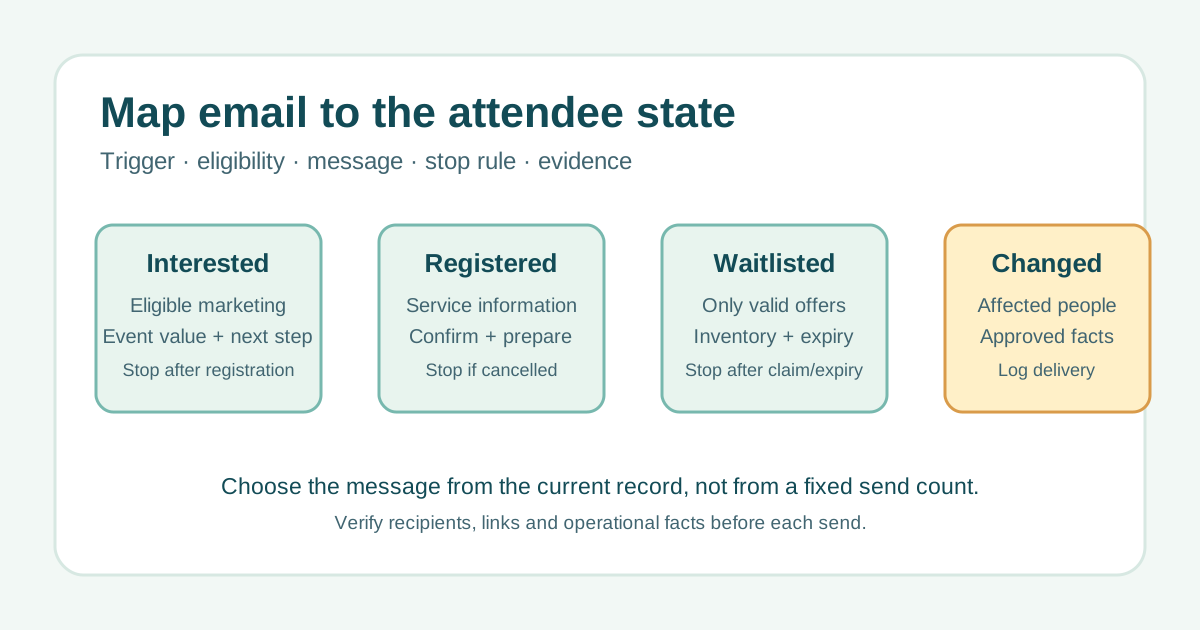
Keep prospective contacts, registered attendees, waitlisted people and cancelled registrations separate. A promotion announcing ticket availability belongs to eligible prospects; a confirmation goes only to a person whose registration was actually recorded. A material venue or time change goes to the affected attendees, whether or not they opened earlier campaigns. i4a’s sequence table is useful for seeing purpose across stages, but its sample cadence is a context-specific suggestion rather than an event rule.[1]
- Interest → useful event value and a valid registration destination.
- Registered → confirmation and practical service information.
- Waitlisted → an offer only when inventory and offer rules permit.
- Changed or cancelled → a targeted, approved update to affected records.
Write eligibility and suppression before drafting copy
For each row, state what record or permission makes a recipient eligible. Keep promotional outreach separate from essential operational messages and have the applicable rules reviewed for the audience and jurisdiction. Stop sales prompts when someone registers or opts out as appropriate; stop arrival reminders for cancelled records. A generic list export is not enough to prove eligibility. Where platform data is delayed, pause the send until the source of truth is reconciled.
Tie each message to a real trigger and approved facts
An opening announcement follows the actual registration release. A practical-information message waits until venue, arrival, accessibility and schedule details are checked. A change notice follows an authorized decision and uses the current version of the event page. Put the owner and approver in the map, then follow the final link as a recipient would. For example, “Your arrival details are ready” should lead to current arrival information, not a generic homepage.
Record delivery and what happened next
Keep the approved copy version, recipient segment, send time, destination and support issues with the row. Review bounces, replies and completed actions that matter to that message; an open alone does not show that someone understood or registered. If people report a broken link or wrong time, correct the source page and target the affected recipients. Revisit the map when registration, inventory, venue or event status changes.