Event interpreting and live-captioning supplier brief
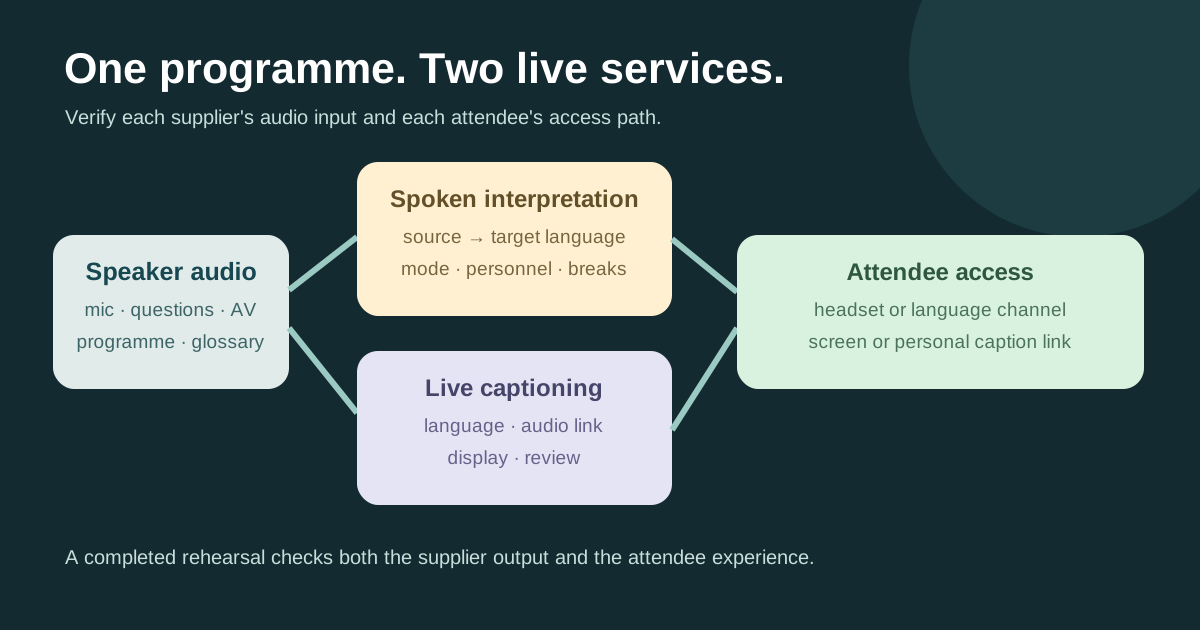
The leading Google result for a conference interpreting checklist lists language pairs, agendas, equipment and a supplier briefing. Those are useful questions, but an event can book spoken-language interpreters and a live-captioner and still leave attendees without a working channel. This original worksheet follows the speaker audio through each supplier to the listener or reader. It is distinct from sign-language interpreting and from captioning an edited recording.
Boletolibre editorial team
Published
Download the session-by-session supplier brief
Download the editable interpreting and captioning brief (Markdown, English)
Make one row for every session and language path. Include the source language, target language or variant, interpretation mode, caption language, room, local time, audio owner and attendee delivery channel. Record who approved the scope; “multilingual support” alone is not enough for a quote or a test.
The leading interpreter checklist correctly asks for an agenda, subject matter and venue requirements. Ask the supplier which interpreters and technical arrangement fit the actual sessions rather than adopting its generic equipment list as a universal specification.[1]
Keep the services and audiences separate
Spoken-language interpretation delivers speech in another language; live captioning displays text from speech and relevant audio. Sign-language interpretation, assistive listening and captions for a later recording are different requirements. W3C asks organizers to work with participants and providers to determine the needed services and how people will access them.
State whether each service covers plenary talks, breakouts, audience questions, remote speakers and transitions. Agree the spoken source and target languages; specify the caption language and whether participants will read a room display, personal link or online player. Ask the people using the service about workable access without publishing identifiable accommodation details.[2]
Prepare people and the technical path
Send the current run of show, speaker names, slides, terminology and pronunciation notes to both suppliers through an approved route. Identify the AV person responsible for each microphone and feed, including audience questions and remote contributions. Confirm rehearsal time, supplier entry, breaks and a direct live contact. Do not assume a microphone feeding the room also feeds a remote captioner or interpretation platform.
UC Berkeley’s live-captioning checklist calls for checking the audio link, network and caption display before an in-person event. Its platform-specific token steps are not a universal recipe. Have the provider and an attendee-side checker verify intelligible audio, the delivered language and the real reading/listening channel on the exact venue or platform setup.[3]
Accept the service and plan a change
Before opening, ask someone other than the supplier to use the actual headset, language channel, screen or personal caption link. Confirm that a changed speaker, room or stream can be handled, and set an escalation owner if the service fails. A backup may be another approved channel or a change to the programme; describe the real option to attendees rather than promising instant restoration.
Log service interruptions with time, affected session, attendee impact, owner and resolution. If a recording will be published, agree separately whether caption files, transcripts or interpreted tracks are delivered and reviewed. W3C’s live-caption criterion concerns live audio in synchronized media at Level AA; it does not by itself certify every in-room conversation or substitute for local accessibility review.[4]
Sources and further reading
- Conference Interpreting Checklist for Event OrganisersDiplomat Translation · Accessed
- Making Events AccessibleW3C Web Accessibility Initiative · Accessed
- Live Captioning Checklist for In-Person EventsUC Berkeley Disability Access & Compliance · Accessed
- Understanding SC 1.2.4: Captions (Live)W3C · Accessed