Event structured data eligibility checklist for Google Search
Adding schema.org Event markup does not put an event into a Google event card by itself. First check whether the page and event fit Google’s event experience, then match every marked-up fact to what attendees can see. The official rules distinguish eligible public, in-person events from virtual-only, invite-only or promotional pages. This worksheet turns those rules into an evidence record; it is not a promise of ranking or display.
Boletolibre editorial team
Published
Decide whether this is an eligible event page
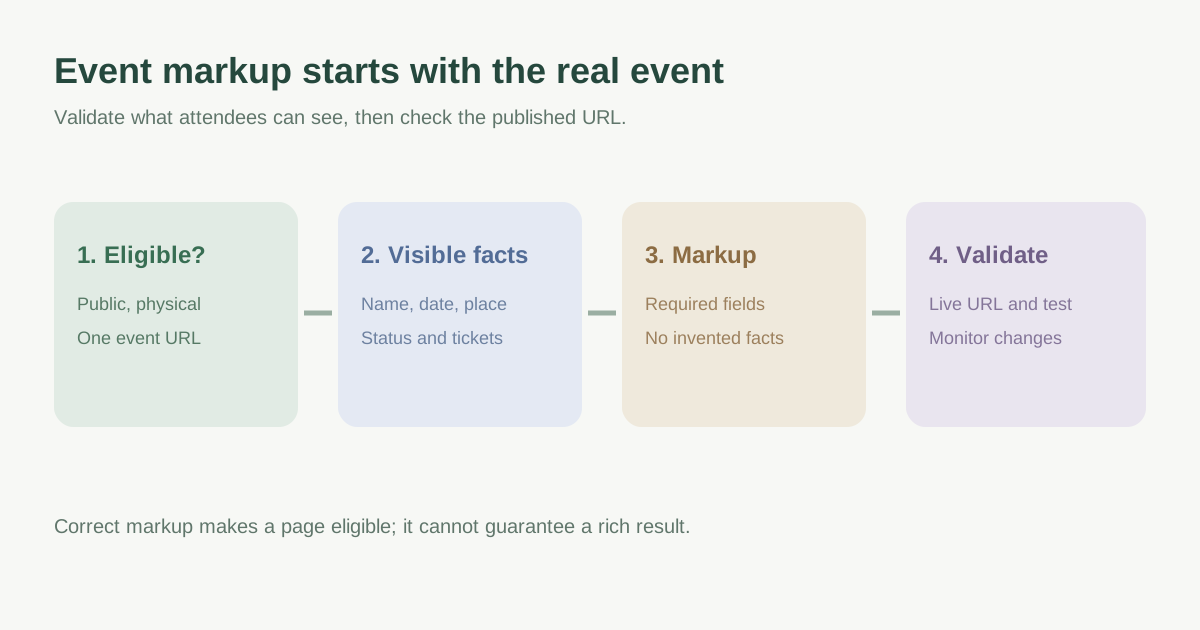
Google’s event experience requires a unique URL for each event, with the page focused on that single event. Use a specific event landing page rather than a general calendar, organization homepage or schedule listing. The documented experience requires a physical location and general-public bookability; virtual-only experiences and events requiring membership or invitation before buying or attending are outside this feature. Do not mark a temporary discount, coupon or business opening hours as an Event.[1]
If a ticketing platform already publishes the event, determine which page you will maintain as the authoritative attendee destination. For a multi-day event with one ticket covering the whole run, record start and end dates. For separately ticketed performances on different dates, Google says to create a separate Event item for each performance. Check current region/language availability in the official guide because a valid page may still not be shown in every market.[1]
Map visible facts to required and useful fields
Before writing JSON-LD or using a CMS plugin, make an inventory of facts that an attendee can verify on the page. Google requires event name, startDate and a physical Place location with a detailed address. Keep the event title separate from the venue name. Use the actual local date and time with the correct UTC offset when a time is known; do not invent midnight for an all-day event or an unannounced start hour.[1]
| Visible attendee fact | Markup review question |
|---|---|
| Event title | Does name describe this event without sale language? |
| Date and local time | Does startDate match the page and timezone? |
| Venue and address | Does location identify the real physical place? |
| Ticket offer | Does offers.url lead to this event’s public purchase path? |
| Price and availability | Do offer values match the current page and fees? |
| Status and images | Are cancellation, postponement and image URLs current? |
Recommended fields such as description, image, endDate, eventStatus and offers can make the item more useful when accurate. An offer URL must be a clickable, crawlable route to a page that predominantly offers admission to that specific event; a generic provider homepage is not enough. If price changes or tickets sell out, update the visible page and markup together. An image in markup should represent the event and be crawlable.[1][2]
Treat reschedules and cancellations as data changes
A canceled or postponed event should not silently disappear into a new edition or retain a misleading scheduled status. Google says to keep identifying facts such as the original startDate and location when marking a cancellation or unknown-date postponement. When a new date is confirmed, update startDate and endDate, use EventRescheduled where appropriate, and consider previousStartDate. The page itself must explain the new attendee action. Do not reuse a past event date to make next year’s occurrence look current.[1][2]
Validate the published page, then monitor
Use Google’s Rich Results Test to catch markup errors, then inspect the published event URL in Search Console to see the page as Google can access it. The page must not be blocked by robots.txt, noindex or login. Compare the rendered attendee page with the parsed event item; a test can pass syntax while the underlying event facts are misleading. After deployment, check the event enhancement/status report and any rise in invalid items when templates change. Allow time for recrawl and reindexing.[1][2]
A valid test makes a page eligible, not guaranteed to appear as a rich result or to rank higher. Google chooses whether and how to show enhanced results, and the event experience has region and language limits. Record the date you reviewed the official documentation because requirements and supported markets can change.[1][2]
Download the event markup eligibility audit worksheet (Markdown, English)
Sources and further reading
- Event (Event) structured dataGoogle Search Central · Accessed
- General structured data guidelinesGoogle Search Central · Accessed