How to archive an event website after the event ends
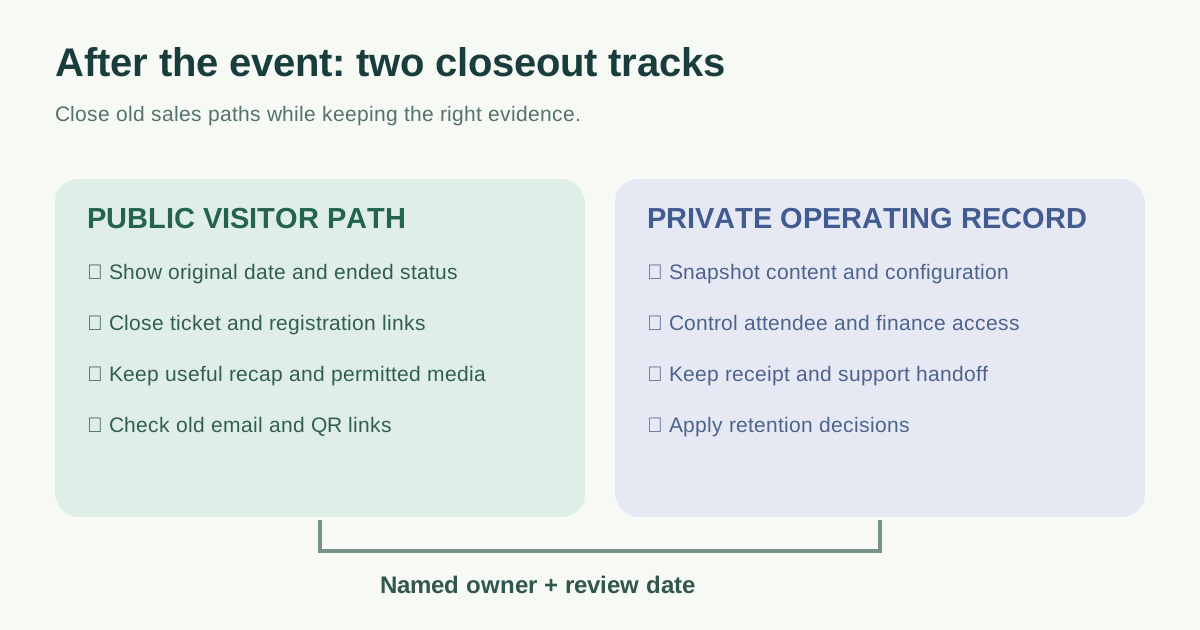
The show is over, but people may still follow links in confirmation emails, search results, press stories and photo posts. Archiving an event website is a transition from selling attendance to answering historical questions. It is not a single switch that makes every page disappear or stay online forever. Work through the public visitor journey and the private operating record separately.
Boletolibre editorial team
Published
Capture the live site before changing it
Record the event date, current public URLs, registration and checkout destinations, the latest schedule, media permissions and site owner. Save an internal snapshot of content and configuration according to your organization’s retention rules. A public recap is not a substitute for secure access to invoices, support records, attendee data or consent evidence. Decide who can view the internal copy and when it should be reviewed or deleted.
List where old links circulate: QR codes, confirmation emails, partner calendars, media coverage and social profiles. Those sources tell you which paths still matter even when the campaign has ended.
Close sales promises before changing navigation
Remove or clearly close “register”, “buy”, countdown and limited-time calls to action. Verify the connected form or ticketing platform’s actual state; hiding a button on the website does not close an external checkout. Replace expired offers with a plainly labeled ended-event message and a support route for receipts, access questions or follow-up. If a next edition is confirmed, link to it as a separate event; do not rewrite the old date as though it were the same occurrence.
| Public surface | Closeout action |
|---|---|
| Homepage and event hero | Show the event ended; point to a recap or upcoming events |
| Registration and ticket links | Close or update the destination; test existing email/QR links |
| Schedule, venue and FAQ | Keep historical facts labeled with their original date |
| Metadata and Event markup | Check visible date, title and structured data agree |
Keep a useful public record, with a deliberate search decision
A useful archive might hold the original date and location, program, speakers, results, permitted images, recordings or a concise recap. Label each as from the completed edition. Refresh internal navigation to make current events easy to find, while keeping historic detail recognizable. The first Google result emphasizes preserving valuable post-event content; its traffic percentages are not a forecast for your site.[1]
Decide page by page whether to keep a useful URL eligible for search, keep it public with noindex, redirect to genuinely equivalent content, or return 404/410 when no replacement exists. Avoid routing every old URL to the homepage. Our past-event indexing guide covers this separate search decision in detail. For Event structured data, keep the actual event date and status aligned with the page; changing a past date to the next edition misrepresents the event.[2][3]
Check what an attendee actually sees
Open old email, QR and partner links on a phone. Confirm that the page says the event has ended, the date and venue are historical, the ticket link cannot create a mistaken new order, and support still reaches the right team. Follow navigation from archive to current events. Check that media links and downloads still work and that private attendee details are not exposed in the public recap.
Check the real response for removed pages and the intended redirects for moved ones. Review the sitemap, canonical and search controls according to your page-level decision. A good-looking archive is not proof of correct server responses or search eligibility.
Assign a maintenance owner and review date
Record the person responsible for the public archive, external ticketing destination, support inbox, private snapshot and next review. At review, ask whether a new edition exists, whether archive material remains accurate and permitted, and whether operational records are still needed under the applicable retention policy. Keep a small decision log so the next team knows why each page was retained or retired.
Download the editable event website closeout worksheet (Markdown, English)
Sources and further reading
- The 10-Step Event Website ChangeoverASP Events · Accessed
- Event structured dataGoogle Search Central · Accessed
- Troubleshoot crawling errorsGoogle Search Central · Accessed