Event vendor quote comparison template: compare like for like
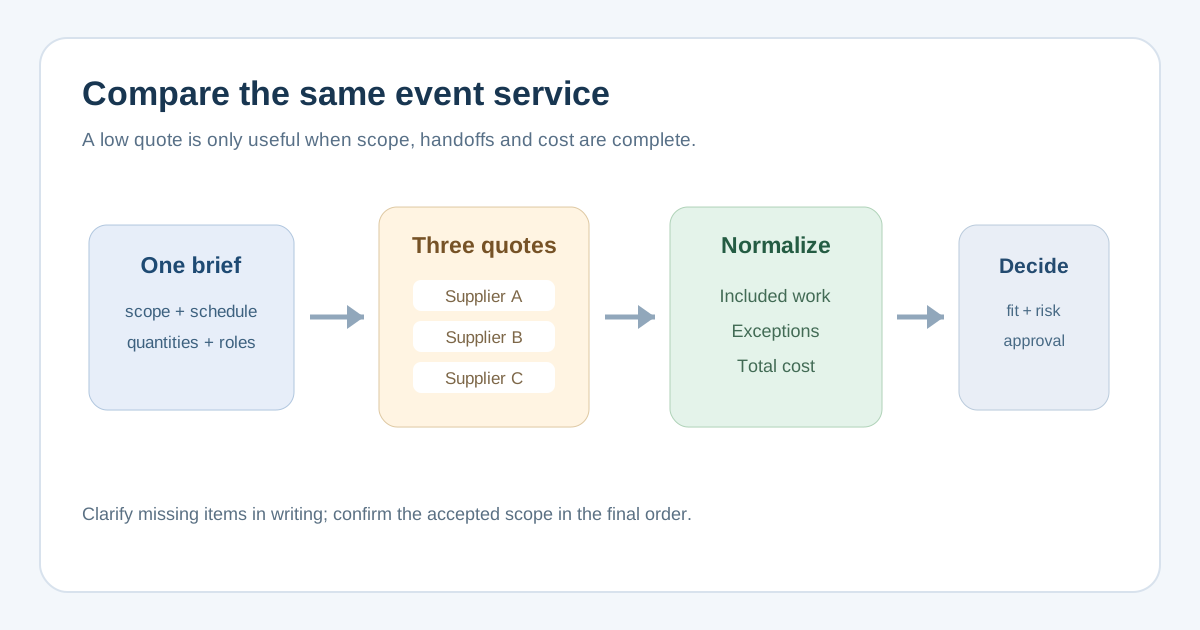
Three suppliers may quote the same event and price three different jobs. A lower total can omit setup crew, strike, delivery or tax; a higher one may include them. The first Google result for this search offers a useful vendor price comparison grid with quantities, vendor prices and tax. This event-specific workbook adds the operational scope and unknowns that determine whether those totals describe the same service.
Boletolibre editorial team
Published
Download the event vendor quote comparison spreadsheet
The editable XLSX compares up to three vendors for one service package. Start with the same RFQ or requirement list for all three. Fill the yellow cells: event, package, currency, each supplier quote, required scope, inclusion status, exceptions and the four cost components. Enter 0 only when a component truly does not apply. The calculated total stays blank until every cost component is supplied. The review status flags missing fields or deviations, but does not choose a winner.
Download the event vendor quote comparison template (XLSX)
Keep the original vendor quotes next to the workbook. This is an internal comparison aid, not a signed order, a tax determination or a substitute for the supplier agreement.
Make the quoted work comparable before reading the totals
Copy the required deliverables, quantities, units and dates from the request for quotation. Record whether each vendor explicitly includes each item, excludes it, marks it as an option, or leaves it unclear. In event work, check load-in access, setup and testing, show-time operators, consumables, breakdown and load-out, and handoffs for power, storage or badges. An assumption is not an inclusion just because it sounds customary.
| Check | What to record | Why the price can change |
|---|---|---|
| Deliverables | Specification, quantity, unit and service dates | A smaller package can look cheaper |
| Crew and time | Headcount, call times, coverage and overtime | The quoted price may end before the show does |
| Site handoffs | Who supplies access, power, lifts, storage and disposal | Another team may inherit a cost or task |
| Exceptions | Substitutions, exclusions, optional upgrades | A base total may omit a must-have item |
Smartsheet’s comparison template demonstrates the basic quantity, vendor price, tax and total layout. The added scope fields in this workbook address event-specific gaps before the totals are compared.[1]
Normalize price without rewriting the supplier’s quote
Use one currency and the same tax basis. Keep the quoted base amount separate from tax, required excluded work and other unavoidable charges such as delivery or labor. If a vendor includes a line another excludes, obtain a documented price for the missing work or ask for a revised quote. Do not invent an estimate and present it as a supplier commitment. The evaluated comparable total is your internal arithmetic: quoted base plus tax plus documented required additions plus mandatory charges. Keep the original quoted amount visible in the source quote.
Check quote validity, event-date availability, deposit, payment milestones, overtime and cancellation terms alongside price. A cash-flow difference or time-limited offer may matter even if the total is similar. A very low bid merits questions about omitted costs and ability to deliver, rather than automatic acceptance. Procurement guidance separates price from capability and advises clarifying unusually low bids; the principle is useful for an event buyer, though public-sector tender rules are not a legal template for a private event.[3][2]
Resolve unknowns and record the decision
Send concise, dated clarification questions tied to the requirement IDs. Ask each supplier to confirm inclusions, exclusions, substitutions and responsibility for site handoffs in writing. When a shared requirement changes, give all bidders the same updated scope and time to respond. Record the quote version and clarification response in the comparison. If a required item stays unclear, leave the decision open rather than forcing a numeric score.
- Reject a comparison that mixes different event dates, currencies, attendee quantities or staffing periods.
- Check that tax and mandatory extras are represented once, with no double-counted delivery or labor.
- Write the chosen supplier, approving owner, date and reasons, including fit, risk and total cost.
- Before work starts, confirm the final scope, schedule, price and change process in the appropriate order or contract.
New Zealand Government Procurement recommends evaluating against the stated requirements and keeping a written record of the decision. For private events, use that as a practical discipline, not as a claim that a particular public procurement regime applies.[3]
Sources and further reading
- Free Price Comparison TemplatesSmartsheet · Accessed
- Decide on your evaluation methodologyNew Zealand Government Procurement · Accessed
- Evaluating responsesNew Zealand Government Procurement · Accessed