Event planning decision log template: record the choice and its impact
When an event plan changes, a chat message saying “we decided” is easy to misread later. A decision log captures the question, alternatives, approver, reason and effects in one place. The leading Google result is a reusable decision-log template; this version adds the event-specific consequences that a general template may leave out: ticket launch, attendee information, schedule and budget.
Boletolibre editorial team
Published
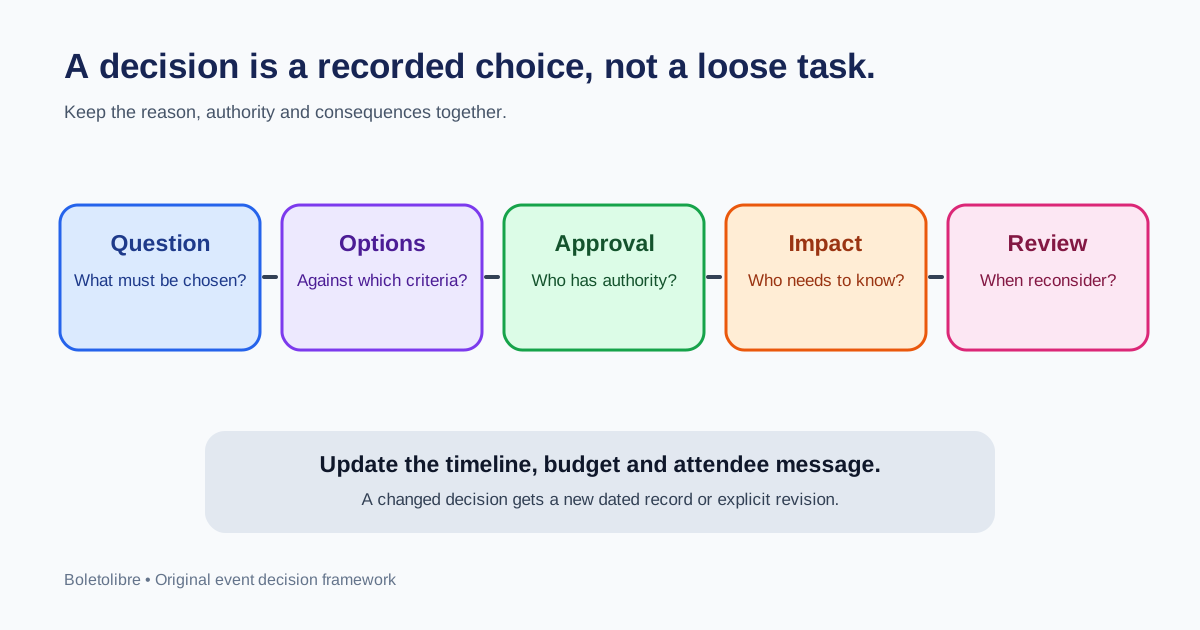
Log choices that change the plan
Record a decision when it commits money, changes an attendee promise, alters the event brief, shifts a milestone, selects a supplier or accepts a material risk. Do not turn every routine task into a decision. “Ask venue for capacity” belongs on the task timeline; “approve Venue B despite a later access handover” belongs in the log. Start a pending row before approval if the team needs a deadline and named authority.
| Example | Decision question | Downstream impact |
|---|---|---|
| Venue | Which venue meets access, capacity and cost limits? | Contract date, event page, travel information |
| Ticketing | When can public sales start safely? | Checkout verification, campaign launch |
| Check-in | Which fallback applies during an outage? | Staff training, attendee instructions |
Capture enough context to explain the choice
Use one stable ID and date per decision. State the question and real options, not just the winner. Record the criteria that mattered, the selected option and the reason. Name the actual person or body with approval authority; an assigned task owner may not have that authority. Add status such as pending, approved, deferred or superseded. Lark’s search-result template emphasizes basic fields including ID, date, description, rationale, impact, owner and status; the original worksheet below expands them for event operations.[1]
- Decision ID, question and deadline.
- Alternatives and criteria, including rejected tradeoffs.
- Approved choice, rationale, approver and date.
- Timeline, budget and attendee effects.
- Communication owner, follow-up action and review trigger.
Worked example: delay a ticket launch
The team wants to advertise Friday, but the controlled ticket purchase and confirmation email have not passed. The options are launch Friday or move promotion after verification. The event director decides to delay. The reason is to avoid sending attendees to a broken purchase path. The log records the expected effect on page publication and the campaign, any extra promotion cost, and which web and marketing owners must be told. The ticket lead owns the checkout test; the event director reviews the decision if the test still fails at the new deadline. The timeline holds the execution tasks; the decision log preserves why the date moved.
Connect decisions to work and preserve the history
After approval, link the decision ID to affected milestones, budget lines and published attendee copy. Notify the people who need to change work. If facts change, add a dated revision or a new decision that supersedes the old one; do not silently overwrite the original reason. Review open decisions at each planning meeting, but close completed follow-up tasks in the task tracker. Keep the shared log concise and store confidential supplier quotes, personal attendee information and contract details in restricted systems, linking only to authorized evidence.
Sources and further reading
- Decision Log TemplateLark · Accessed