Published event website update not showing? Find the stale layer first
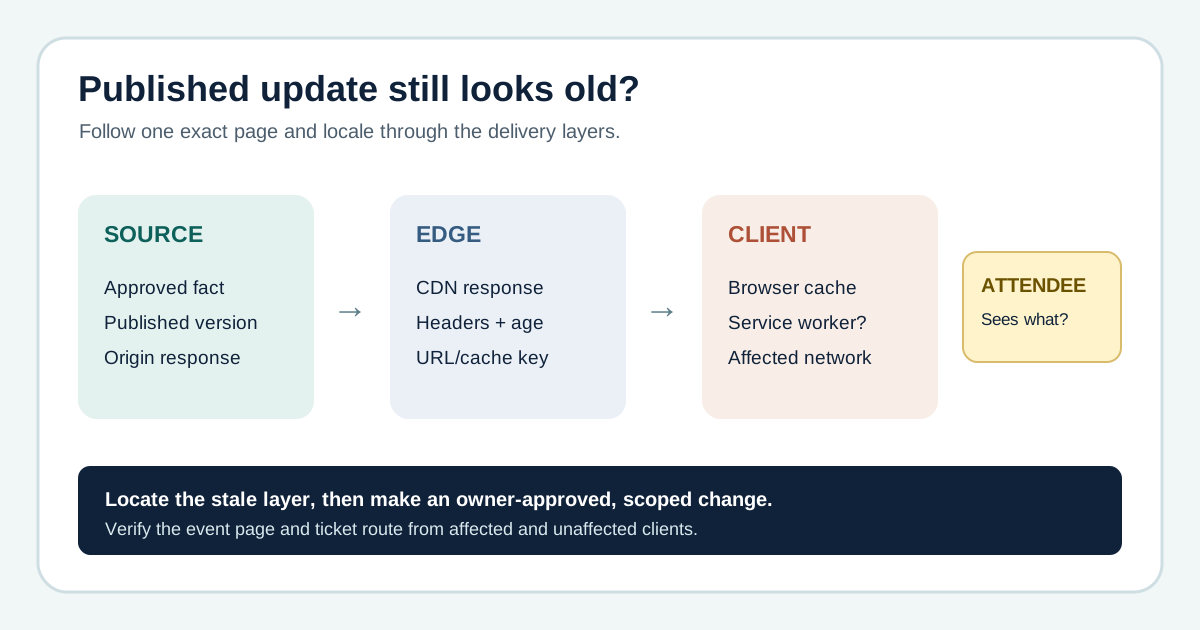
An organizer corrects a start time or venue note, publishes it, and still hears that attendees see the old version. Before changing a CDN cache, an event team needs to prove what was approved, what actually deployed, and which exact page or locale is stale. This worksheet traces one public URL through its delivery layers before an owner changes cache behavior.
Boletolibre editorial team
Published
Freeze the exact fact, URL and publication evidence
Download the original published-update diagnosis sheet (Markdown)
Record the approved new value and source of truth, old value reported, exact URL including language prefix and query string, publishing time, and CMS version or deployment identifier. Check whether the value lives in HTML, an API response, an image, an embedded schedule or hosted ticketing page. A stale page is different from conflicting editorial facts across several pages; resolve the approved content first if the source itself is inconsistent.
Compare origin, public edge and affected client
If you can safely access the published origin or a provider preview, confirm it has the new value. Then compare the same public URL from an affected device and an unaffected network, recording the visible value, response time and available headers such as Date, Cache-Control, Age and provider-specific cache status. An Age or cache-status header is evidence about a particular response, not a global verdict. Browser cache, service worker, intermediary proxy and CDN can each reuse content; a fresh profile helps isolate a client symptom but does not prove what every attendee receives.[2]
Make the smallest owner-approved change supported by evidence
If the origin is old, fix the publish or deployment rather than purging an edge copy. If the origin is new and the CDN serves an old object, the CDN owner can consider a URL-scoped invalidation or the provider’s versioned-asset approach. CloudFront documents that invalidating its edge does not necessarily remove a copy from browser or corporate caches; Cloudflare documents a single-file purge for a specific resource. Exact behavior and cache keys vary by provider, URL, locale and configuration. The AEM-first-result procedure is platform-specific, not a universal instruction to purge every cache.[1][3][4]
Check the attendee task from more than one client
After the authorized action is confirmed, repeat the same exact requests from affected and unaffected clients. Check the public event page, registration entry and external checkout or ticket link separately; a corrected page does not update a third-party flow by itself. If attendees may have acted on the wrong time, venue or access information, assign a support or communications owner and retain the evidence and correction time. Treat search snippets and social previews as separate update surfaces, not proof of the current live page.
Choose an update policy for time-sensitive facts
During planning, identify event facts that may change late and decide which HTML or API responses should revalidate more often, which assets use versioned filenames and who can perform a scoped purge. Test that policy before a high-stakes announcement. Avoid a universal cache duration: the right value depends on the content, platform and acceptable staleness. Keep a record of the exact route and locale so the next urgent correction can be diagnosed quickly.[2][3]
Sources and further reading
- AEM: Updated content not appearing on live pages due to CDN cachingAdobe Experience League · Accessed
- HTTP cachingMDN Web Docs · Accessed
- Invalidate files to remove contentAmazon CloudFront documentation · Accessed
- Purge by single-fileCloudflare documentation · Accessed