German event page text expansion QA checklist
A German event page can be linguistically accurate and still hide its most important action. Longer labels and compound words may wrap differently from the source language, especially in navigation, cards and ticket controls. This checklist focuses on the rendered attendee journey rather than a predicted expansion percentage. Use the approved German wording and real event data; a placeholder or automatic translation cannot show whether the final page works.
Boletolibre editorial team
Published
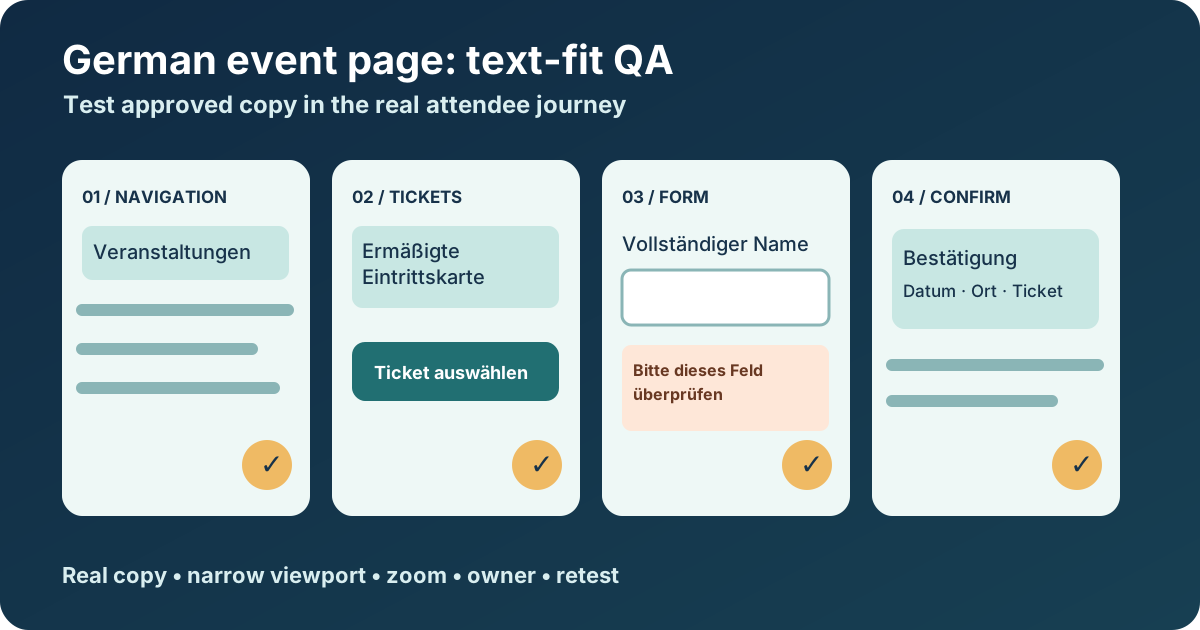
Start with the approved German copy and the real states
Download the German event-page layout QA worksheet (Markdown, English)
Collect the event title, venue, ticket tier names, price and currency, date and time, accessibility information, and primary action from the current approved edition. Include sold-out, postponed, validation-error and long-name states. Ask a German-literate reviewer to confirm meaning; the visual reviewer should not shorten a policy or ticket condition merely to fit a button.
W3C notes that translated text can change length and that German compound nouns may not wrap where an English phrase does. Treat that as a reason to test the actual strings, not as a fixed growth factor for every label.[1]
Inspect the places where space is tight
Open the German page at desktop and narrow mobile widths. Inspect navigation, event cards, title and venue blocks, schedule tabs, ticket selectors, price, availability badges and the main call to action. Then inspect field labels, help text, error messages and the confirmation. Look for clipping, overlap, inaccessible controls, misleading separation of price from its ticket type, and a wrapped action that no longer looks actionable.
The accompanying sheet records each surface, approved German string, viewport, observed break, attendee impact, owner and retest. Photograph or link the exact state. A screenshot of the normal page cannot approve a sold-out or failed-payment message.
Check resize, reflow and the ticket handoff
Increase text size and zoom while following the same task. W3C accessibility guidance expects text to resize without loss of content or function, and describes reflow at narrow effective widths. Use those checks to discover a cut-off button or two-direction scrolling; do not call a single screenshot an accessibility certification.[2][3]
Follow the registration link to the point controlled by your site. If checkout is hosted elsewhere, record the boundary and inspect the provider’s German label or stated language fallback separately. If the event is listed on Boletolibre.com, compare the published event facts and ticket destination with the German page before approval.
Fix the component without weakening the wording
Prefer flexible containers, wrapping and enough vertical room over shrinking type. A short approved alternate label can help when it preserves the same action, but a developer should not silently abbreviate a ticket condition or replace a specific access instruction with a vague phrase. Test the component with the longest approved real string and with the normal string.
Scope fixes to the failing component. A global word-breaking rule may solve one compound noun while harming titles, names or ticket codes elsewhere. Recheck focus order, touch target and adjacent content after the layout changes.
Record a decision and retest the final page
Log the affected URL or preview revision, locale, component, device width, exact wording, observed failure, decision owner and before/after evidence. Mark whether the issue blocks purchase or access information, impairs reading, or is a cosmetic preference. Assign a fix and retest the same state and nearby content.
Approve only the revision attendees will see. Reopen the check when a new ticket tier, venue, translated policy, sponsor name or event edition changes the copy. The worksheet supports review and handoff; it cannot establish translation quality or legal compliance by itself.
Sources and further reading
- Text size in translationW3C Internationalization · Accessed
- Understanding SC 1.4.4 Resize TextW3C WAI · Accessed
- Understanding SC 1.4.10 ReflowW3C WAI · Accessed