Event website translation review checklist and issue log
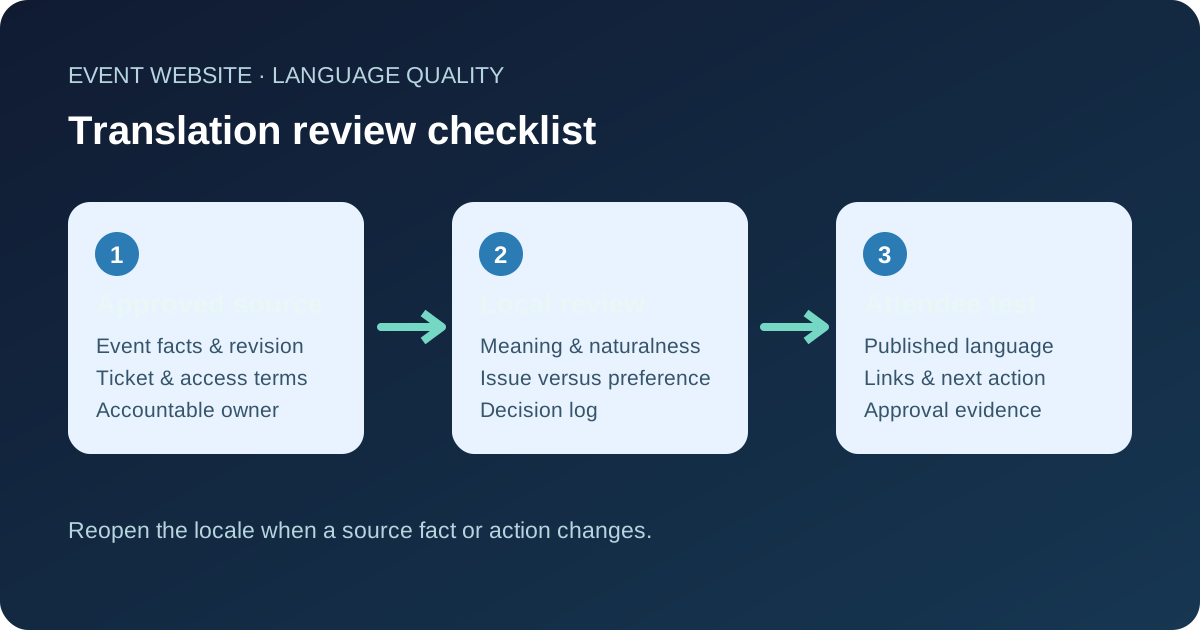
A translated event page can read smoothly and still send people to the wrong entrance, time or ticket. Review quality against the approved source and the real attendee journey, not spelling alone. This checklist and editable issue log help a native-language reviewer record what is wrong, who can decide it and what was actually retested.
Boletolibre editorial team
Published
Download a reviewer worksheet
Download the editable translation review checklist (Markdown)
Copy the sheet once per event page, target language and source revision. Record reviewer, decision owner, preview or public URL and status. Its issue log separates a wrong fact or blocked action from a wording preference, then captures the approved fix and retest evidence. A review mark from an old source version is not approval of a new one.
Give the reviewer the event, not just two columns of text
Send the approved source URL and revision, target audience, event edition, terminology list and the action the page must support. Flag the authoritative sources for date, time zone, venue, entry gate, price, ticket availability and access instructions. If the source itself is ambiguous, ask its owner to resolve it before polishing the translation. A reviewer cannot verify a claim against a draft nobody owns.
Let a person who knows the target language and event context read the page in its final layout. Translation is only one part of localization: W3C also describes adaptation to the language, culture and region of the intended audience. A literal sentence can be grammatically correct yet unclear to a local attendee.[1]
Check meaning and omissions first
Compare the target page with the approved source paragraph by paragraph. Look for missing conditions, extra promises, reversed negatives and uncertain pronouns. Give special attention to purchase, cancellation, access and check-in wording because readers may act on it. Do not rewrite policy meaning for fluency. If a passage is legally or operationally sensitive, route the decision to its qualified owner and record the hold.
- Can a reader identify the same event, edition, date, start time and time zone?
- Do ticket type, price, availability and any stated limitation mean the same thing?
- Are venue, accessible entrance, travel and contact instructions complete?
- Do headings, buttons, image text and confirmations support the same next step?
Check naturalness, formats and the real page
Read the translated page without looking at the source. Ask whether its tone, terminology and labels sound native to this audience rather than mechanically translated. Keep proper names consistent, but do not force unfamiliar abbreviations into navigation or buttons. W3C advises attention to language declarations, translatable text in images and local conventions for dates, times, numbers and addresses; review these in context instead of applying a universal format.[2]
Open the actual page on a narrow screen and follow each important link. A translated button may wrap, a date may be cut off, or a link may land on an unrelated language or event. If the event is listed on Boletolibre.com, compare its published event facts and ticket destination with the localized website copy. Do not assume a reviewed string is also a working page.
Separate errors from preferences
For each issue, save the URL or element, source fact, current wording, proposed wording, impact and decision owner. A wrong start time, omitted accessibility condition or broken registration link needs correction before approval. Two equally clear phrasings are an editorial preference and should not silently block an urgent factual fix. When reviewers disagree, write the reason for the decision instead of overwriting their comments.
Mark the exact page revision you inspected. After changes, the reviewer checks the altered passage and its surrounding context, then opens the final URL and next action again. Where a correction affects email, checkout or signs, tell the owner of those channels; a website-only fix can leave conflicting attendee instructions.
Approve only the version people can use
Approve a locale when high-impact issues are resolved, the real page has been checked and the owner has evidence of the final wording and links. Keep unresolved minor preferences visible without calling them factual defects. If the source event fact changes after approval, reopen affected locales and linked messages. Do not represent a draft, machine translation or unreviewed locale as fully reviewed.
This worksheet is an editorial control. It does not certify legal compliance, guarantee accessibility or substitute for testing the registration and ticketing path.
Sources and further reading
- Localization vs. InternationalizationW3C Internationalization · Accessed
- Internationalization Quick Tips for the WebW3C Internationalization · Accessed