Add a skip link to a website template and test the whole journey
A visitor opening several event pages should not have to tab through the same logo, menu, search box and ticket controls every time before reaching the event details. A skip link gives keyboard users a direct route to the main content. Its usefulness depends on more than a visible “Skip” label: the destination must exist on every page, keyboard focus must land beyond the repeated controls, and the next Tab must continue through the content.
Boletolibre editorial team
Published
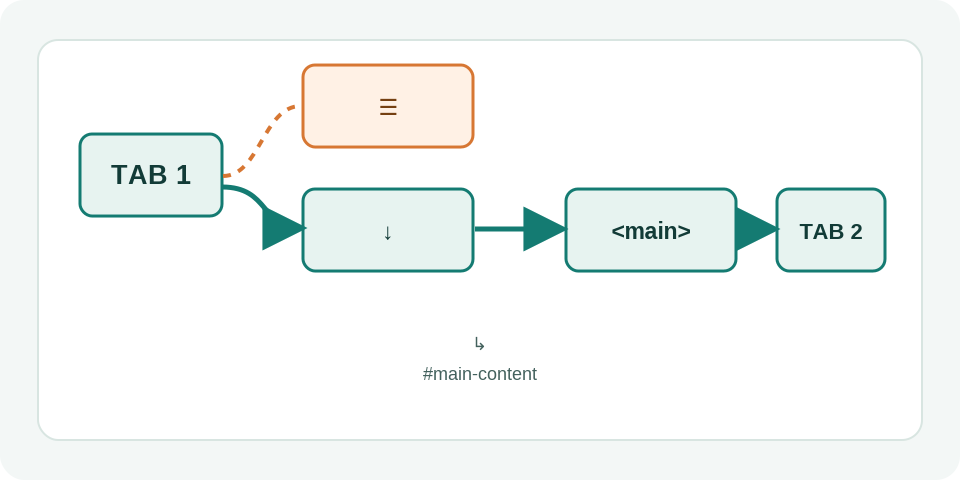
Use the skip link for the repeated block
WCAG 2.2 success criterion 2.4.1 asks for a mechanism to bypass content repeated across pages. It does not demand one specific widget called a skip link; semantic headings and landmarks can also help some users. A direct link remains a practical mechanism for sighted keyboard users who cannot use a screen-reader landmark command. On a multi-page event site, the repeated block may contain the brand link, primary navigation, account controls, search, sponsor strip and a recurring ticket button. The intended landing place is the beginning of the unique page content, such as the event title and details.[1][2]
An ordinary in-page table of contents serves a different task. It helps a visitor jump between sections after they have reached the page body. A skip link lives before the repeated site chrome and bypasses it. If a page has only a tiny repeated block, a link may add more clutter than benefit; assess the actual keyboard route. For most full site headers, one route to main content is enough.[1][2]
Treat this as a shared template decision. Adding a link in one CMS article while the header is generated elsewhere produces inconsistent behavior. Place the link near the beginning of the document order on every relevant page template, before the repeated controls. The accessible name should say where it goes, such as “Skip to main content.” Translate that label with each page language.[2][3]
Connect a real link to one real destination
Use a normal anchor with a fragment target, for example href="#main-content", and give the main content container the matching id="main-content". The main element identifies the dominant content of the document and can serve as the target. Keep that id unique within the page. The link should remain present in the document even when it is visually tucked away before focus. A button without a reliable target, an empty href, or a destination on an element that does not contain the page’s actual content does not complete the journey.[4][2]
A main element can have tabindex="-1" when you need a dependable programmatic focus target without making it another ordinary Tab stop. Do not use a positive tabindex value to reorder the page. Browser and framework navigation behavior can differ, so the practical acceptance test is whether activating the link moves keyboard focus to the main content and the next Tab reaches the first relevant control after it. If the URL fragment changes or the page scrolls while focus stays in the header, the mechanism is incomplete.[8][2][6]
Download the skip-link pattern and test record (Markdown, English)
Make the control discoverable when focused
A skip link can remain visible all the time, or it can be visually tucked away until keyboard focus reaches it. W3C’s easy check accepts a focus-only presentation when the link becomes highly visible. Do not use display:none or a hidden attribute for the only skip link: those remove it from normal keyboard navigation. A simple offscreen position that returns on :focus is easier to reason about than a chain of opacity and clipping rules.[3][2]
Give the focused link a solid background, readable text, a visible focus indicator and a stacking level above the header. Check it against hero imagery, sticky navigation and narrow mobile widths. Focus visibility is a separate WCAG requirement; an outline erased by global CSS makes the link hard to use even when it is present. Do not let a sticky header cover the destination or its first focusable item after activation.[5][7]
A fixed header can hide the target at the top of the viewport after fragment navigation. If it does, adjust the page’s scroll offset, for example with scroll-padding-top on the scroll container, and retest at normal and enlarged text sizes. The exact offset depends on the header’s actual size at each breakpoint; a hard-coded number that works on desktop may fail when the mobile header wraps.[9][7]
Run a keyboard journey on representative pages
- Reload the page and put keyboard focus in the page document rather than the browser toolbar. Press Tab. The first focusable page control should be the skip link, and its label and focus indicator should be easy to see.
- Press Enter. Confirm that the view reaches the page’s unique content and that keyboard focus is no longer trapped among header links. Press Tab once more; it should continue in a sensible content order rather than returning to the menu.
- Use Shift+Tab to check the reverse path. Repeat with a narrow viewport or zoomed text, where sticky navigation and wrapped labels can cover the target.
- Try the homepage, a detail page, a long agenda or listing page, and a page with a modal or menu. Check localized templates separately; a translated shell may use a different layout or duplicate id.
A page can pass a quick visual glance while failing the important part. Common symptoms are a focused link that remains behind a sticky bar, an anchor that points to an id absent from a CMS layout, a jump to the top of the page because href="#" was used, or a scroll without a useful focus transition. Record the current focus location, target id and next Tab destination instead of reporting only “skip link broken.”[2][4][7]
| Observation | Likely place to inspect | Repair and retest |
|---|---|---|
| No link on first keyboard pass | Shared header template or focus-only CSS | Ensure the anchor is early in document order and appears on focus |
| Link appears but Enter does nothing useful | href and main id mismatch | Match the fragment to one real main target |
| Page scrolls; next Tab returns to header | Focus handling at target or route transition | Make main focusable as needed and repeat the Enter/Tab test |
| Target is behind sticky header | Scroll offset or header layout | Adjust offset for each layout and retest at zoom |
Publish through the right template owner
Identify which layer owns the public page shell: CMS theme, application layout, or a hosted-site template. Apply the pattern there so every page with the repeated header receives the same link and a valid destination. If separate event, article and ticket-information templates exist, review each one. An embedded checkout hosted by another provider is a different document and must be assessed on its own; a link on the marketing site cannot bypass that provider’s header.[1][2]
Before release, check that the localized label is accurate, the destination id is unique, the control does not obscure another focused item, and the route works without a pointer. After release, inspect the public page rather than relying on a staging screenshot. Keep a small regression record for one page per template and language. When a new sticky promotion bar or navigation item appears, rerun the journey, because the repeated block and viewport geometry have changed.[3][5][7]
The pass condition is operational: the visitor can reach main content efficiently, see the skip link while focused, and continue through the page in a coherent order. A checkbox saying “skip link present” does not prove this. Conversely, WCAG 2.4.1 is about a bypass mechanism, so do not state that every site without this exact anchor necessarily fails that criterion.[1][2][6]
Sources and further reading
- Understanding Success Criterion 2.4.1: Bypass BlocksW3C WAI · Accessed
- Technique G1: Adding a link at the top of each page that goes directly to the main content areaW3C WAI · Accessed
- Skip Link — Easy ChecksW3C WAI · Accessed
- The main HTML elementMDN Web Docs · Accessed
- Understanding Success Criterion 2.4.7: Focus VisibleW3C WAI · Accessed
- Understanding Success Criterion 2.4.3: Focus OrderW3C WAI · Accessed
- Understanding Success Criterion 2.4.11: Focus Not Obscured (Minimum)W3C WAI · Accessed
- The tabindex HTML global attributeMDN Web Docs · Accessed
- The scroll-padding-top CSS propertyMDN Web Docs · Accessed