Audit missing hreflang return links after a website update
A translated event page can load correctly in every language while its search annotations disagree. A “missing return link” means one page names another as an alternate, but that other page does not name the first one back. Use this audit when a locale is added, a slug changes, or a CMS template is republished.
Boletolibre editorial team
Published
What the warning actually tests
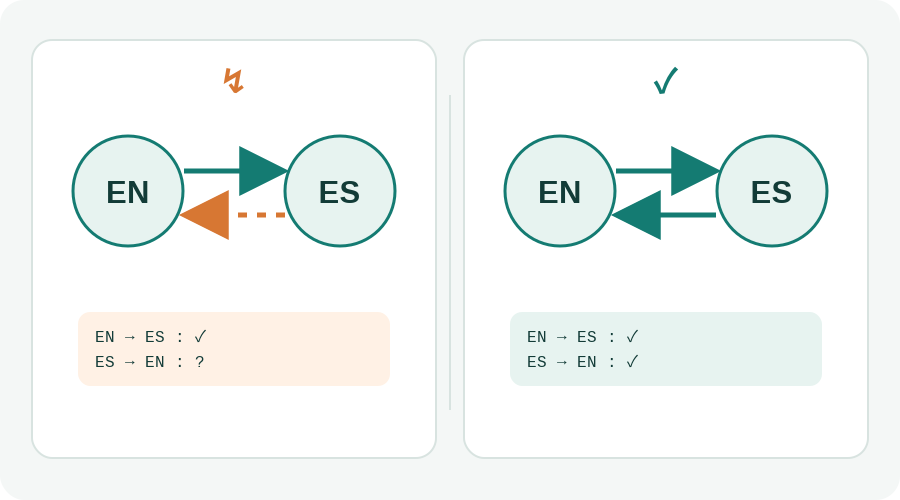
Hreflang describes equivalent page versions for different languages or regions. It is a search annotation, not the visible language switcher and not a substitute for translated main content. Google asks each version to list itself and the other versions with fully qualified URLs. If page A points to page B, B must point back to A; otherwise Google may ignore or misinterpret that pair of annotations. This is narrower than saying the whole multilingual site is broken. Google also says it can process reciprocal pairs even when a very large site cannot maintain every possible cross-link.[1]
Example: an English event guide at https://example.com/en/guide and a Spanish guide at https://example.com/es/guia are the same guide in two languages. The English page lists hreflang="es" pointing to https://example.com/es/guia, while the Spanish page lists only itself. The missing entry is hreflang="en" on the Spanish page pointing to the English guide. Adding a language-switcher button in the page body alone does not repair this search annotation.[1]
Do not manufacture a pair between different events, an old edition and a new edition, or a guide and a checkout page merely to make an audit tool green. The first question is whether the two URLs really represent the same underlying page for different audiences.[1]
Write the expected URL group before touching tags
Choose one affected page family and write an expected row for each published translation: language or region code, exact live URL, content equivalent, and current publication owner. Follow the final public URL, including scheme, host, path, slash and any redirect. If the Spanish guide was unpublished, it does not belong in the expected group. If its path changed, record the new destination and treat old links as stale references, not as a missing translation.[1][2]
- Check that each URL serves the intended language and that the primary page content answers the same visitor question. A translated navigation shell around unchanged main content is not a completed translation.
- Use language codes such as en, es or fr; add a region only when the audience targeting actually differs. A country code alone is not a valid hreflang language value.
- Decide whether there is an actual fallback page for unmatched languages. x-default is an optional fallback annotation, not a code to add reflexively to every group.
Download the reciprocal-link audit worksheet (Markdown, English)
Inspect what visitors and crawlers receive
Inspect the published page, not only the CMS editor or a cached preview. In an HTML implementation, examine the response document’s well-formed head for link elements with rel="alternate", hreflang and an absolute href. Record the entries from A and from B separately. Some sites instead publish hreflang through HTTP Link headers or an XML sitemap; Google treats these methods as equivalent, so inspect the method the site actually owns. Using all three adds maintenance work without a Search benefit.[1]
A URL in an hreflang entry should be a final, intended page URL, not a redirecting old slug, preview host, HTTP variant, or query-driven duplicate. Compare the displayed link exactly with your expected row. A small difference in host or trailing slash can mean the target is a different URL from the one you reviewed. Then inspect the target page’s own output rather than inferring reciprocity from the source page.[1][2]
| Observation | Likely source | Next check |
|---|---|---|
| B has no entry for A | One locale template or metadata row is incomplete | Compare the page-family record and template output on both locales |
| B points to an old A URL | Slug or host moved without regenerating alternates | Resolve the redirect and update the source URL map |
| B points to a different event | Wrong content-equivalence mapping | Correct the pair rather than adding more tags |
| B returns a canonical to another language | Possible canonical conflict | Review the canonical of B and its intended indexable URL |
Repair the source of the mismatch
Update the CMS translation relationship, route map, or rendering template that generates the annotations. For a two-page group, both published documents should include a self-reference and a reference to the other page with the correct codes and final absolute URLs. For a larger group, generate the set from one verified equivalence map so a new locale does not update only one page. If a translation is intentionally absent, remove its stale annotation from the remaining pages rather than redirecting that locale’s URL to unrelated content.[1]
Keep canonical and hreflang decisions separate. Google recommends a canonical in the same language when using hreflang, or the closest substitute language if none exists. A translated page that canonicals to a different-language URL may contradict the intended localized set; inspect the actual canonical before changing tags. Use redirects for retired duplicate URLs, not as a replacement for a return annotation on a live translated page.[2]
For HTML, place each alternate element in the head. For a sitemap implementation, each URL entry needs its own loc and the same alternate set, including itself. For HTTP headers, the Link set is returned with every version. Choose the publishing layer your site can keep consistent. If a plugin writes unexpected canonical or hreflang values, capture a before/after URL pair and fix that plugin or its configuration at the source.[1][2]
Retest a small representative set
- Fetch A and B after publication, record response status and final URL, and verify the main content and language of each.
- Compare each page’s published alternate set with the expected map. Every intended pair must return in the opposite direction; each page must also list itself.
- Check that canonical signals lead to the intended same-language page and that no old slug, staging host or unpublished locale remains in the set.
- Repeat for a second page family generated by the same template and one family with a missing translation. This catches a template fix that only works for the example.
If you have Search Console access, URL Inspection can show Google’s indexed view and Google-selected canonical. Its live test helps check accessibility of a current URL, but it does not test every indexing condition or predict the eventual canonical. Use it as supporting evidence after the published page-pair test, not as the only pass criterion.[3]
Record the repair date and sample URLs, then monitor after recrawling. A recrawl request or updated sitemap can help Google discover a change, but Google says crawling may take days or weeks and inclusion in search is not guaranteed. The immediate success criterion is consistent published annotations, not a promise that the search result will switch today.[4]
Keep the next locale launch from reopening the issue
Make “published in this locale” an explicit state in the page-family record. On publish, unpublish or slug change, regenerate the alternate set for every affected version and check the final rendered output. Give one owner the URL-equivalence map and another person the release check, so translations cannot quietly diverge from templates.[1]
Keep the worksheet with the change record. Its rows show which URL pair failed, whether the fault was missing reciprocity or a wrong destination, who owns the generator, and what was observed after publication. That is more actionable than a screenshot of a crawler warning alone.
Sources and further reading
- Tell Google about localized versions of your pageGoogle Search Central · Accessed
- How to specify a canonical with rel="canonical" and other methodsGoogle Search Central · Accessed
- URL Inspection toolGoogle Search Console Help · Accessed
- Ask Google to recrawl your URLsGoogle Search Central · Accessed