Canonical URLs for event pages: choose the right preferred version
An event page may be reachable through its clean address, a campaign tracking link, a print view and an old website path. A canonical URL is the version you prefer search engines to use when several addresses have duplicate or very similar content. The leading Google result for this question is Google Search Central’s canonicalization guide. It explains that redirects and rel="canonical" are strong preference signals, while sitemap inclusion is weaker; Google still makes the final choice. The first task is therefore editorial: decide whether the pages really represent the same event content.
Boletolibre editorial team
Published
Compare the visitor answer before merging URLs
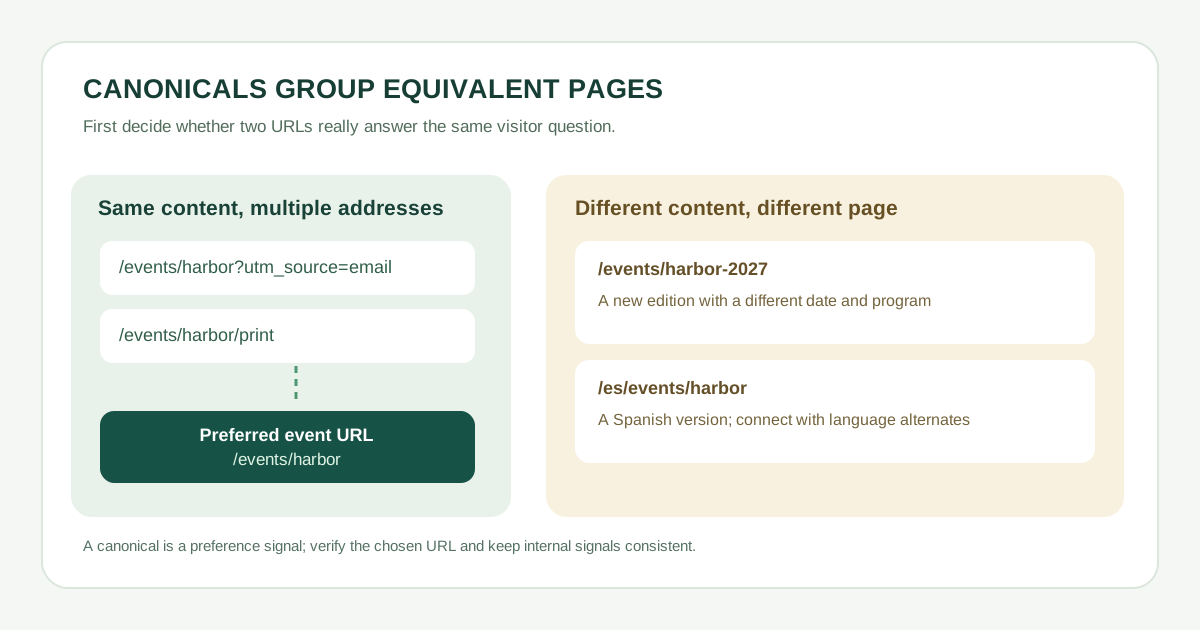
Open both URLs side by side. Are event date, venue, program, ticket terms and audience substantially the same? A tracking parameter such as ?utm_source=email normally changes attribution, not the page answer. A print view may change layout only. Those are candidates to point at one clean URL. A different annual edition with a new date or lineup is usually a different answer; do not automatically canonicalize last year’s page to this year’s event. Distinct ticket-tier pages also need a content and purpose review before any consolidation.
| Pair | Same essential content? | Decision |
|---|---|---|
| Clean URL and campaign parameter | Usually yes | Prefer clean event URL |
| Public page and print view | If only layout differs | Prefer public page |
| 2026 and 2027 event editions | Usually no | Keep each edition distinct |
| English and Spanish page | Language differs | Use a canonical in each language |
Choose a method that fits the URL’s lifecycle
If an obsolete duplicate should no longer be visited, redirect it permanently to the preferred page. If two near-identical HTML pages must remain accessible, add a rel="canonical" link in the duplicate’s HTML head to the preferred absolute URL, and put a self-referential canonical on the preferred page. Include only preferred URLs in the XML sitemap. Google describes redirects and canonical links as strong signals and sitemap inclusion as a weak signal; none is an absolute command.[1]
- A campaign URL can still work for sharing; its canonical can point to the clean event URL. Use clean internal links when possible.
- Do not canonicalize a checkout on a third-party ticket provider unless you own and can configure that provider’s page. Instead, keep the organizer’s public ticket information clear and link visitors to checkout.
- Use one preferred host, protocol and path format consistently. Avoid a sitemap that suggests one URL while the page’s canonical points elsewhere.
Download the editable event canonical decision worksheet (CSV)
Keep editions and languages distinct
A new annual edition may reuse branding yet have its own date, lineup, pricing and practical information. If you want an evergreen series overview, create a separate page for that purpose and link to individual editions. Do not use canonical tags to hide genuinely different event pages.
Translated event pages should normally identify a canonical URL in their own language, then connect language versions with appropriate hreflang alternates. Google specifically recommends a same-language canonical when hreflang is used. A Spanish page should not casually canonicalize to English and disappear as a distinct search candidate.[1]
Check the signals after publication
- Load both URLs. Verify the preferred page returns useful content and a duplicate behaves as intended: redirect or still-accessible page with a canonical in its HTML head.
- Check the canonical is an absolute URL, points to the intended page, and is self-referential on the preferred page.
- Inspect internal links, sitemap entries and language alternates for conflicting preferred URLs. Do not use robots.txt or noindex as a substitute for choosing a canonical.
- Check Google Search Console’s URL inspection for the user-declared and Google-selected canonical when available; if they differ, examine content similarity and conflicting signals rather than repeatedly changing tags.
Maintain a small register of duplicate variants and owners. Update it when an event is rescheduled, a new edition launches, or a former URL is retired; a one-time canonical decision can become wrong as content changes.[1]
Sources and further reading
- How to specify a canonical URL with rel="canonical" and other methodsGoogle Search Central · Accessed