How to choose a hosting region for an event website
A host may offer several data-center regions, and the nearest one is an attractive default. The leading Google discussion asks whether testing a provider’s sample server before deploying the actual site is enough. It is not: the event experience also depends on CDN cache hits, the application and database, and an external registration or ticketing platform. Compare candidate regions against those real paths before committing.
Boletolibre editorial team
Published
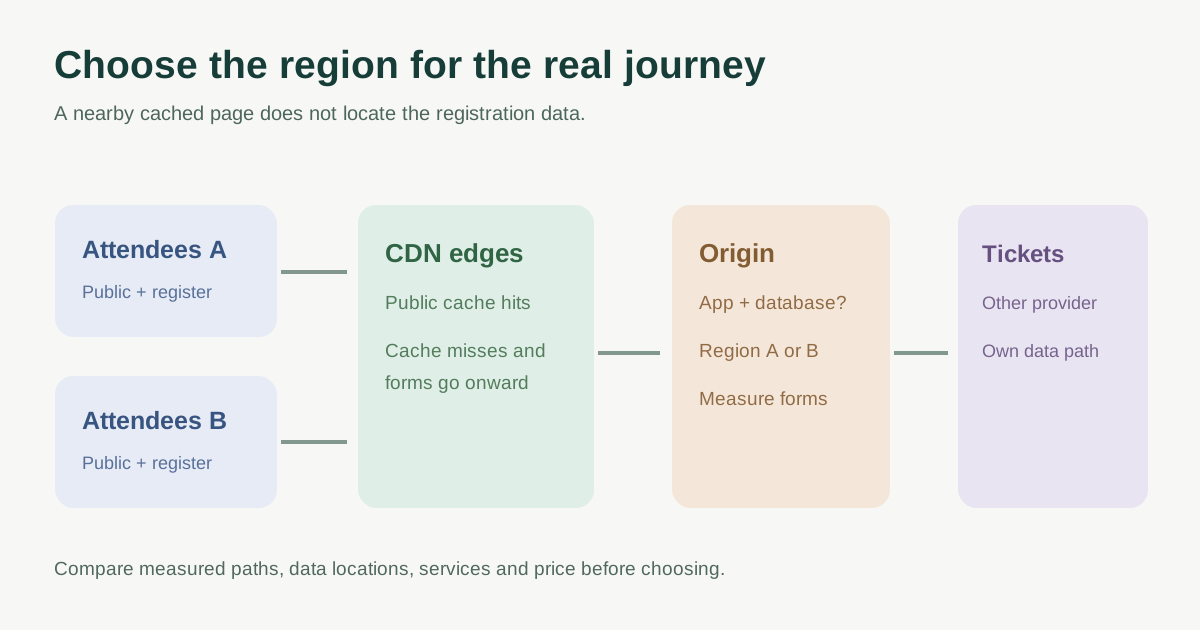
Map attendees and the requests that matter
Use event analytics or registration history to identify where likely visitors actually are. Separate public event pages, images and schedules from uncached form submission, availability checks, account pages and checkout. Include staff/admin access if it is operationally important. A global audience may not have one obvious closest origin; test representative networks rather than applying a fixed majority threshold.[2][3]
| Path | Audience location | Origin or dependency | Measure |
|---|---|---|---|
| Public event details | _____ | CDN/cache or origin | Page response and cache hit |
| Registration form and API | _____ | App and database regions | Completion time and errors |
| Ticket availability/checkout | _____ | Ticket/payment provider | Handoff and confirmation |
| Editor/admin workflow | _____ | CMS or origin | Save and publish time |
The CDN and origin are different locations. A cached poster may load quickly from a nearby edge while a personalized registration request still travels to the origin. CloudFront documents separate cached and dynamic request paths; measure both. DNS or ping to a provider demonstration domain does not reproduce your event application, database or third-party flow.[4]
Check where data and operations actually live
List the web runtime, database, backups, logs, analytics, email and ticketing provider locations separately. Moving only the page server may increase the application-to-database round trip. Ask each provider what region choices, regional services, failover and support windows are actually offered. AWS notes that service availability and regional cost vary.[2][3][5]
If contracts or applicable rules constrain attendee data location or transfers, record the exact data flow and obtain qualified review for the relevant jurisdiction. A server in one region does not prove every processor, backup or log remains there. Do not equate an edge cache location with the legal or technical location of the underlying record.
Compare two or three viable regions with one test plan
Shortlist regions that meet feature, data-handling and operations requirements. For each, estimate total hosting and data-transfer cost using the provider’s current quote. Deploy the same representative test flow or use comparable measured production data: public cache hit and miss, form submission, database-backed request and ticketing handoff from attendee locations. Repeat at a meaningful peak if authorized. Avoid drawing a winner from one synthetic speed-test server.[1][5]
Write down the chosen region and the trade-off: which attendees gain, which paths remain slower, whether a CDN helps the public page, who owns cross-region dependencies and when the choice will be reviewed. The worksheet below makes unknowns visible before purchase or migration.
Download the event website region decision worksheet (Markdown, English)
Sources and further reading
- What to be aware of when choosing a web host data center locationr/webhosting · Accessed
- AWS RegionsAmazon Web Services · Accessed
- Choose your workload location based on network requirementsAWS Well-Architected · Accessed
- How CloudFront delivers contentAmazon Web Services · Accessed
- Choose Regions based on costAWS Well-Architected · Accessed