Prepare event website hosting for an on-sale traffic spike
An on-sale announcement can send many visitors to the same event page within minutes. The useful question is not a universal “visitors per day” rating: it is what each arrival makes your origin, registration service and ticketing partner do at the busiest moment. Start with a documented scenario, then ask each provider to confirm its actual limits and recovery path.
Boletolibre editorial team
Published
Write a peak scenario, with assumptions visible
Record launch time and time zone, expected announcement reach, estimated click-through, the fraction arriving in the first few minutes, and the paths they take: event page, schedule, registration, availability check, checkout and confirmation. These are planning assumptions, not measured concurrency. Keep a low, expected and high case; replace estimates with historical analytics or a controlled rehearsal when available.
| Question | Working estimate | Who confirms it? |
|---|---|---|
| Arrivals in the busiest minute | _____ | Marketing and analytics |
| Requests per arrival by page or API | _____ | Website and ticketing teams |
| Concurrent registration or checkout sessions | _____ | Ticketing provider |
| Image and asset transfer per visit | _____ | Web/CDN owner |
| Duration of the burst and retry behavior | _____ | Campaign and support owners |
A page view is not a request count: images, scripts and API calls can multiply work. Concurrent sessions also depend on how long a visitor remains in a flow. Do not convert reach directly into server size without measurements.
Separate cacheable pages from live transactions
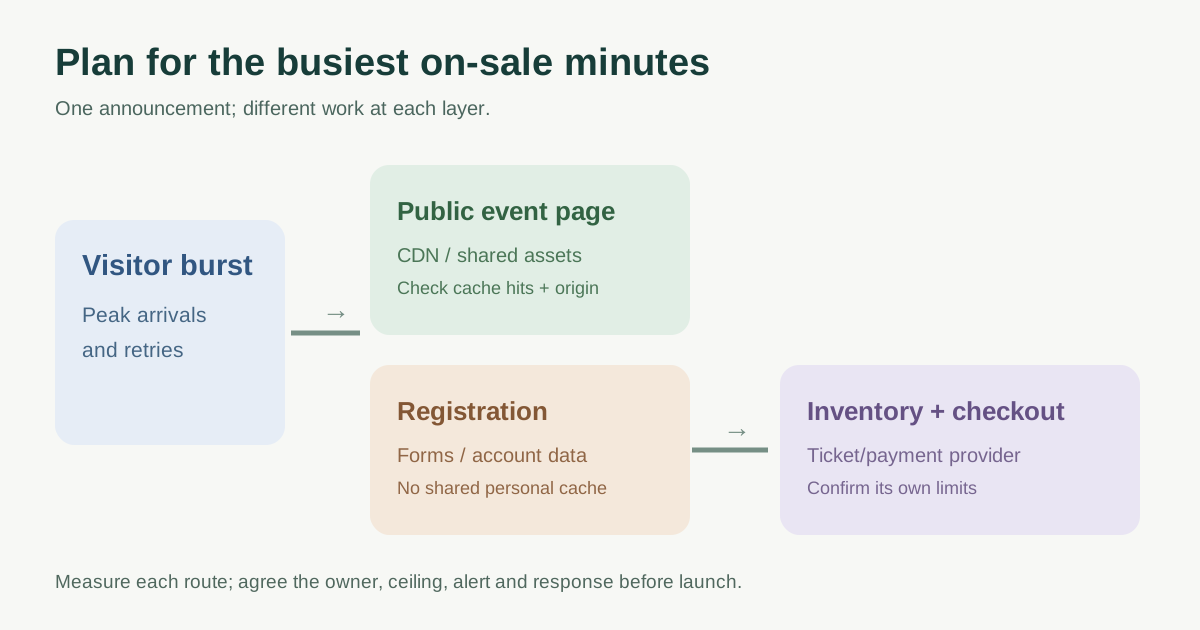
Cache public event details, posters and other shared assets where the content and update policy allow it. A CDN may reduce origin requests for these resources; confirm real cache-hit behavior. Keep personalized registration, seat availability, account pages, cart and checkout out of shared caches. Cloudflare documents rules that bypass cache based on a cookie; the correct rule depends on the application and must be reviewed against authenticated flows.[1][4]
Map every dependency after the event page: forms, inventory, payment, email and ticket delivery. If checkout is hosted elsewhere, the website host cannot promise its capacity. Ask the ticketing provider about rate limits, queue or waiting-room behavior, webhook backlog, duplicate submissions and support coverage during the sale.
Ask for a capacity and scaling decision before launch
Give the host the scenario and ask which limits actually apply: concurrent connections, origin CPU/memory, serverless concurrency, database connections, bandwidth, CDN request limits and deploy or scaling lead time. Ask whether hitting a limit queues, throttles, fails, or incurs extra cost. If the sale time is known, ask whether capacity can be prepared ahead of it; scheduled scaling is a provider-specific option, while reactive scaling needs headroom during its response time.[2][3]
Rehearse an approved, representative flow in a production-like non-production environment where practical. Increase load gradually, measure error rate, response time and origin utilization, and confirm that test identities/payments cannot create real orders. AWS recommends non-production load testing and checking maximum scaling limits. Agree any provider permission and test ceiling first; a sudden live stress test can harm real attendees.[2]
Make the launch observable and reversible
Assign an owner to the public page, origin, database, CDN, form and ticket vendor. Before launch, verify event details, cache exclusions, monitoring, alert destination, provider contact path and the latest safe rollback. During the burst, watch error rates, slow routes, cache misses, registration completion and checkout handoff—not just total visits. Record who decides to pause promotion, switch to a clearly labeled waiting page or escalate to the vendor.
After the sale, compare the observed peak with the three scenarios. Capture the first bottleneck, any attendee-facing failure and the provider response. Update limits and the next launch plan rather than treating one quiet event as proof of unlimited capacity.
Download the on-sale hosting scenario and provider questions (Markdown, English)
Sources and further reading
- How to Prepare Your Website for a Sudden Traffic SpikeAsushost · Accessed
- Obtain resources upon detection that more resources are neededAWS Well-Architected · Accessed
- Scheduled scaling policy overviewAmazon Web Services · Accessed
- Bypass Cache on CookieCloudflare · Accessed