How to spot bot-distorted traffic in event website analytics
A launch-day surge in sessions may be welcome, but it is not a count of interested people. Event sites also receive search crawlers, monitors, test traffic and unwanted automation. Use this worksheet to investigate one anomaly around an announcement, on-sale or schedule change. It helps you qualify a report; it does not identify individuals or replace bot-protection engineering.
Boletolibre editorial team
Published
Define the anomaly before naming a bot
Download the event traffic anomaly investigation sheet (Markdown, English)
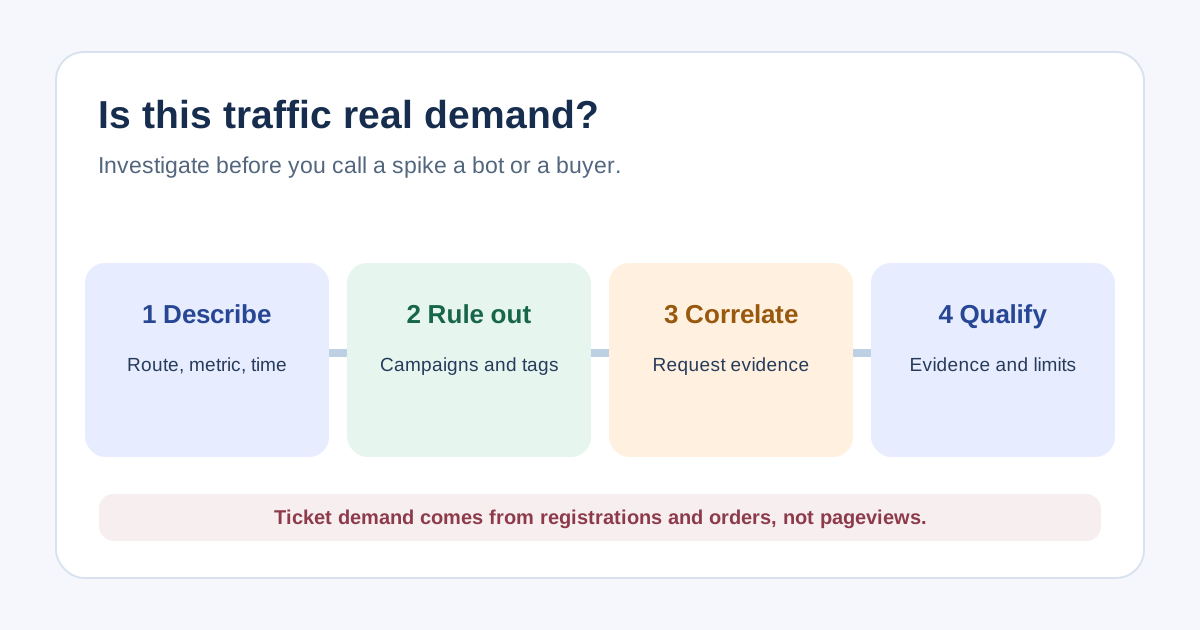
Record the exact metric, route, source, time window and comparison period. A spike in pageviews is different from a spike in registration starts or confirmed purchases. Compare the same hour and event stage where possible: on-sale windows, ads, press mentions and schedule releases have different baselines. Google Analytics already excludes traffic it recognizes as known bots and spiders, but does not reveal the excluded count; remaining sessions are not verified humans. Avoid a fixed bounce-rate, session-duration or geography threshold as a bot verdict.[1][2]
Rule out ordinary and measurement causes
Check what changed when the anomaly began. Was an analytics tag added twice, a consent setting changed, a test run started, a monitoring job deployed, or a marketing link distributed? Compare event definitions and campaign tags before judging behavior. A short visit could be a person checking the door time and leaving satisfied. If you find a collection error, correct the instrumentation and annotate reports rather than blocking users. Keep raw and adjusted counts separate so the correction can be reviewed.[1]
Compare analytics with request evidence
Inspect the same time and paths in edge or application request logs with an authorized operations owner. Compare aggregate request rate, response codes and affected routes with the analytics slice; do not try to identify a person from coincident timestamps or location. Note that an HTTP request can hit a cache or server without producing a browser analytics event. Conversely, duplicate analytics events can occur without a corresponding new page visit. Look for corroborating evidence across systems, and write down alternative explanations before classifying the pattern.[1]
Protect legitimate visitors and crawlers
Separate helpful automation from harmful traffic. A verified search crawler, uptime monitor or accessibility test is not an attendee but may be expected. Cloudflare describes verified bots as a distinct class; the exact signals depend on your provider. Do not block a country, device type or user agent merely because its engagement looks unusual. If a request-level control is needed, let the security/operations owner assess false positives and attendee recovery. An analytics filter changes reporting, not access; a production GA4 exclusion can permanently remove matching incoming data.[4][3]
Publish a qualified conclusion
Write the conclusion as “likely automated,” “collection error,” “legitimate campaign,” or “unresolved,” with evidence and limitations. Present ticket demand using registration and order-system evidence, not pageview totals. If a range was excluded from a report, show the rule, affected period and both original and adjusted figures when available. Assign an owner to retest after the next launch and review whether real visitors were affected by any traffic controls.
Sources and further reading
- How to identify bot traffic in Google Analytics 4Centinel · Accessed
- Known bot-traffic exclusionGoogle Analytics Help · Accessed
- Filter out internal trafficGoogle Analytics Help · Accessed
- Verified botsCloudflare Docs · Accessed