How to prevent bot spam in event registration forms
A flood of suspicious RSVPs can occupy limited seats, pollute a waitlist, trigger confirmation email or overwhelm support. Yet a campaign announcement or group buyer can also create a real spike. The leading Google result lists bot controls; an event team should begin by measuring the actual registration harm, then choose the smallest useful defenses and watch for rejected real guests.
Boletolibre editorial team
Published
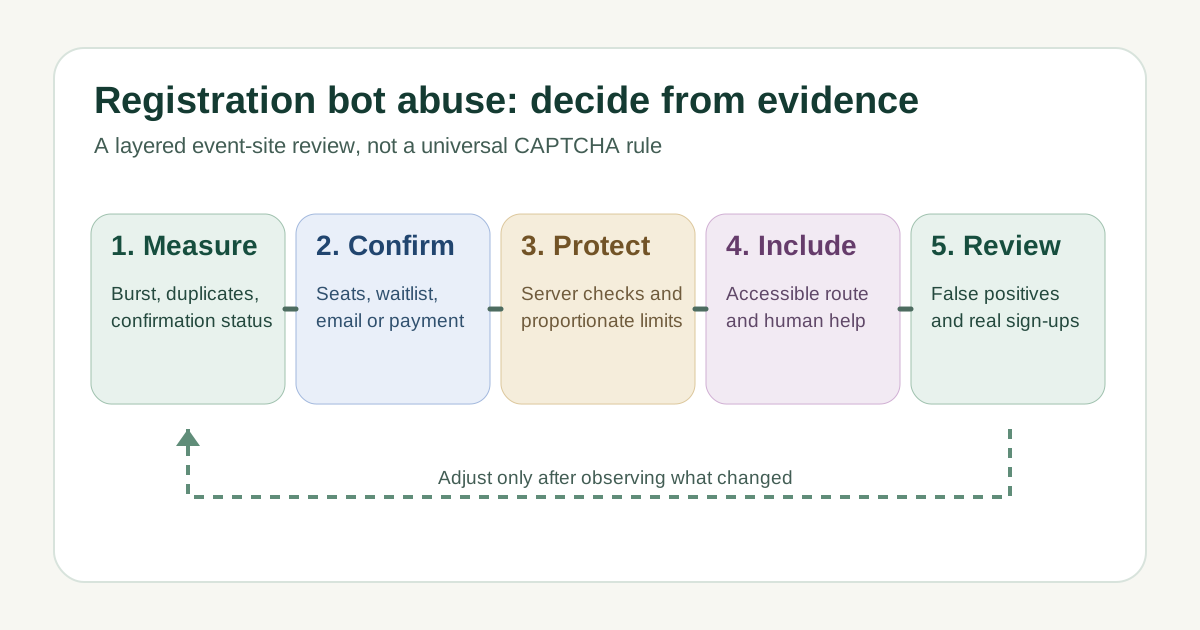
Measure suspicious patterns before blocking
Download the editable event registration bot-abuse decision sheet (Markdown, English)
Record a normal baseline for the same event stage and compare submission rate, completion rate, repeated values, invalid addresses, confirmation status and source. Keep timestamps and event edition. Do not equate traffic volume or one IP address with abuse: shared networks, group bookings and an on-sale announcement can look unusual. The worksheet separates observed signal, innocent explanation and evidence. OWASP recognizes automated bulk account creation, but a registration form may be attacked without account creation; classify your actual flow.[1][2][3][4]
Confirm the effect on event operations
Check the ticket or RSVP source of truth: are suspicious attempts reserving inventory, creating usable tickets, adding unconfirmed waitlist entries, sending repeated mail or causing payment attempts? Distinguish submitted, confirmed, paid and admitted states. If only a public form counter rises while no seats are held, the response differs from an active inventory or email-abuse incident. Preserve minimal evidence and assign an owner; do not export attendee details into an unsecured investigation sheet.[1][2][3][4]
Add proportionate controls at the server
Validate required fields and business rules on the server, handle duplicate requests safely, and set rate or resource limits at the endpoint where harm occurs. Consider email confirmation, seat-hold expiry or review for high-impact free registrations when appropriate to the event. A bot challenge is one layer, not a guarantee of a human attendee. If using Turnstile, Cloudflare requires the backend to validate each token through Siteverify; the visible widget alone does not protect the form. Set limits from measured legitimate demand rather than copying a universal threshold.[1][2][3][4]
Keep a usable route for real attendees
A visual or audio CAPTCHA may block people with disabilities; W3C describes the trade-offs and no single ideal solution. Test controls with keyboard, assistive technology, mobile devices, slow connections and relevant languages. Explain an error without accusing the visitor, and provide a staffed alternate route for someone who cannot complete a challenge. Do not make an accessibility request or support form depend solely on the same failing protection.[1][2][3][4]
Monitor false positives and revise
After any change, compare completed legitimate registrations, blocked or challenged attempts, confirmation delivery, support requests and remaining suspicious inventory. Inspect challenge validation failures separately from suspected bot traffic: an expired token or faulty integration can reject genuine people. Review during the next campaign or on-sale peak, record the owner and rollback path, and loosen a harmful control promptly. A passing challenge does not prove a ticket is valid or a guest will attend.[1][2][3][4]
Sources and further reading
- Website Form Bot Protection: The Complete 2026 GuideTrustSig · Accessed
- Automated Threat Handbook: OAT-019 Account CreationOWASP · Accessed
- Validate the tokenCloudflare Turnstile Documentation · Accessed
- Inaccessibility of CAPTCHAW3C Accessible Platform Architectures Working Group · Accessed